

描述
The PriveWellness.nl plugin connects your WordPress site to the PriveWellness platform (https://privewellness.nl). Pick the parts you need:
- Sync your appointments — bookings made through PriveWellness.nl appear automatically in your own calendar, and the other way around.
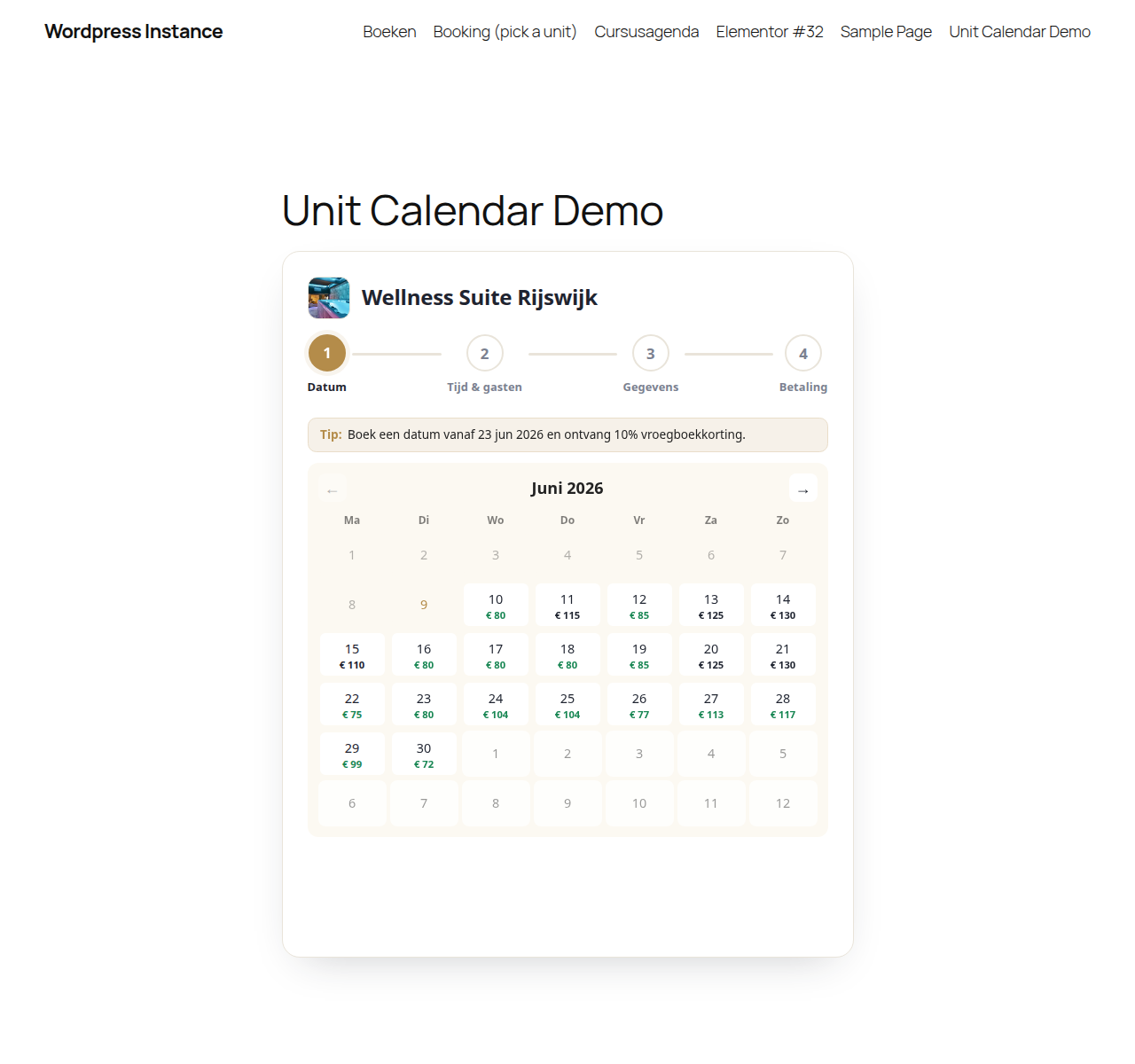
- Enrich your units — show the live availability of your rooms in a booking calendar on your own site through a simple shortcode.
- Power your website — optionally use the full PriveWellness theme for a complete, ready-made website.
Booking systems
The plugin automatically detects the booking system that is active on your site. We keep adding support for more systems.
How it works
- Install and activate the plugin.
- Generate a pairing code on the settings page and share it with PriveWellness, who connect the site for you.
- Choose the features you want to use: synchronisation, availability calendar and/or theme.
Features
- Two-way synchronisation of appointments
- Automatic detection of your booking system
- Availability calendar via a shortcode, with a configurable accent colour
- Optionally the full PriveWellness theme
- Simple, secure connection
External services
This plugin connects to the PriveWellness platform (privewellness.nl). This connection is required to synchronise appointments and show availability.
What is sent, and when:
- On connecting: the URL of your WordPress site, in order to exchange an API key.
- When a booking is created: customer details (name, email, phone), date/time and staff ID are sent to the PriveWellness platform.
- When fetching staff: names, services and working hours are sent to the PriveWellness platform.
The availability calendar and booking interface shown by the [privewellness_unit_calendar] shortcode — including unit photos and live prices — are served by the PriveWellness platform. The browser only talks to your own site; your site forwards each request to the platform.
The connection is only made after you explicitly link the plugin to your PriveWellness account from the settings page.
Terms of service: https://privewellness.nl/voorwaarden
Privacy policy: https://privewellness.nl/privacybeleid
Source code and build
The booking-calendar widget is the only part of this plugin that uses compiled assets. assets/dist/widget.js and assets/dist/widget.css are generated with webpack from the human-readable source that ships inside this plugin:
- Source:
assets/src/— the widget entry point (widget.js), the Stimulus controllers and the SCSS stylesheets. - Build configuration:
webpack.config.jsandpackage.json.
To rebuild the compiled assets from source:
npm installnpm run build
This regenerates assets/dist/widget.js and assets/dist/widget.css. Use npm run dev to rebuild on change during development. All third-party libraries (Stimulus, stimulus-use) are pulled in via npm as declared in package.json.
屏幕截图

安装
- Upload the
privewellnessplugin folder to/wp-content/plugins/, or install it via Plugins > Add New. - Activate the plugin through the Plugins menu in WordPress.
- Open the PriveWellness.nl menu, copy the pairing code shown there, and share it with PriveWellness.
- PriveWellness completes the connection from their side; the page updates to “Verbonden” automatically.
常见问题
-
Do I need a PriveWellness account?
-
Yes. This plugin is a connector to the PriveWellness platform. Without an active account you cannot sync appointments or show availability. See https://privewellness.nl for more information.
-
Which booking systems are supported?
-
The plugin automatically detects the booking system that is active on your site. We keep adding new integrations.
-
What happens when I remove the plugin?
-
Deactivating keeps your settings. Permanently deleting the plugin automatically removes all PriveWellness options from your database.
评价
此插件暂无评价。
贡献者及开发者

更新日志
1.0.0
- First public release.
- Two-way synchronisation of appointments with the PriveWellness platform.
- Generate a pairing code and let PriveWellness connect the site for you.
- Availability calendar via the [privewellness_unit_calendar] shortcode, with an embedded booking wizard: pick a unit, date, timeslot and guests, enter details and pay — all in one widget.
- Unit picker with thumbnails when no unit is specified, plus AJAX unit selection (no page reload).
- Discount-aware pricing: voordeeltijd and early-booking (vroegboekkorting) prices in the calendar and slot list.
- Mobile-friendly layout, isolated from the host theme via Shadow DOM (no FontAwesome dependency).
- Adapter architecture for extensibility to more booking systems.