
描述
Integrates Max Mega Menu with the WooCommerce StoreFront theme.
Requires Max Mega Menu and StoreFront.
This plugin will add a ‘StoreFront’ menu theme (designed for a dark StoreFront header background. If you are using a light header background color you will need to update the theme font colors under Mega Menu > Menu Themes).
This plugin will also remove residual styling from contents within mega sub menus.
IMPORTANT: When Max Mega Menu is enabled, the “Primary Menu” menu will be displayed on both desktop and mobiles. The “Handheld Menu” will not be used.
屏幕截图

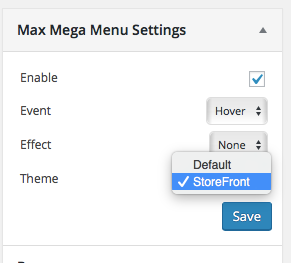
安装
- Go to the Plugins page in WordPress
- Search for “Max Mega Menu – StoreFront Integration”
- Click “Install”
After installation go to Appearance > Menus. In the Max Mega Menu Settings box (on the left) change the Theme setting to “StoreFront”.
评价

2019 年 11 月 28 日
5 stars to this plugin.

2019 年 4 月 25 日
Works great :-)! Thanks

2018 年 1 月 27 日
Worth 6 stars! Great work, so chuffed 😀

2017 年 1 月 6 日
Great : -)
贡献者及开发者

更新日志
1.0.3
- Fix: StoreFront 2.4.4+ compatibility. On mobile, the footer search icon doesn’t/didn’t work when Max Mega Menu is enabled.
1.0.2
- Fix: StoreFront 2.2.6+ compatibility. On mobile, the footer search icon doesn’t/didn’t work when Max Mega Menu is enabled.
1.0
- Add support for “Storefront WooCommerce Customizer”. Make menu full width when “Cart Link” option has been unchecked (https://docs.woocommerce.com/document/storefront-woocommerce-customiser/)
- Add support for “Storefront Powerpack”. Make the menu full width when the header layout customizer has been used
- Fix: Change “Navigation” to “Menu” to reflect update to the StoreFront theme
- Fix: Positioning of menu when sticky
- Fix: Clear mobile menu so that it sits below site branding instead of inline
0.1
- Initial version