

描述
Are you a web designer or developer? Or are you creating a plugin or a theme? Are you finding hard to keep track of your tasks or your notepad is just untidy?
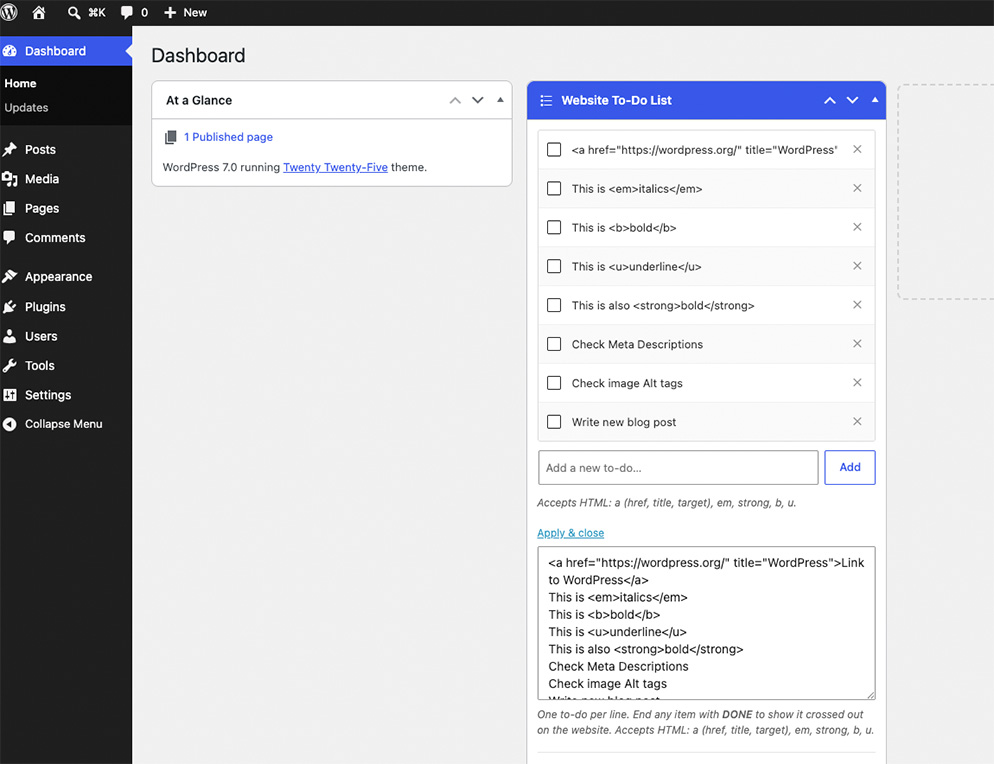
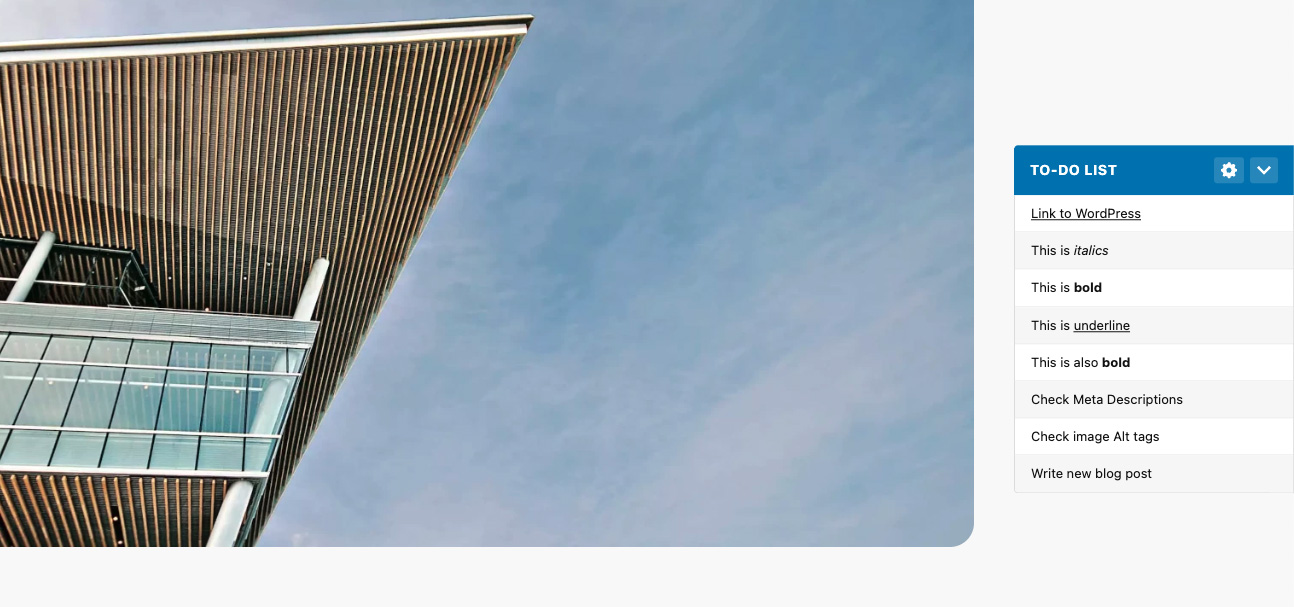
Add this useful tool to keep your project tasks in one place, right inside WordPress. Dashboard To-Do List adds a widget to your Admin Dashboard where you can write and manage a to-do list, then optionally show it as a collapsible floating panel on the frontend of your site.
Plugin Features
- Add, edit, and delete to-do items directly from the Admin Dashboard
- Mark an item as complete (shown with a strikethrough on the frontend but stays in your list) or delete items to remove them from your list
- Bulk Edit mode for pasting or reorganising multiple items at once
- Display the list as a collapsible floating panel on your website
- Choose left or right positioning for the frontend panel
- Pick a custom colour for the frontend panel
- Control which user roles can see the dashboard widget
- Control which user roles (including guests) can see the frontend panel
屏幕截图


安装
Via WordPress
- From the WordPress Dashboard, go to Plugins > Add New.
- Search for ‘Dashboard To-Do List’ and click Install. Then click Activate.
- Go to the WordPress Dashboard to start building your list.
Manual
- Upload the /dashboard-to-do-list/ folder to the /wp-content/plugins/ directory.
- Activate the plugin through the Plugins menu in WordPress.
- Go to the WordPress Dashboard to start building your list.
常见问题
-
How do I create my to-do list?
-
After activating the plugin, go to your Admin Dashboard. You’ll see the Website To-Do List widget. Type a new item and click Add. Items are saved instantly when added. To save all changes including settings, click the Save button.
-
How do I edit or remove items?
-
Each item in the checklist is an editable text field. Click into it and type to make changes, then click Save. To remove an item, click the ✕ button on the right. You’ll be asked to confirm, and the deletion is only made permanent when you click Save. Reloading the page before saving will restore any deleted items.
-
What is Bulk Edit?
-
Bulk Edit opens a plain textarea containing your full list, one item per line. It’s useful for pasting in a list of items or reordering by cutting and pasting lines. Click Apply & close to rebuild the checklist from your edits.
-
How does the DONE marker work?
-
In the Bulk Edit view, add the word DONE (case insensitive) at the end of any line. On the frontend, that item will display with a strikethrough but remain in your list. Use the Checklist view if you want to permanently remove completed items.
-
How do I show the list on my website?
-
In the dashboard widget (administrators only), tick the roles you want to see the floating panel under “Show floating list on website for:”. You can include specific user roles or Guests (visitors who are not logged in). Leave all boxes unticked to hide the panel from everyone.
-
Can I show the widget to custom user roles?
-
Yes. Both the dashboard widget visibility and the frontend panel visibility pull from all registered roles on your site, including any custom roles added by plugins.
-
Can guests (non-logged-in visitors) see the frontend panel?
-
Yes. Tick the “Guests (not logged in)” option under “Show floating list on website for:” and the panel will be visible to anyone who is not logged in.
-
What does the colour change?
-
The colour picker in the dashboard widget settings (visible to administrators) lets you choose the colour of the frontend panel header.
-
Where do I report security bugs?
-
You can report security bugs through the Patchstack Vulnerability Disclosure Program. The Patchstack team help validate, triage and handle any security vulnerabilities. Report a security vulnerability.
-
I need help with something else
-
If your question is not answered here, please create a new topic in the WordPress support forum.
评价


贡献者及开发者

更新日志
2.0.0
- Replaced textarea with an interactive checklist. Add items individually, tick to mark as done, delete with confirmation
- Added Bulk Edit mode for pasting or editing multiple items at once as plain text
- Added DONE marker. End any item with the word DONE to display it with a strikethrough on the frontend without removing it from the list
- Added colour picker setting for frontend panel
- Replaced admin/editor role checkboxes with a full multi-role selector for both dashboard widget visibility and frontend panel visibility; supports custom user roles
- Added Guests option so the frontend panel can be shown to visitors who are not logged in
- Frontend panel is now collapsible.
- Frontend panel header now shows a cog icon linking to the dashboard, and an animated chevron for the collapse toggle
- Improved frontend panel design and responsive behaviour
- Improved admin widget layout and settings organisation
1.3.2
- Patched reported Cross Site Request Forgery (CSRF) vulnerability when saving the dashboard widget.
1.3.1
- Fixed capabilities bug when saving the widget if switching between user roles (thanks to chrslcy).
1.3.0
- Fixed bug where any authenticated user (subscriber+) could modify the To-Do list widget
- Added option for Administrators to allow Editors to view and edit the To-Do list widget
- Edited option to allow only Administrators to view the To-Do list on the frontend
- Added option to allow Editors to view the To-Do list on the frontend
- Visibility options on widget hidden from Editors.
- Styling updates
1.2.0
- Added German translation (thanks to m266)
- Added Japanese translation (thanks to Naoko Takano)
- Added UK translation
- Styling updates
1.1.2
- Translation updates
- General bug fixes
1.1.1
- Enabled translation
- Description added to textarea
- Bug fix with the checkbox option
1.1.0
- Added option to position the widget left or right on the website.
- You can now use the following HTML tags in your list: a, em, strong, b, u.
- Fixed issue with slashes being added to the text on save.
1.0.2
- Made dashboard widget full width
- Bug fixes
1.0.1
- Donate link added to Readme.txt
- Stable version updated
- Update to public css as some themes were showing bullet points in the list
1.0.0
- Initial release