

描述
Easily display WordPress Gutenberg Editor saved reusable blocks anywhere via widget.
Easy Setup
After plugin activation, Reusable Block widget will be available under Appearance > Widgets, just drag and drop to any desired widget area.
Extensible
If you want to upgrade your widgets usage. You can use Modal Pop-up & Sliding Widget Options to display your widgets as modal pop-ups, slide-ins and/or sliding widgets. Powered with triggers like exit-intent, on load and on scroll you can increase your user engagement easily.
屏幕截图
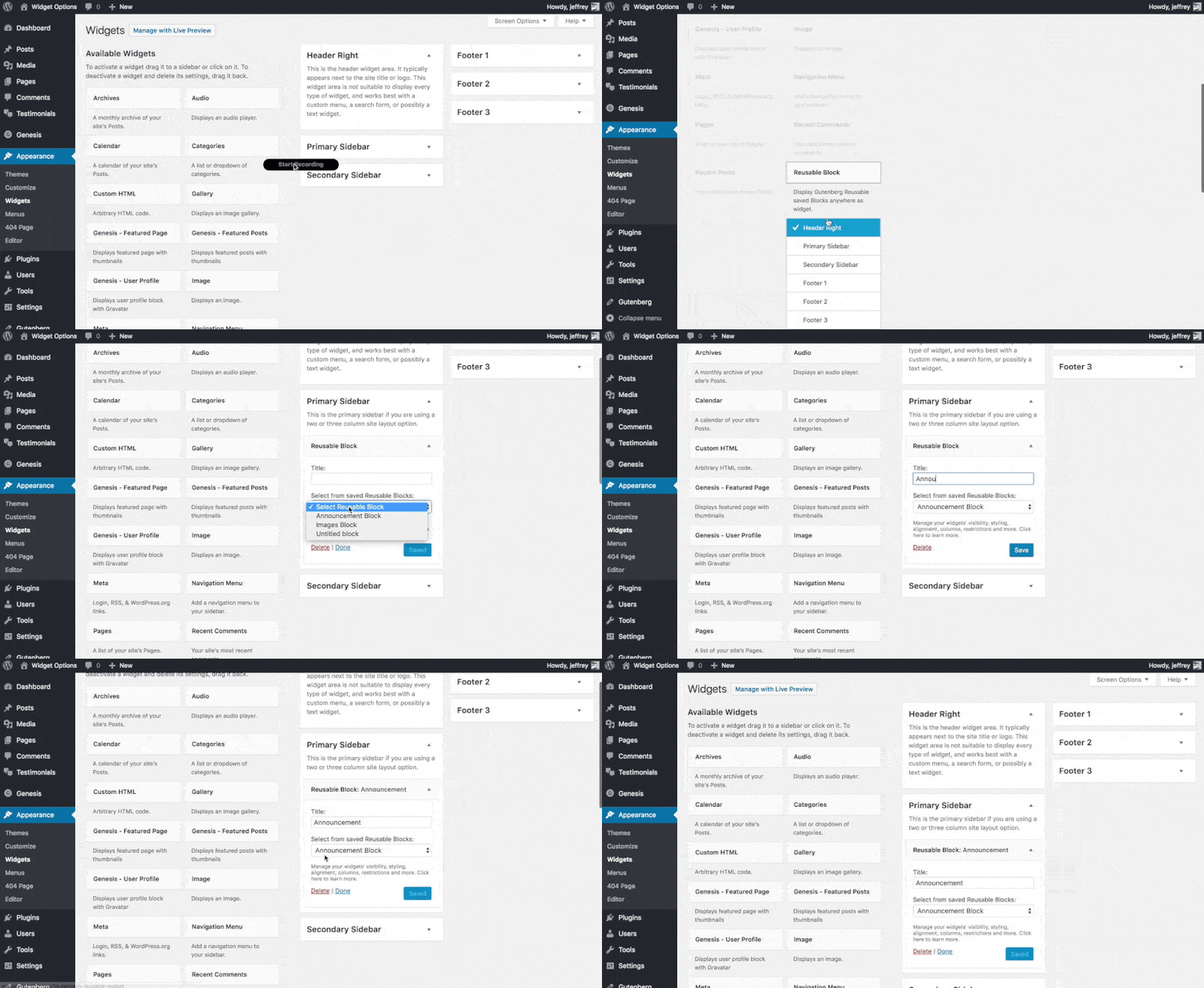
Using Reusable Block Widget
安装
- Upload the full directory into your wp-content/plugins directory
- Activate the plugin at the plugin administration page
- Go to Appearance > Widgets then drag and drop “Reusable Block” to any widget area
常见问题
- Installation Instructions
-
- Upload the full directory into your wp-content/plugins directory
- Activate the plugin at the plugin administration page
- Go to Appearance > Widgets then drag and drop “Reusable Block” to any widget area
评价

2023 年 4 月 19 日
It’s silly that WP core still doesn’t allow reusable blocks in widget areas in 2023, but thankfully this plugin gets it done.

2020 年 7 月 20 日
Great plugin. If you want to add gutenberg re-usable blocks to widgets this does it well. Tested and works straight out the box, no complaints

2020 年 1 月 23 日
1 回复
This plugin rocks because it allows to design your widgets in Gutenberg!

2019 年 7 月 17 日
1 回复
A very nice plugin to use until WordPress team add support for blocks in widgets.

2019 年 4 月 2 日
Created an account specifically to leave this review.
Love the implementation, was happy to see all js initiated as expected.

2019 年 3 月 7 日
This worked as intended in my case and allows my client to modify their header Call-To-Action via Gutenberg Block.
Using:
WP Version: 5.1
Framework: Genesis Framework
