Title: Desktop Mode
Author: Daniel López Sánchez
Published: 2026 年 5 月 7 日
Last modified: 2026 年 6 月 7 日
---
搜索插件
# Desktop Mode
作者:[Daniel López Sánchez](https://profiles.wordpress.org/allterraindeveloper/)
[下载](https://downloads.wordpress.org/plugin/desktop-mode.0.9.1.zip)
* [详情](https://cn.wordpress.org/plugins/desktop-mode/#description)
* [评价](https://cn.wordpress.org/plugins/desktop-mode/#reviews)
* [安装](https://cn.wordpress.org/plugins/desktop-mode/#installation)
* [开发进展](https://cn.wordpress.org/plugins/desktop-mode/#developers)
[支持](https://wordpress.org/support/plugin/desktop-mode/)
## 描述
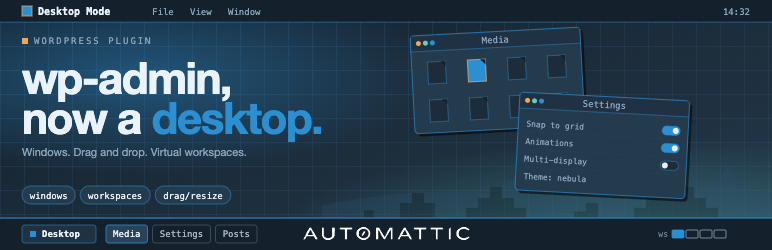
Desktop Mode renders /wp-admin as a desktop operating system. Admin screens open
as draggable, resizable, minimizable windows on a desktop, with a left-edge dock
built from the admin menu. The classic admin stays untouched for everyone else,
and deactivating the plugin restores vanilla Core exactly.
Built and maintained by [Automattic](https://automattic.com) — the company behind
WordPress.com, Jetpack, WooCommerce, and Tumblr. Zero Core patches: every feature
is wired through public WordPress hooks.
#### Highlights
* **Per-user opt-in.** An admin-bar toggle flips a user-meta flag; nobody else
sees any change.
* **Window system.** Iframe windows load admin pages chromelessly. Native windows
render directly in the parent DOM via a public registration API. Both share drag,
resize, minimize, maximize, fullscreen, and detach-to-new-tab.
* **Dock + taskbar.** Left-edge dock for core menus; bottom macOS-style pill taskbar
for plugin menus. Letter-badge icon fallback for plugins without icon art.
* **Virtual desktops (“Spaces”).** Multiple desktops per user, each with its own
window set. Overview grid surfaces the Spaces switcher and thumbnails.
* **Arrange & snap.** Cascade, Tile, Overview, Snap-to-grid. Plugins contribute
custom entries.
* **Wallpaper & widget registries.** Server- and client-side registration. CSS
presets plus canvas (WebGL/2D) wallpapers with collision-aware surface data for
snow/rain/physics effects.
* **Desktop icons.** Wallpaper-layer shortcuts that open native windows or admin
URLs.
* **AI Copilot (optional).** Cmd+K palette backed by an agentic loop with built-
in search tools. Disabled until you supply an API key. See “External services”
below.
* **Slash commands & palettes.** Public registration APIs for plugin authors.
* **Cross-frame drag bridge.** Media-library attachments drag across iframe boundaries.
* **Session persistence.** Window stack (including desktops, focus, state) restored
across reloads.
* **i18n.** Full gettext coverage across PHP and TypeScript; Spanish translation
shipped.
#### For plugin authors
Desktop Mode is built to be extended. Every significant behavior is hookable — add
a desktop icon, register a dock item, gate desktop mode by role, react to window
events, or register a native window, all from your own plugin with zero patches
here.
Comprehensive PHP and JavaScript hook surface, plus stable `desktop_mode_register_*`
functions for windows, widgets, wallpapers, icons, window tabs, commands, settings
tabs, and AI tools. See the [developer docs on GitHub](https://github.com/WordPress/desktop-mode/tree/trunk/docs).
#### External services
This plugin’s optional **AI Copilot** sends data to **OpenAI** (`https://api.openai.
com/v1/responses`) when, and only when, an administrator configures an OpenAI API
key in **Settings AI**. With no key configured, no external requests are made.
When the AI Copilot is enabled and a user invokes it (via Cmd+K or the slash-command
palette):
* **What is sent:** the user’s prompt, the conversation history for the active
session, the chosen model identifier (e.g. `gpt-4o-mini`), and tool-call metadata.
The plugin’s built-in tools (`search_posts`, `search_pages`, `search_comments`)
run WordPress’s native keyword search and may include excerpts of the matching
posts/pages/comments in tool results, which are then sent back to OpenAI as part
of the agentic loop.
* **When it is sent:** on user-initiated AI requests, and (if enabled) on comment-
save hooks for spam analysis. Comment spam analysis runs server-side as part
of the comment-insert flow. Posts, pages, and taxonomy terms are not sent automatically.
* **Why it is sent:** to obtain model completions and tool-call decisions that
drive the AI Copilot.
* **Who provides the service:** OpenAI, L.L.C. — see the [OpenAI Terms of Use](https://openai.com/policies/row-terms-of-use/)
and the [OpenAI Privacy Policy](https://openai.com/policies/row-privacy-policy/).
The AI Copilot’s provider layer is also extensible: third-party plugins may register
additional providers via `desktop_mode_register_ai_provider()`. Those providers
may send data to other endpoints; review each plugin’s own privacy disclosure separately.
No other external services are contacted by this plugin.
### Credits
Desktop Mode is brought to you by [Automattic](https://automattic.com). The plugin
is open source under GPLv2-or-later; contributions are welcome on [GitHub](https://github.com/WordPress/desktop-mode).
#### Third-party libraries
The plugin bundles the following third-party JavaScript library, loaded on demand
only when a feature that needs it is in use:
* **[PixiJS](https://pixijs.com/)** (MIT License) — used by the interactive **OS
Settings About** scene, the **Content Graph** window, and built-in canvas wallpapers(
e.g. the animated WordPress logo). PixiJS is loaded from the plugin’s own `assets/
vendor/` directory; no CDN requests are made.
## 安装
1. Upload the plugin folder to `/wp-content/plugins/`, or install via **Plugins Add
New Upload Plugin**.
2. Activate the plugin through the **Plugins** screen in WordPress.
3. Click the **desktop** icon in the admin bar’s top-right corner. The admin reloads
inside the desktop shell.
4. Click the same icon again at any time to return to the classic admin.
#### Optional: enable the AI Copilot
1. Open **Settings AI** inside desktop mode.
2. Paste an OpenAI API key and pick a model.
3. Press **Cmd+K** (or **Ctrl+K**) anywhere in desktop mode to open the AI palette.
## 常见问题
### Does this change anything for users who don’t opt in?
No. The classic admin is untouched until a user toggles desktop mode on for themselves.
Deactivating the plugin restores vanilla Core exactly.
### Does the plugin require an external service to function?
No. The desktop shell, windowing, dock, taskbar, virtual desktops, widgets, wallpapers,
and all extension APIs work entirely on-site. The AI Copilot is the only feature
that contacts an external service, and it is disabled until an administrator configures
an API key. See “External services” in the description.
### Does it patch WordPress core?
No. Every feature is wired through public WordPress actions and filters.
### How do I disable desktop mode for my user?
Click the desktop icon in the admin bar a second time to flip the toggle off. The
plugin can also be deactivated globally from the Plugins screen.
### Where is the developer documentation?
In `docs/` inside the plugin, and on [GitHub](https://github.com/WordPress/desktop-mode/tree/trunk/docs).
The hook reference, JavaScript reference, bridge protocol, and copy-paste examples
all live there.
## 评价

### [One word… Wow!](https://wordpress.org/support/topic/one-word-wow-7/)
[MauroS](https://profiles.wordpress.org/maurosp91/) 2026 年 6 月 4 日
This plugin blowed my mind. It turns your wordpress admin in such a beautiful dashboard.
What an experience. Contratulations to the owners of the project!

### [Modern and creative admin experience](https://wordpress.org/support/topic/modern-and-creative-admin-experience/)
[Rami Obeidat](https://profiles.wordpress.org/obeidat/) 2026 年 5 月 28 日
Really interesting concept and one of the more unique WordPress admin experience
plugins I’ve tested recently. I especially like the desktop/workspace direction
and the overall creativity behind the UI. I spend a lot of time testing modern admin/
workspace plugins and Desktop Mode definitely stands out with its own approach.
Looking forward to seeing how the project evolves 👌

### [A total game-changer for the WordPress experience!](https://wordpress.org/support/topic/a-total-game-changer-for-the-wordpress-experience/)
[Abhishek Padhi](https://profiles.wordpress.org/abhishekpadhi/) 2026 年 5 月 28
日
This plugin is awesome! It runs perfectly smoothly and completely upgrades the default
dashboard experience. If you spend a lot of time in the WordPress backend, this
makes a world of difference. I’ve been using it on my website, Key2blogging, and
it has made managing everything so much cooler and easier. Highly recommended!

### [Homebase](https://wordpress.org/support/topic/home-base/)
[speff](https://profiles.wordpress.org/speff/) 2026 年 5 月 26 日 1 回复
This is a really neat idea. WP core’s been giving me similar vibes to Tiddlywiki
in its capability towards extensibility and this plugin solidifies that idea in
my mind. I’d be interested in having other providers available for use with quick
search – and even an option to fall back to the normal Ctrl+K behavior. But this
is a great enhancement of WP Admin for my personal use-case as-is and really makes
my personal site feel like home.

### [Interesting…](https://wordpress.org/support/topic/interesting-60/)
[karelv92](https://profiles.wordpress.org/karelv92/) 2026 年 5 月 25 日
Very interesting idea. It makes working in WP somewhat more productive…

### [Super interesting](https://wordpress.org/support/topic/super-interesting/)
[tickastudios](https://profiles.wordpress.org/tickastudios/) 2026 年 5 月 24 日
3 回复
It’s a cool project. Very much creative. I wouldn’t have ever thought about turning
WP admin into a desktop-like interface. How did you come up with it?
[ 阅读所有21条评价 ](https://wordpress.org/support/plugin/desktop-mode/reviews/)
## 贡献者及开发者
「Desktop Mode」是开源软件。 以下人员对此插件做出了贡献。
贡献者
* [ Daniel López Sánchez ](https://profiles.wordpress.org/allterraindeveloper/)
* [ Automattic ](https://profiles.wordpress.org/automattic/)
* [ Roberto Aranda ](https://profiles.wordpress.org/epeicher/)
「Desktop Mode」插件已被翻译至 1 种本地化语言。 感谢[所有译者](https://translate.wordpress.org/projects/wp-plugins/desktop-mode/contributors)
为本插件所做的贡献。
[帮助将「Desktop Mode」翻译成简体中文。](https://translate.wordpress.org/projects/wp-plugins/desktop-mode)
### 对开发感兴趣吗?
您可以[浏览代码](https://plugins.trac.wordpress.org/browser/desktop-mode/),查看
[SVN仓库](https://plugins.svn.wordpress.org/desktop-mode/),或通过[RSS](https://plugins.trac.wordpress.org/log/desktop-mode/?limit=100&mode=stop_on_copy&format=rss)
订阅[开发日志](https://plugins.trac.wordpress.org/log/desktop-mode/)。
## 更新日志
#### 0.9.1
* Make native list windows opt-in (Beta) instead of opt-out
* Scope AI to comment spam + native-search assistant
* Feat/unfocus window effects
* Fix placement, gear/Help, and dock⇄desktop visibility bugs
* Fix Guidelines-experiment 404 noise, duplicate welcome dialog, and unused-preload
warnings
* Add “View activity footprint” row action in Users list
#### 0.9.0
* Gate per-user REST routes on desktop mode enabled
* Refine recycle bin badge styling and sync on stop
* Clear comments selection after applying action
* Don’t let a failing sync block the agent
* Make the AI-disabled error link to AI Settings
#### 0.8.9
* Improve drag-and-drop handling in chromeless bridge and iframe bridge
* The whole shell loads faster, especially the first time you open wp-admin
* Open an app from the wallpaper or from the dock — it’s the same window now (no
more two copies floating around)
* Minimize a window and the dock icon shows it’s minimized — even if you opened
it from the desktop icon
* Click “+ New” twice and you get two editors. Drafting a post and want to start
another? Just click again
* “Switch to Desktop Mode” always takes you to the dashboard, so you know where
you’re starting from
* Resizing a window and accidentally letting go over the desktop no longer minimizes
everything
* WooCommerce: the “Add Order” button is back on the Orders page
* “Add New” buttons (Add Post, Add Order, Add anything) stay visible inside every
plugin page
* After we ship a fix, you get it on your next page load — no more “try refreshing
twice”
#### 0.8.8
* Align dock badge with in-window update count
* Make every dock scrollable, keep system tiles pinned
* No more flash when you create, move, or delete a file or shortcut on the desktop
* Trashing a folder that contained other folders now works (used to silently fail)
* Drag an image from the Media Library straight into a Gutenberg post, it now inserts
* Edit User screen: the form is centered instead of pinned to the left
* Title-bar icons (Help, etc.) are now visually centered
* Sticky notes powered by WP Guidelines
#### 0.8.7
* Bump Tested up to WordPress 7.0
* Fix plugins window stale-nonce ‘Cookie check failed’ on long-running sessions
* Fix plugin .zip drop routing to Media Library uploader
* Add server-side search to entity list views
* Rename Browse tab to Add Plugin
* Drag and drop improvements
#### 0.8.6
* Light indicators for native-window-target dock icons
* Additional fixes and polish
* Add compatibility layer for Divi script dependencies and tests
* Show plugin icons
* Open off-site menu items in a new browser tab
#### 0.8.6-rc1
* Tag cloud & category mindmap: search, clustering, server cache
* Drag & Drop from local desktop
* Implement loading skeletons and staggered animations for file tiles
* Arrow-key shortcuts + Overview-from-Show-Desktop fix
* Shortcuts popover, dock-style tooltips, reorder
* Add Featured Plugins View and Ribbon Component
* Add “Automatic Updates” column and related functionality to Plugins window
* Add window notices feature with persistent dismissal and server sync
* Polish four framework surfaces for plugin authors
* Disable focus on other window actions
* Add Media section to “My WordPress” + uniform preview-pane hook surface
* Refactor My WordPress to use `` + add post status ribbons
* Allow deactivating plugins in CMO desktop & dock
* OS-file drop — progress UI, live refresh, cancel cleanup, CMO
* Group-by selector + click-to-deselect + focused-icon centering
* Test against PHP 8.3 and 8.4
* Enhance minimize/restore behavior to preserve pre-minimize state and add cross-
state transition tests
#### 0.8.5
* Shared folders, heartbeat widget, and heartbeat-pipeline hardening
* Recycle Bin: show item type badges inline next to title
* Plugins window: expandable rows with rich plugin details
* Remember native window size across opens
* Fix blank plugin icons in the Plugins window
* Restore “Show desktop on wallpaper click” as an opt-in setting
* Fix plugin update refresh, dock badge, and stuck-row failures
* Trash bin polish: URL badge, live placement badge, no media auto-trash
* Throw on empty REST body to avoid TypeError after self-replace
* Hide Media filter tab when MEDIA_TRASH is off
* Sequence openCurrentPage after restoreSession to avoid duplicate windows
* Fix window refresh issue on new sessions
#### 0.8.4
* Faster Desktop Mode, main bundle cut by 59 %
* “Edit Post” from the front-end admin bar opens nothing
* Cross-page admin-link clicks: state, destructive actions, referer hint
* Warn loudly when a `` tag is used without being imported
* Support re-uploading existing plugins, add post-install Activate panel
* Restore the full WordPress command palette inside Cmd+K
#### 0.8.3
* Feat comments as native windows
* Chrome <111 titlebars + duplicate-placement REST 500s
* SW navigation interception caused window-in-window after core update
* Open each post as its own window from the Posts window
* Fix Users window data + live-refresh, plus per-window REST clients
* Session-expiry cascade + Plugins window sync
* Narrow scope to /wp-admin/ and throttle SW reloads
* Plugins window: real updates, not just a phantom badge
* Support plain permalinks for REST URL construction
* Hide registered icons from desktop instead of trashing
#### 0.8.2
* Many fixes and new features
* Add unit test to ensure bridge script skips core AJAX update buttons
* Native Plugins window + ``
* Appearance window polish + dock-peek fixes
* Fix upload theme
* Implement favicon resolver and associated tests for desktop mode
* Auto-inject X-WP-Nonce for REST API requests
* Enhance user management functionality in WordPress REST API
* Fix user role updates
* Fix plugin native issues
* Enhance color scheme preview functionality by adding shell scheme flipping
* Fix rearrange icons out of desktop
* Open each post in its own window
* Add item visibility and dock order settings
* Add first-run welcome dialog for Desktop Mode
* Fix dock management
* Refetch desktop placements on Recycle Bin restore
#### 0.8.1
* Framework rework and stability improvements — significant internals refactor,
smoother window lifecycle, and more reliable bridging between iframe and native
windows.
* Drag and drop reworked end-to-end: calmer pointer behavior, more accurate hit-
testing, and reliable handoff across windows.
* Posts, Pages, and Users now open as native desktop windows — direct DOM rendering
inside the shell instead of an iframe, faster open, instant interaction, and
UI tailored to the windowing model.
* New Content Graph tool — an interactive map of how your content links together.
Pan, zoom, and focus a node to explore its neighborhood.
* Cross-page admin link routing in the chromeless bridge so links across the admin
stay inside the desktop shell.
* Many bug fixes across the admin bar, Fullscreen toggle, resize handles over iframes,
real-time icon refresh on plugin activation, and the PWA shell.
#### 0.5.1
* Code editor and framework improvements.
* Enhanced AI provider integration: third-party providers may register through `
desktop_mode_register_ai_provider()`.
* Title-bar button registry with icon painting for plugin authors.
* OS Settings tabs are now extensible via `desktop_mode_register_settings_tab_script()`/`
desktop_mode_register_settings_tab()`.
* AI Copilot extensibility: server-side tool registry (`desktop_mode_register_ai_tool()`)
and client-side `wp.desktop.ai.ask()` programmatic entry point.
* UI component kit expansion (~25 `` web components).
* Backtick hotkey to cycle window focus.
* Unified command palettes via the palette registry.
* OS Settings Help tab.
#### 0.5.0
* Command registration APIs (`desktop_mode_register_command_script()` / `desktop_mode_register_command()`)
with live install/activate refresh.
* Media-library enhancement enabled by default, with opt-out.
* Dock CSS selectors updated; overflow handling improved.
See the [GitHub releases page](https://github.com/WordPress/desktop-mode/releases)
for the full history.
## 额外信息
* 版本 **0.9.1**
* 最后更新:**21 小时前**
* 活跃安装数量 **2,000+**
* WordPress 版本 ** 6.0 或更高版本 **
* 已测试的最高版本为 **7.0**
* PHP 版本 ** 7.4 或更高版本 **
* 语言
* [English (US)](https://wordpress.org/plugins/desktop-mode/) 和 [Turkish](https://tr.wordpress.org/plugins/desktop-mode/).
* [翻译成简体中文](https://translate.wordpress.org/projects/wp-plugins/desktop-mode)
* 标签
* [admin](https://cn.wordpress.org/plugins/tags/admin/)[AI](https://cn.wordpress.org/plugins/tags/ai/)
[desktop](https://cn.wordpress.org/plugins/tags/desktop/)[productivity](https://cn.wordpress.org/plugins/tags/productivity/)
[ui](https://cn.wordpress.org/plugins/tags/ui/)
* [高级视图](https://cn.wordpress.org/plugins/desktop-mode/advanced/)
## 评级
5 星(最高 5 星)。
* [ 20 条 5 星评价 ](https://wordpress.org/support/plugin/desktop-mode/reviews/?filter=5)
* [ 1 条 4 星评价 ](https://wordpress.org/support/plugin/desktop-mode/reviews/?filter=4)
* [ 0 条 3 星评价 ](https://wordpress.org/support/plugin/desktop-mode/reviews/?filter=3)
* [ 0 条 2 星评价 ](https://wordpress.org/support/plugin/desktop-mode/reviews/?filter=2)
* [ 0 条 1 星评价 ](https://wordpress.org/support/plugin/desktop-mode/reviews/?filter=1)
[Your review](https://wordpress.org/support/plugin/desktop-mode/reviews/#new-post)
[查看全部评论](https://wordpress.org/support/plugin/desktop-mode/reviews/)
## 贡献者
* [ Daniel López Sánchez ](https://profiles.wordpress.org/allterraindeveloper/)
* [ Automattic ](https://profiles.wordpress.org/automattic/)
* [ Roberto Aranda ](https://profiles.wordpress.org/epeicher/)
## 支持
最近两个月解决的问题:
总计 8,已解决 5
[查看支持论坛](https://wordpress.org/support/plugin/desktop-mode/)