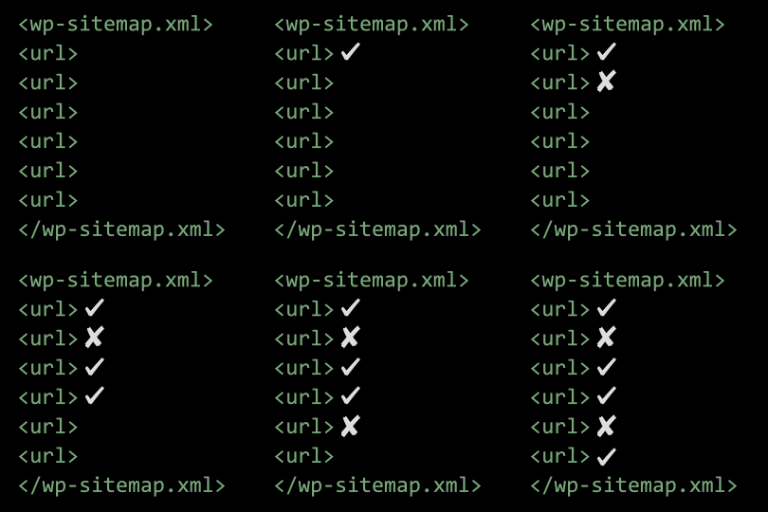
描述
This plugin is now part of Native AEO Pack.
Everything this plugin does is bundled into Native AEO Pack, a single lightweight
plugin that unifies the three AyudaWP “Native SEO” plugins (Meta Tags, NoIndexer
and Sitemap Customizer) into one, built entirely on WordPress native features.
This plugin still works and stays available, but new features and fixes now go
into Native AEO Pack. If you’re setting up a new site, install Native AEO Pack
instead of this one.
Moving to Native AEO Pack
- Install and activate Native AEO Pack.
- Open its settings, enable the modules you need (Meta Tags, NoIndex, Sitemap)
and set your site-wide options. - Deactivate this plugin. Native AEO Pack reminds you while both are active,
because running both at once prints duplicate tags. - Check your page source: you should see a single set of tags, from Native AEO Pack.
Your settings are not imported automatically in this first version. Site-wide
options take a minute to re-enter. For per-post values (individual noindex/nofollow,
custom titles and descriptions, Open Graph images), deactivate this plugin rather
than deleting it, so the data stays in place for the automatic importer planned
for a future Native AEO Pack release.
Support
Need help or have suggestions?
Love the plugin? Please leave us a 5-star review and help spread the word!
About AyudaWP
We are specialists in WordPress security, SEO, AI and performance optimization plugins. We create tools that solve real problems for WordPress site owners while maintaining the highest coding standards and accessibility requirements.
Privacy
This plugin does not collect or store any personal data. It only modifies which URLs appear in your public sitemap.
安装
- Upload the plugin files to
/wp-content/plugins/native-sitemap-customizer/or install through WordPress plugins screen - Activate the plugin through the ‘Plugins’ screen in WordPress
- Go to Settings > Sitemap to configure your sitemap options
- Submit your sitemap to Google Search Console and Bing Webmaster Tools
常见问题
-
Should I install Native AEO Pack before or after removing this plugin?
-
Install and activate Native AEO Pack first, configure it, and only then deactivate
this plugin. That way your site is never left without meta tags or sitemap output.
A short overlap with both active is fine; just don’t leave both on long-term. -
Will my settings move over automatically?
-
Not in this first version. Site-wide settings are quick to re-enter on Native AEO
Pack’s settings page. Per-post and per-term values are stored under this plugin’s
own meta keys, which Native AEO Pack does not read yet. An importer that moves them
across automatically is planned for a later release. -
Can I run both plugins at the same time?
-
Only briefly, while you set up Native AEO Pack. With both active you emit duplicate
tags (or duplicate sitemaps), which hurts SEO, so deactivate this plugin
once Native AEO Pack is configured. Native AEO Pack detects this plugin and reminds
you on its settings screen. -
I have a lot of per-post noindex settings. What’s the safest path?
-
Deactivate this plugin instead of deleting it: deactivating leaves your data in the
database untouched, ready for the automatic importer in an upcoming release. If you’d
rather not wait, Native AEO Pack’s Quick Edit and Bulk Actions let you re-apply
noindex/nofollow across many posts in seconds.
评价


贡献者及开发者


更新日志
1.9.1
- Fix: cross-promo banner styling at the bottom of the settings page. The CSS rules were chained to a wrapper class and heading level that the markup never used (since 1.8.0), so the “Install” buttons stretched to full column width with WordPress’s default 40px-tall sizing instead of the compact inline layout the rest of the AyudaWP plugins use.
1.9.0
- New: static sitemap file detector — warns when a physical
sitemap.xml,sitemap_index.xml,news-sitemap.xml, etc. exists in the WordPress root. These files are served by the web server before reaching PHP, silently bypassing the native dynamic sitemap and all configuration in this plugin. Includes a one-click “Delete file” button per detected file, with nonce + capability checks and a whitelist of accepted filenames. - Improved: cross-promo banner catalog refreshed with three newly published AyudaWP plugins (DietPress, EU Withdrawal Compliance, Terms & Conditions Consent Log).
- Fix: removed the orphan
NSM_Promo_Bannerclass file. It was superseded by the sharedNSEO_Core_Promo_Bannerin 1.8.0 but the old file kept shipping unused inside the plugin .zip. - Fix: Native SEO Meta Tags now appears again in the cross-promo banner rotation. Since 1.8.0 a duplicate array key was silently overriding its entry, so the slot was effectively unreachable.
For older changelog entries, please check the changelog.txt file