

描述
Protect My Infos is a WordPress plugin designed to protect sensitive information, such as phone numbers and email addresses, by obfuscating or hiding them on the frontend of your site.
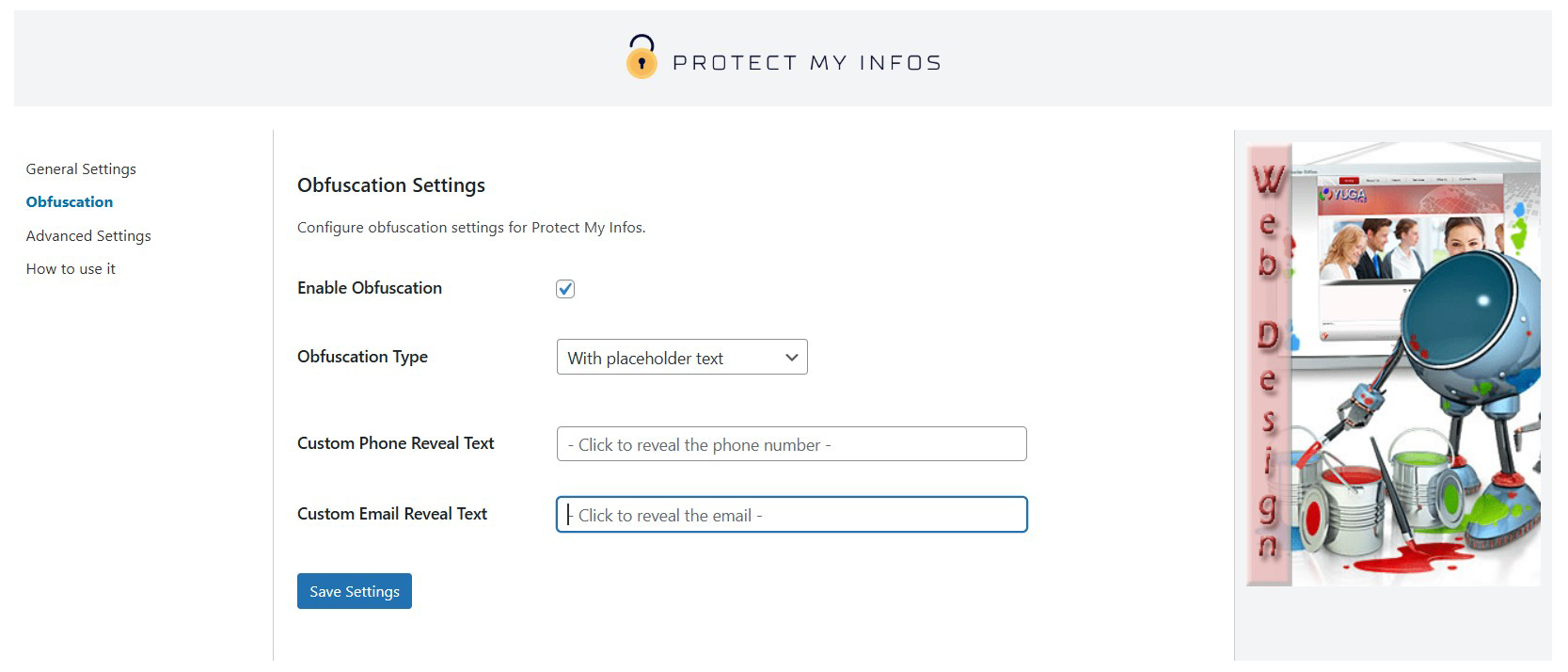
Emails and phone numbers are encoded and hidden from bots, while visitors can interact with placeholders to reveal the information.
Features
- Obfuscate sensitive information with placeholders, blur effects, or base64 encoding.
- Use the
[protect_my_infos]shortcode for integration in posts or pages. - Fully customizable settings for icons, colors, and reveal texts.
- Easy-to-use admin interface.
External Services
This plugin integrates with the PayPal Donate API to facilitate donations via PayPal’s secure platform.
- Service Name: PayPal Donate API
- Purpose: To provide a “Donate” button for collecting user donations securely via PayPal.
- Data Sent:
- Donation amount
- Currency
- PayPal Merchant ID
- When: Data is sent to PayPal only when a user interacts with the “Donate” button.
- Service Links:
Note: This plugin does not store or process sensitive personal information. All payment transactions are handled securely by PayPal’s platform.
屏幕截图



安装
- Upload the plugin files to
/wp-content/plugins/protect-my-infosor install it via the WordPress admin. - Activate the plugin in the ‘Plugins’ menu.
- Configure the settings in
Settings > Protect My Infos.
常见问题
-
How does the obfuscation work?
-
The plugin uses base64 encoding combined with JavaScript to hide sensitive information, making it inaccessible to bots while keeping it accessible to human users.
-
Can I customize the icons and colors?
-
Yes, the plugin allows you to change the icon style and colors for both text and icons directly from the settings page.
-
Can I customize the reveal text?
-
Yes, you can set custom reveal texts for both emails and phone numbers.
-
Is the plugin compatible with all themes?
-
Yes, it works with most WordPress themes.
-
Is the plugin compatible with caching plugins?
-
Yes, the plugin works with most caching plugins. If you encounter any issues, try clearing your cache after activating Protect My Infos.
-
Does this plugin slow down my website?
-
No, Protect My Infos is lightweight and optimized for performance. It uses minimal resources and doesn’t impact page load speed significantly.
-
Can I protect other types of sensitive data?
-
Currently, the plugin is designed to protect email addresses and phone numbers. Future updates may include support for additional types of data.
-
How do I use the shortcode?
-
You can use the shortcode
[protect_my_infos type="email" value="[email protected]"]to protect an email, or[protect_my_infos type="phone" value="+1234567890"]to protect a phone number. -
Can I disable the obfuscation?
-
Yes, you can disable the obfuscation in the plugin settings. However, this may expose your data to bots.
-
Does the plugin work with all WordPress themes?
-
Yes, Protect My Infos is compatible with most WordPress themes. If you experience layout issues, check your theme’s custom styles or contact support.
-
What happens if JavaScript is disabled in the browser?
-
If JavaScript is disabled, the obfuscated data will not be revealed to users. Ensure your audience has JavaScript enabled for the best experience.
-
Can I translate this plugin?
-
Yes, Protect My Infos is translation-ready. You can use tools like Loco Translate or Poedit to translate the plugin into your desired language.
-
Is there a Pro version of this plugin?
-
Not yet, but we are working on additional premium features. Stay tuned for updates!
-
Does the plugin comply with GDPR?
-
Yes, Protect My Infos does not store or process any user data, ensuring compliance with GDPR and other privacy regulations.
评价
此插件暂无评价。
贡献者及开发者


更新日志
1.3.8
- Declare compatibility with WordPress 6.9 and update documentation.
1.3.7
- Fix: two-tap reveal behavior on mobile for obfuscated emails/phones (first tap reveals, second tap opens link).
1.3.6
- Serve images locally from /assets (removed external CDN).
- Settings saved via AJAX with nonce; sanitization through the Settings API.
- Standardized option keys with fallbacks for prior versions.
- Refactored asset structure (css/js/img) and minor optimizations.
1.3.5
- Performance and localization updates
1.3.4
- Refactoring and security updates
1.3.3
- Performance and localization updates
1.3.2
- Security updates
1.3.1
- Added How to use section
1.3
- Added customizable settings for obfuscation type, reveal texts, and colors.
1.2
- Added obfuscation functionality.
- Added different types of obfuscation.
- Added icons.
1.1
- Added shortcode support.
1.0
- Initial release with email and phone number protection.