

描述
Bix AI Writer adds a simple panel in the Gutenberg editor where you can:
– Generate full content for a post/page from a prompt.
– Create a clean summary from any text you paste.
Bring your own backend: choose OpenAI, OpenRouter, or a fully free local setup with Ollama (http://localhost:11434). You keep control of keys and models. No vendor lock-in.
Privacy and Data Usage
Bix AI Writer connects to third-party AI services to generate content or summaries based on your prompts. Depending on the provider you select in Settings AI Writer, your text will be sent to:
- Ollama (Local, Self-Hosted) — https://ollama.com/
Your data stays on your own server. No external transmission is involved unless your Ollama endpoint is remote. - OpenAI — https://openai.com/ — Privacy Policy: https://openai.com/privacy
- OpenRouter — https://openrouter.ai/ — Privacy Policy: https://openrouter.ai/privacy
The plugin itself does not collect analytics or store personal data; it only inserts the returned text into the editor. API requests are performed from your WordPress server directly to the configured provider. You are responsible for complying with the selected provider’s terms of use and privacy policies.
屏幕截图
安装
- Upload the ZIP via Plugins Add New Upload.
- Activate Bix AI Writer.
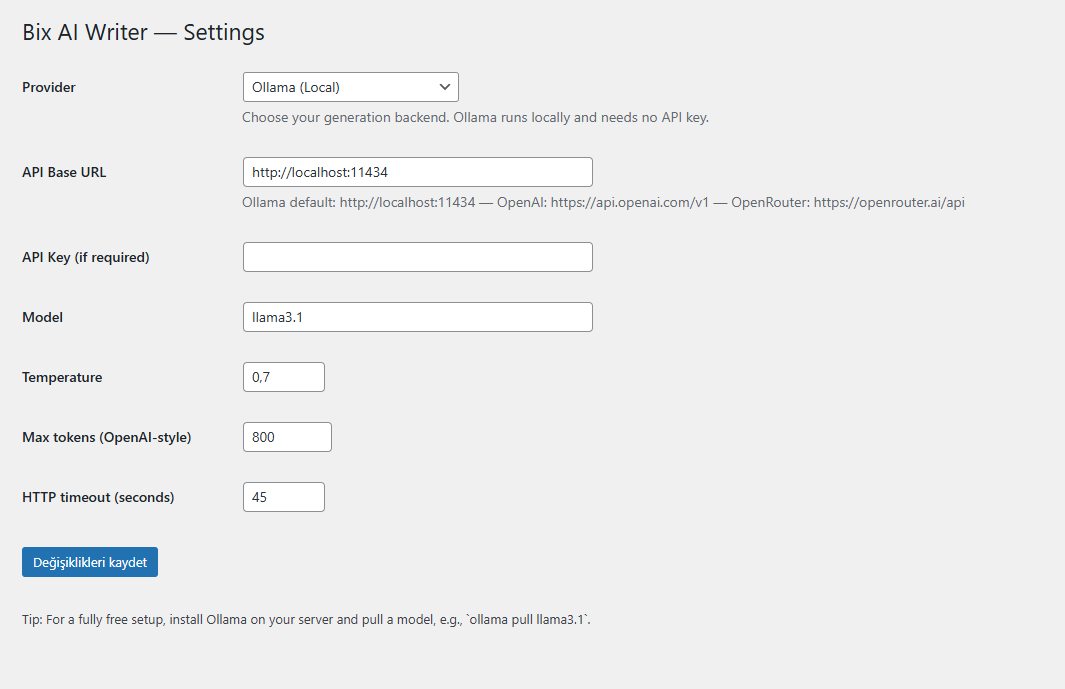
- Go to Settings AI Writer and choose your provider:
- Ollama: API Base
http://localhost:11434, Modelllama3.1, no key required. - OpenAI: API Base
https://api.openai.com/v1+ your key + model (e.g.gpt-4o-mini). - OpenRouter: API Base
https://openrouter.ai/api+ your key + model (e.g.openrouter/auto).
- Ollama: API Base
评价
此插件暂无评价。
贡献者及开发者

更新日志
1.0.3
- Add Privacy and Data Usage section documenting third-party services (OpenAI, OpenRouter, Ollama) with links and privacy policies.
- Fix Contributors to
bilirsoft(WordPress.org username). - Compliance polish for review feedback.