描述
Live demo (no install needed): Explore the full BrikPanel admin on a real WooCommerce store
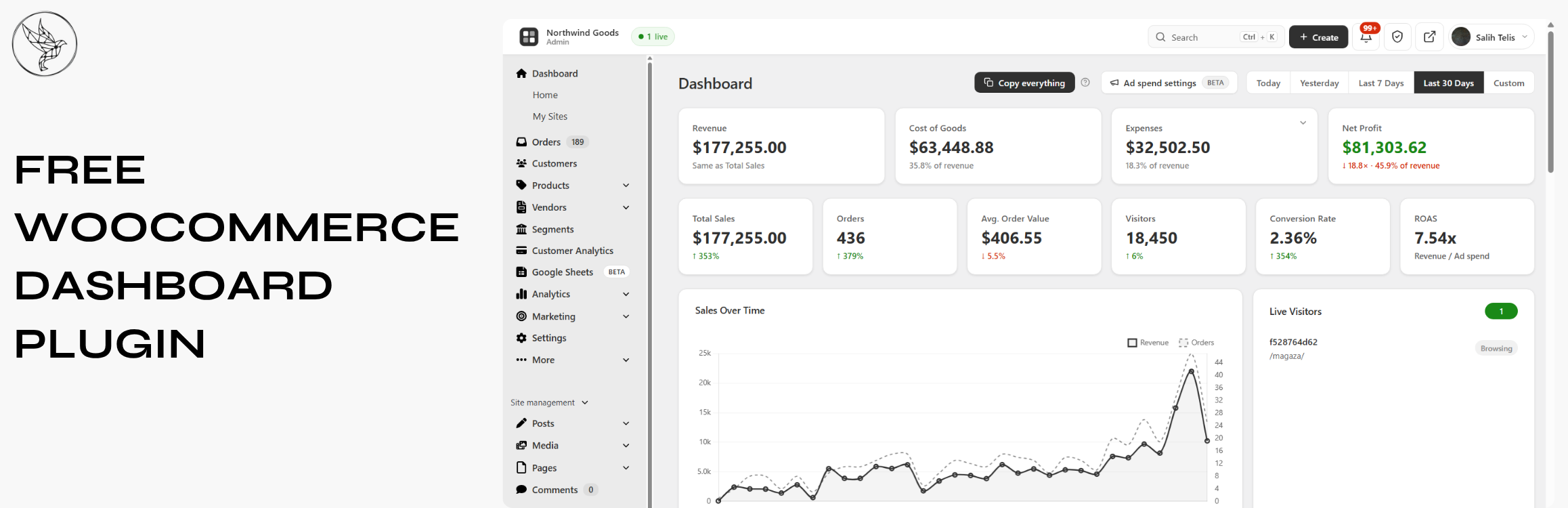
BrikPanel turns the default WooCommerce admin panel into a clean, fast, all-in-one cockpit — a modern WooCommerce dashboard, a powerful WooCommerce bulk editor, an inventory management workspace, an order management center, a coupon manager, a custom WP login page, and a real-time conversion tracking suite. Everything is free. Forever. No premium tier, no feature locks, no monthly subscriptions. A self-hosted Shopify alternative for WooCommerce — own your data, your products, and your customer list, with no monthly platform fee and no transaction fee.
Built by a developer who shipped 1000+ WooCommerce stores and got tired of every workflow taking five extra clicks.
Who is BrikPanel for?
- Store owners who want a modern WooCommerce dashboard with real numbers, not the slow built-in reports — and a self-hosted WooCommerce analytics solution instead of paying monthly fees to external SaaS tools
- Stores that want a lighter woocommerce inventory management workspace built into a complete admin redesign
- Anyone who needs to bulk edit WooCommerce products — including variations — without a premium plugin
- Agencies handing off stores to non-technical clients who need a simplified WooCommerce admin
- Shop owners migrating from Shopify who want a familiar, modern admin for their WooCommerce store — a free, self-hosted Shopify alternative
What you get (all free)
Modern WooCommerce Dashboard with Real-Time Sales Analytics
The heart of BrikPanel is a modern WooCommerce dashboard — a true woocommerce admin panel plugin, not a styling layer.
- Total Sales, Total Orders, Average Order Value (AOV) — today, yesterday, last 7/30 days, or any custom range, with ±% period-over-period delta on every metric
- Visitors counted from your own database (admins excluded), and Conversion Rate computed live from real visitors and real orders
- Beautiful sales chart powered by Chart.js, plus an order status donut (Completed, Processing, Cancelled, Refunded, Failed)
- WooCommerce conversion funnel — Visitors Add to Cart Checkout Orders, with the conversion percentage at every step
This is the best WooCommerce dashboard and a complete WooCommerce sales report for stores that need a modern WooCommerce admin and a woocommerce custom dashboard without paying for a SaaS.
Customer Analytics — LTV, RFM Segmentation & Cohort Retention
BrikPanel ships a complete WooCommerce customer analytics suite, calculated from your store data and visualized in the dashboard — no external service.
- Customer Lifetime Value (LTV) — total customers, average and top LTV, full LTV distribution histogram, and a sortable top-customers table
- RFM segmentation — every customer scored on Recency, Frequency, and Monetary, then bucketed into Champions, Loyal, At Risk, About to Sleep, Hibernating, and Lost, with revenue per segment
- Cohort retention — month-by-month cohort retention grid plus an average retention by month-offset trend line
- Advanced filtering and segmentation — combine spend range, product, location, date and more to build saved segments for both customers and orders
A free woocommerce LTV plugin, woocommerce RFM tool, and woocommerce cohort retention report rolled into the same dashboard you already use for sales.
Live Visitors & Real-Time Conversion Tracking
BrikPanel ships a built-in WooCommerce live visitors widget — see who is on your store right now, what page they are on, and whether they have items in the cart. Refreshes every 30 seconds. No external service, no Hotjar, no monthly fee.
- WooCommerce real time visitors widget with cart status (Browsing / Has items in cart / On thank-you page), current page, and customer info
- WooCommerce conversion tracking in the same database that powers the dashboard
- IP addresses SHA-256 hashed for privacy
- Most-viewed pages and most added-to-cart products reports
A free woocommerce statistics plugin and woocommerce sales tracker without any external SaaS.
Geographic Analytics — WooCommerce Sales by Country
A 3D rotating globe (Cobe.js) plots every order on its real location — see WooCommerce sales by country and city without exporting a CSV, with Top 10 Countries and Top 10 Cities tables. Works with both HPOS and legacy order storage.
Lightning-Fast Order Search — Cmd/Ctrl + K from Anywhere
Hit Ctrl + K (or Cmd + K on Mac) anywhere in wp-admin and a beautiful order search overlay opens — the free woocommerce order search plugin every store owner has been asking for. Searches across order ID, customer first/last name, email, phone, and product SKU inside order line items at once. True woocommerce quick search with results as you type, color-coded status badges, totals, and dates.
Modern WooCommerce Order Management
BrikPanel replaces the cluttered default orders page with a clean woocommerce order list plugin screen.
- 30-day overview bar: total orders, completed, refunded, cancelled, revenue
- Inline status change without opening the edit page
- HPOS (
wc_get_orders) and legacy storage (WP_Query) both supported - Two new statuses: Return Draft and Change
- Reskinned order edit page with copy-to-clipboard for billing/shipping
- Sold downloadable products column on the order edit page
- Optional BrikMarket marketplace stats integration
A real woocommerce order management plugin, not a reskin. Disable from settings anytime.
WooCommerce Product List Plugin — Built for People Who Actually Edit Products
The default WooCommerce product list is fine for browsing, painful for editing. BrikPanel ships a complete woocommerce product list plugin that fixes it.
- Thumbnail, name, SKU, regular/sale price, stock badge, category
- Publish status toggle — flip draft published with one click, no reload
- Edit, Duplicate, Delete actions; bulk publish, draft, delete
- Status tabs (All / Published / Draft / Trash), live search by name or SKU
- Configurable per-page (5–100, default 20), AJAX pagination
- Per-user toggles for any third-party / SEO column added by Yoast, Rank Math, ASE and other plugins
- Admin and Site Enhancements (ASE) custom columns are respected in the BrikPanel product, order and customer lists
Quick Edit Sidebar — Edit Without Leaving the List
A slide-in panel from any product row to edit name, SKU, regular/sale price, stock, and category — save without leaving the list. The woocommerce quick edit experience WooCommerce should have shipped years ago. Update woocommerce quick edit price, stock, or category in two clicks.
Bulk Edit WooCommerce Products with the Variation Editor — Full Variation Support
This is where BrikPanel pulls ahead of every other free woocommerce bulk editor. Most free plugins only handle simple products and only let you “increase price by X%”. BrikPanel does much more — and does it for variable products too.
- WooCommerce bulk price update (regular and sale) — percentage, fixed amount, or absolute value, across the whole catalog or filtered by category
- Bulk update WooCommerce products stock quantities (in/out of stock, set quantity, add/subtract)
- WooCommerce bulk price by category — pick a category, set a rule, every product updates
- WooCommerce bulk sale price updates with a date range
- Confirmation dialog on every bulk action
Now the part nobody else does for free: variation support.
- WooCommerce variation editor — open any variable product and edit every variation in one modal (regular price, sale price, stock, SKU)
- Bulk edit variation prices WooCommerce — set the same price for all variations of an attribute (every “Red” variation, every “L” size), or apply a percentage rule
- Bulk update variation stock — set or adjust the stock of every variation in one click
- Attribute filter to narrow visible variations when a product has 50+ combinations
How to bulk edit WooCommerce products including variations without buying a $79/year plugin? BrikPanel handles both simple and variable products for free.
Simplified WooCommerce Product Editor
The default WooCommerce add-product screen has 11 metaboxes, 3 tabs, and 40+ fields. New owners give up before finishing their first product. BrikPanel ships a complete woocommerce product editor plugin with the noise removed.
- Featured image + product gallery with drag-and-drop upload, unlimited images, drag-to-reorder
- Regular price, sale price with decimal validation
- Searchable category picker with multi-select + quick create category without leaving the page
- Brand field — the WooCommerce
product_brandtaxonomy is now first-class alongside categories and tags - Short description + full rich-text description (wp_editor)
- SEO fields — custom slug, meta title, meta description, live Google SERP preview
- Full SEO plugin compatibility — Yoast SEO, Rank Math, All in One SEO and SEOPress metaboxes (including the SEO score panel) render and save inside the BrikPanel product editor
- Product type (Simple, Variable), attribute management with inline create
- Auto-generate variations from attribute combinations, per-variation price/sale/SKU/stock
- Duplicate any product in one click
Opt-in. Keep the default WooCommerce product page if you prefer.
WooCommerce Variation Gallery
Attach a separate image gallery to each product variation — the frontend swaps gallery automatically when a customer picks a variation. Image metadata (srcset, sizes, alt text) is fully preserved.
WooCommerce Categories Page — Drag-and-Drop Parent/Child Management
The default WooCommerce category screen has not been redesigned in a decade. BrikPanel rebuilds it with per-page settings (5–200), drag-and-drop parent/child nesting with circular reference prevention, for both product_cat and product_tag.
Best WooCommerce Coupon Plugin — Free Coupon Manager
A complete WooCommerce coupon manager that makes coupons a first-class part of the admin — we honestly think this is the best WooCommerce coupon plugin in the free repository.
- Coupon table with code copy-to-clipboard, discount type icon, amount, usage count, expiry highlighting, and status
- Status tabs, AJAX pagination, slide-over coupon panel — create/edit without a reload
- Auto-generate random coupon codes; one-click duplicate
- Discount types: percentage, fixed cart, fixed product + free shipping toggle
- Expiry date picker, total + per-customer usage limits, min/max spend, individual use toggle, product/category include/exclude rules
Custom WordPress Login Page — Custom WP Login Page for WooCommerce
BrikPanel ships a custom WP login page that fully replaces the default wp-login.php look — a real WordPress login customizer built for WooCommerce stores.
- Centered card layout with your site name as logo
- Minimal, distraction-free fields, AJAX submission (no reload)
- Toast notification on errors, footer site branding
- Default WordPress login styles fully hidden
WooCommerce Inventory Management
BrikPanel includes a complete woocommerce inventory management workspace. The product list, bulk editor, variation editor, and quick edit sidebar work together as one inventory workflow.
- Current stock for every product and variation in one place, with stock badges in the product list (in stock / low stock / out of stock)
- Update stock inline from the quick edit sidebar, or bulk update across categories and variations
- HPOS-enabled stores supported
A free woocommerce inventory management plugin that covers the daily workflow without installing another heavy stock control plugin.
Custom Top Admin Bar & Notifications
A Custom BrikPanel-styled top admin bar replaces the default WordPress toolbar across the entire admin with a larger, e-commerce-focused notification bell and quick links — toggleable from settings. Notification sound, confetti animation and a top-right popup the moment a new completed order arrives, with no external services.
Google Sheets Sync — Real-Time WooCommerce Google Sheets Integration
BrikPanel ships a free WooCommerce Google Sheets sync — a fully native WooCommerce to Google Sheets integration that streams orders, customers and analytics into a Google Sheet you control. The free GSheetConnector alternative with no Zapier, no Make, no monthly fee.
- Real-time order sync — every new WooCommerce order is appended within seconds, one row per line item so variations get their own columns. Free woocommerce order sync to google sheets with no external automation tool
- Scheduled WooCommerce Google Sheets export — hourly, every 4h or daily catch-up; idempotent so re-runs never duplicate rows
- Analytics report snapshots — Sales Summary, Daily KPIs, Top Products and Funnel tabs refreshed on an interval for pivots and dashboards in Sheets
- Customer + RFM snapshot — chained to the nightly RFM recompute
HPOS-compatible. A real google sheets woocommerce sync for stores that want orders, customers and analytics in Sheets without paying a monthly fee.
WooCommerce ROAS, Net Profit & Ad Spend — Google Ads + Meta Ads
BrikPanel pulls daily spend from Google Ads and Meta Ads (Facebook / Instagram) so you see real WooCommerce ROAS, Net Profit and ad spend next to revenue. Multi-currency aware. A free Triple Whale alternative and woocommerce profit tracking dashboard with no monthly fee.
BrikMarket Marketplace Analytics
When BrikMarket is active, marketplace orders are excluded from the storefront conversion rate and a dedicated dashboard block breaks down orders, share and top categories per marketplace.
Subscription & Membership Plugin Compatibility
Compatible with major subscription and membership plugins (WooCommerce Subscriptions, MemberPress, Paid Memberships Pro and more) — subscription products and member orders show up in the same product list, order screens and customer analytics.
Developer Hooks & Filters
A developer hooks and filters system for agencies — actions and filters like brikpanel_after_product_save, plus a built-in docs popup in settings with one-click copy buttons.
Navigation & Admin UI Cleanup
- BrikPanel dashboard becomes the first WordPress admin menu item; admin bar gains quick links, footer rebranded
- Optional simplified mode hides the full WordPress menu, showing only BrikPanel + WooCommerce for non-technical clients
A Free, Self-Hosted WooCommerce Analytics & Inventory Suite
Store owners pay monthly SaaS fees for parts of what BrikPanel does free:
- Self-hosted WooCommerce analytics — sales, AOV, conversion, funnels, geo data, customer LTV, RFM, cohort retention, no third-party
- A simpler inventory workspace for stores that only need stock-level visibility and bulk updates
- A free Metorik and Triple Whale alternative — analytics, ROAS and profit on your own server
- Shopify alternative for WooCommerce — the clean admin experience of Shopify with your storefront, customer data and orders on your own server
Your data stays on your server — no external account, no monthly fee.
Why BrikPanel and not the default WooCommerce admin?
WooCommerce’s built-in analytics are slow, refresh hourly, and have no live visitor tracking, conversion funnel, geographic data, customer LTV / RFM / cohort reports, Cmd+K order search, quick edit sidebar, variation bulk editor, custom login or coupon manager. BrikPanel fixes every one of those gaps inside a single free WooCommerce admin plugin — built across 1000+ WooCommerce stores.
WooCommerce HPOS Compatibility & Performance
- Zero impact on storefront speed — only loads inside wp-admin
- Hardened performance for low-resource hosting — heavy queries are batched, cached and run through Action Scheduler so the dashboard, customer analytics and bulk editor stay responsive on shared hosting
- HPOS (High-Performance Order Storage) fully supported with dual code paths
- WooCommerce 7.x, 8.x, and newer; works alongside Admin Menu Editor, Slider Revolution, Yoast SEO, RankMath, WPML, Polylang
- Translation-ready (
.potfile included), with all JavaScript / jQuery strings routed throughwp_localize_script - All AJAX actions verify nonces and
manage_woocommercecapability; DB writes use prepared statements; IPs SHA-256 hashed; admin activity excluded from analytics
屏幕截图
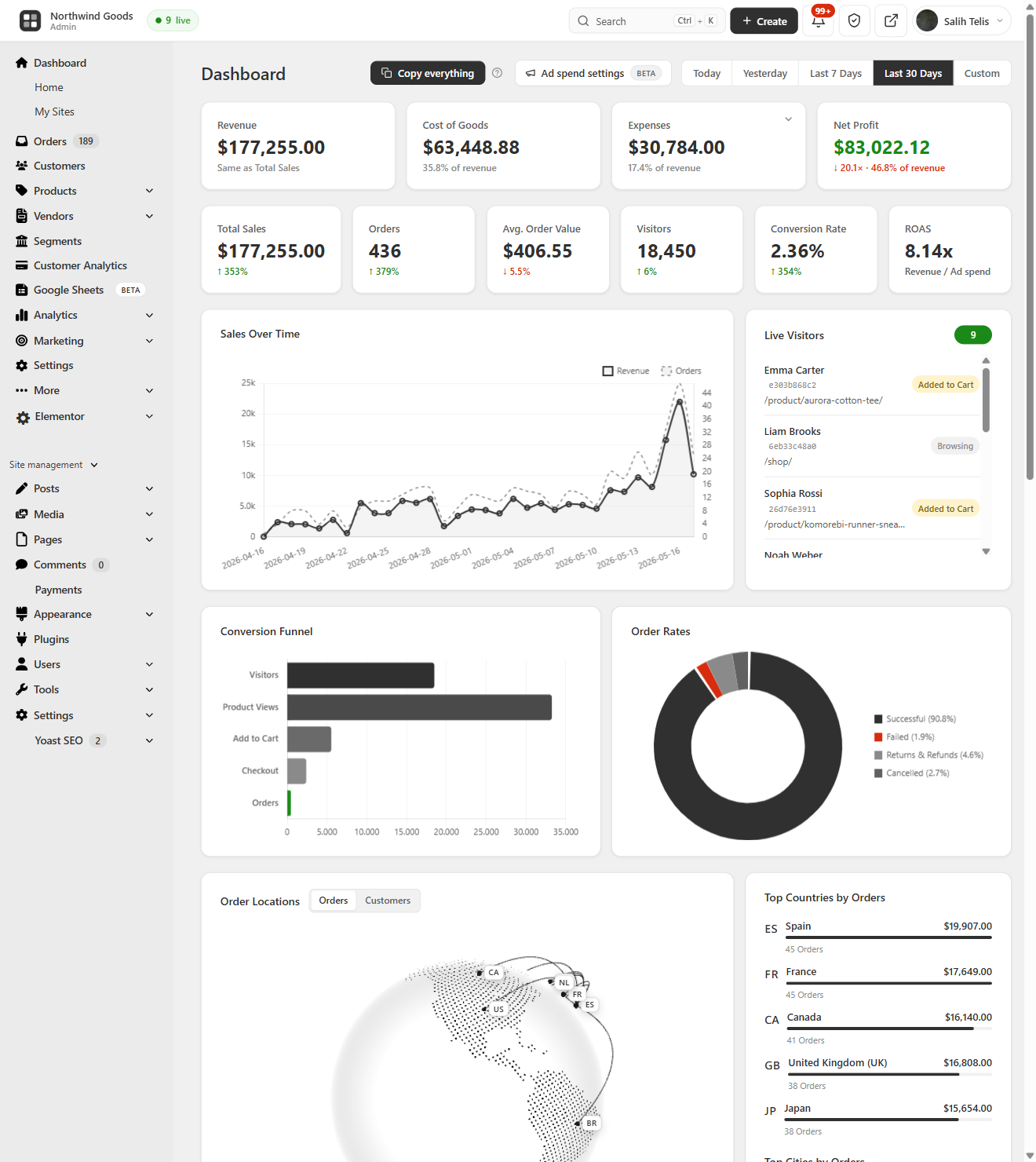
Modern WooCommerce Dashboard — a real-time WooCommerce sales report and admin panel: Total Sales, Orders, AOV, Visitors and Conversion Rate with period-over-period deltas, an interactive sales chart, Net Profit, ROAS and a live visitors widget 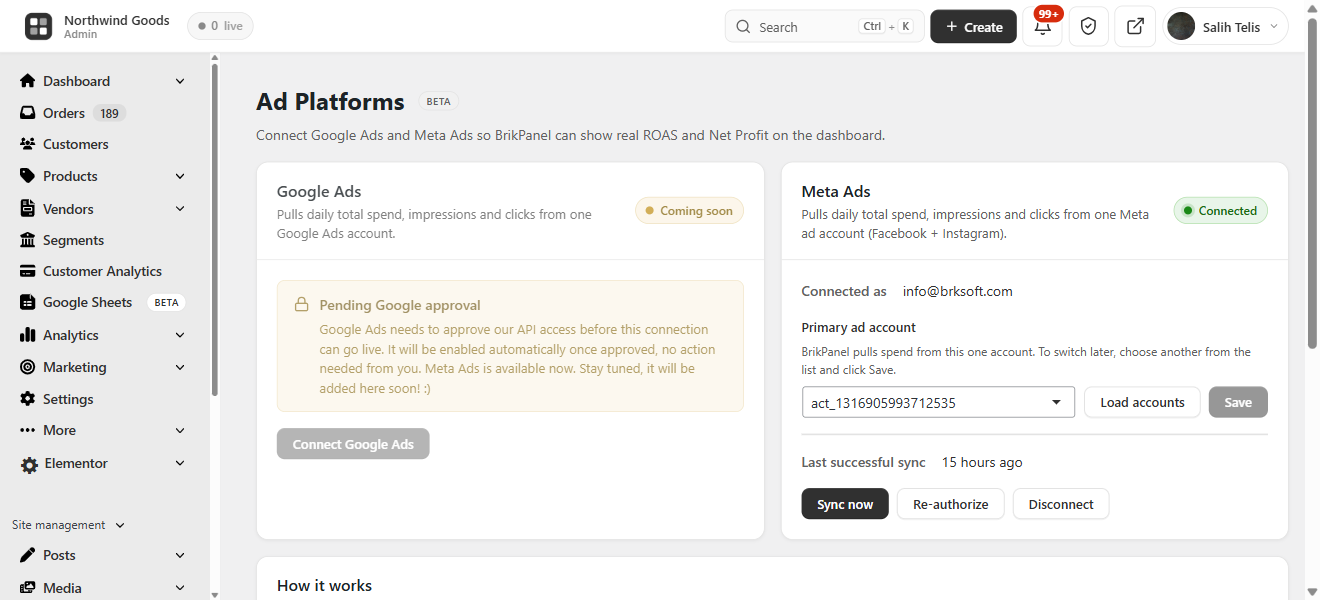
Real ROAS & Net Profit with Google Ads + Meta Ads — native Google Ads and Meta (Facebook / Instagram) Ads integration that pulls daily ad spend into the dashboard so you see true return on ad spend and net profit next to store revenue 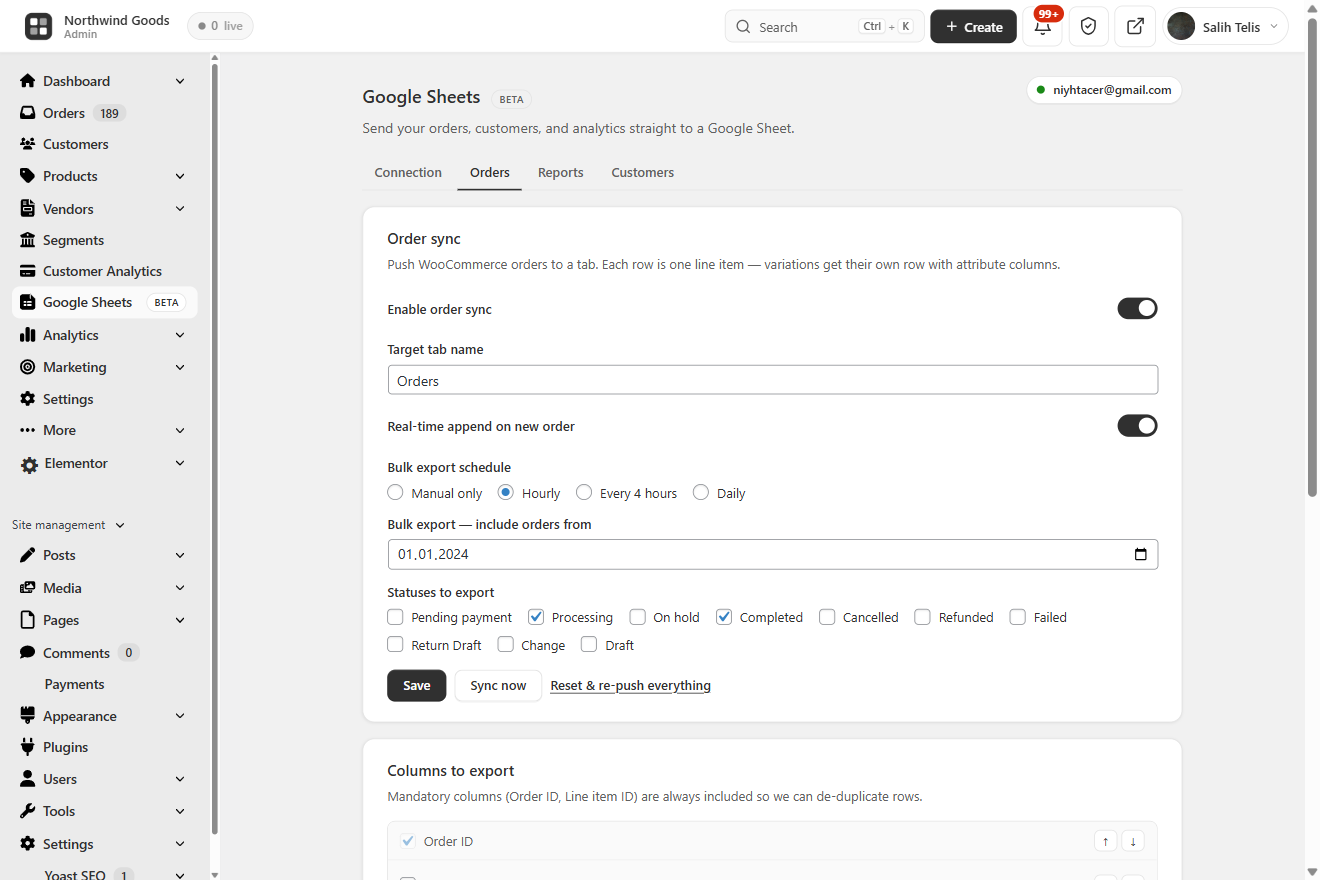
WooCommerce Google Sheets Sync — real-time order sync to a Google Sheet, scheduled bulk export, per-status filters and reorderable columns — a free GSheetConnector alternative 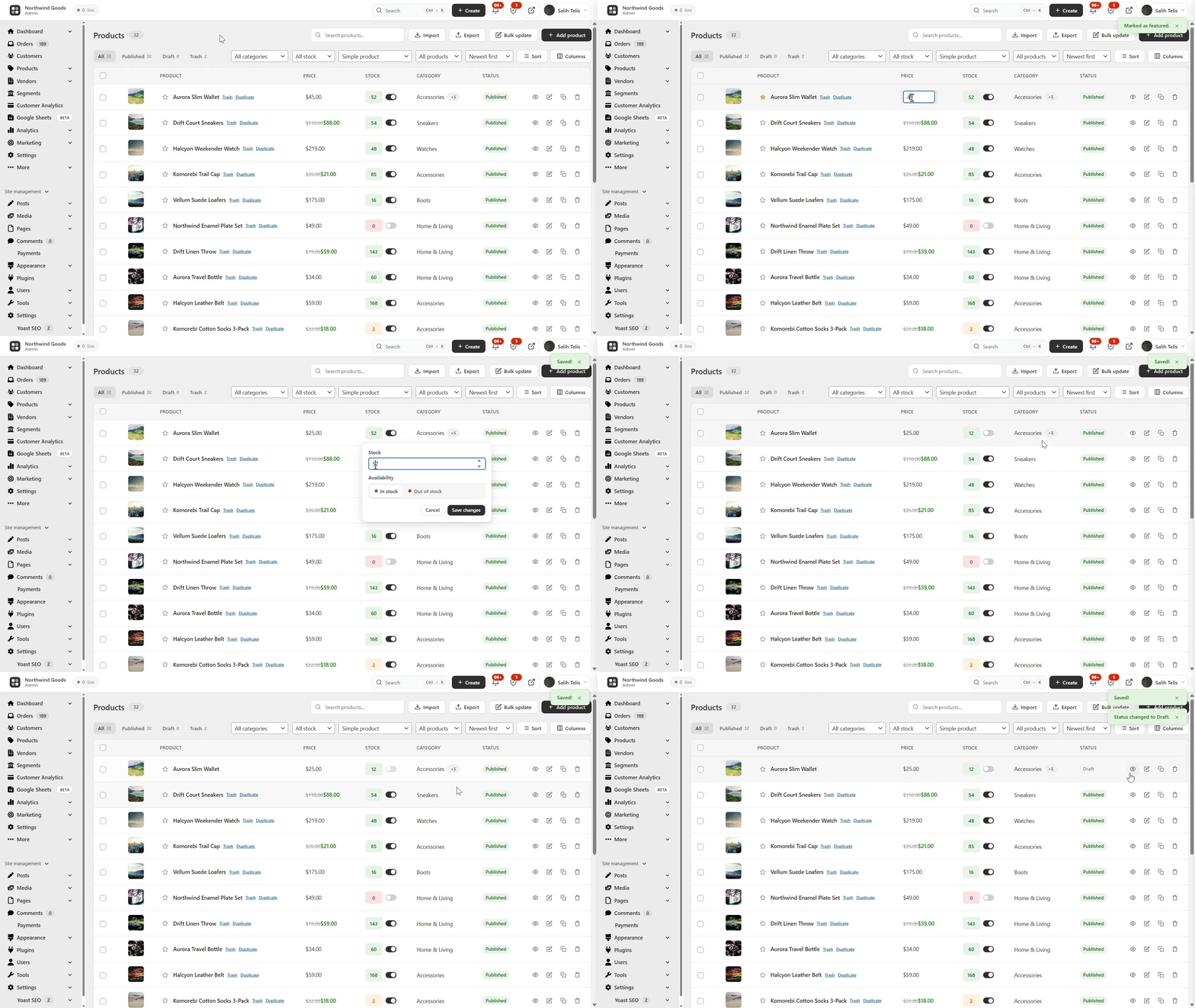
WooCommerce Inventory Management & Product List — clean product table with thumbnails, SKU, regular/sale price, color-coded stock badges, category and a one-click publish toggle, for both simple and variable products 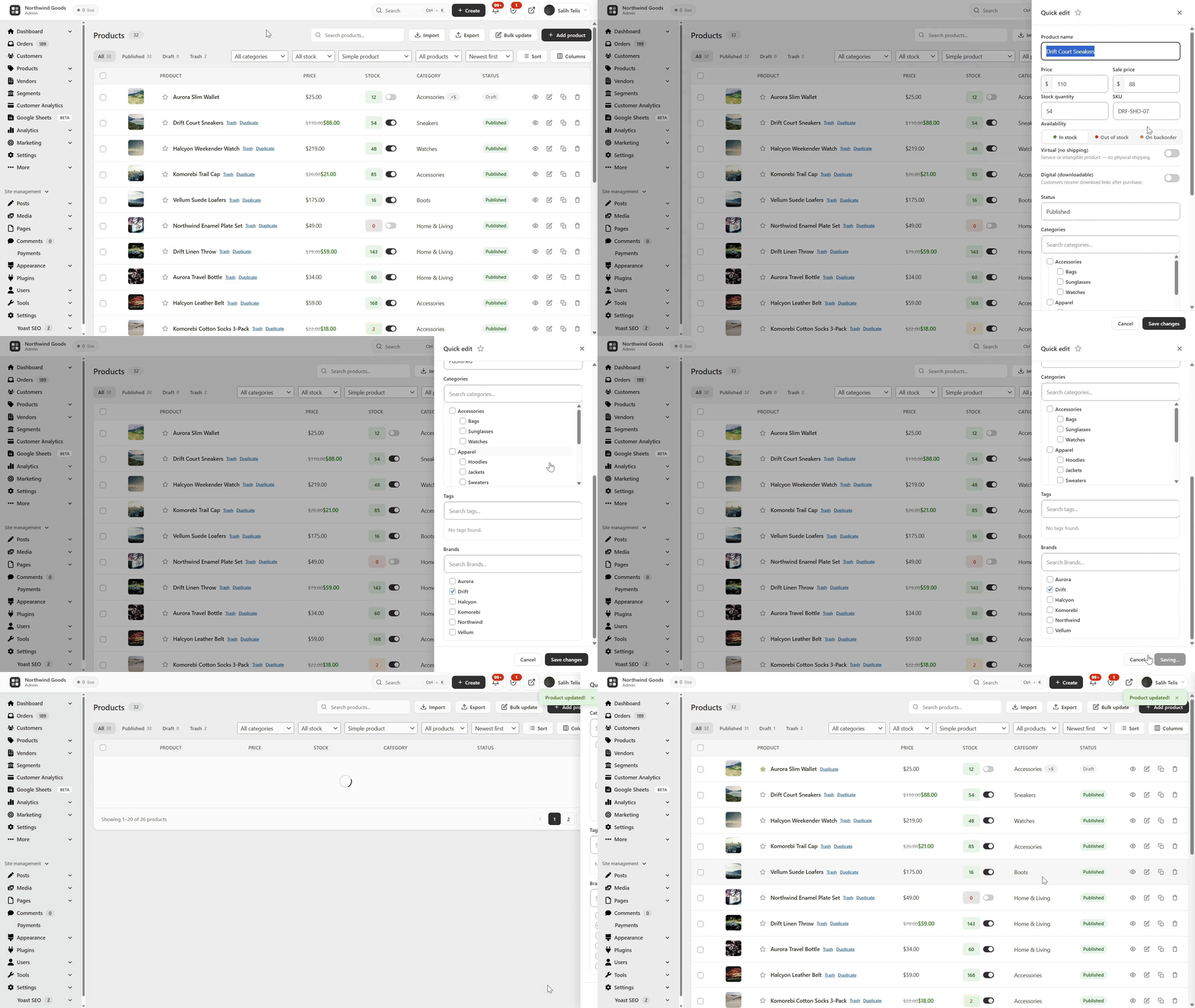
Quick Edit Sidebar — a slide-in panel to edit name, prices, SKU, stock and category without ever leaving the product list 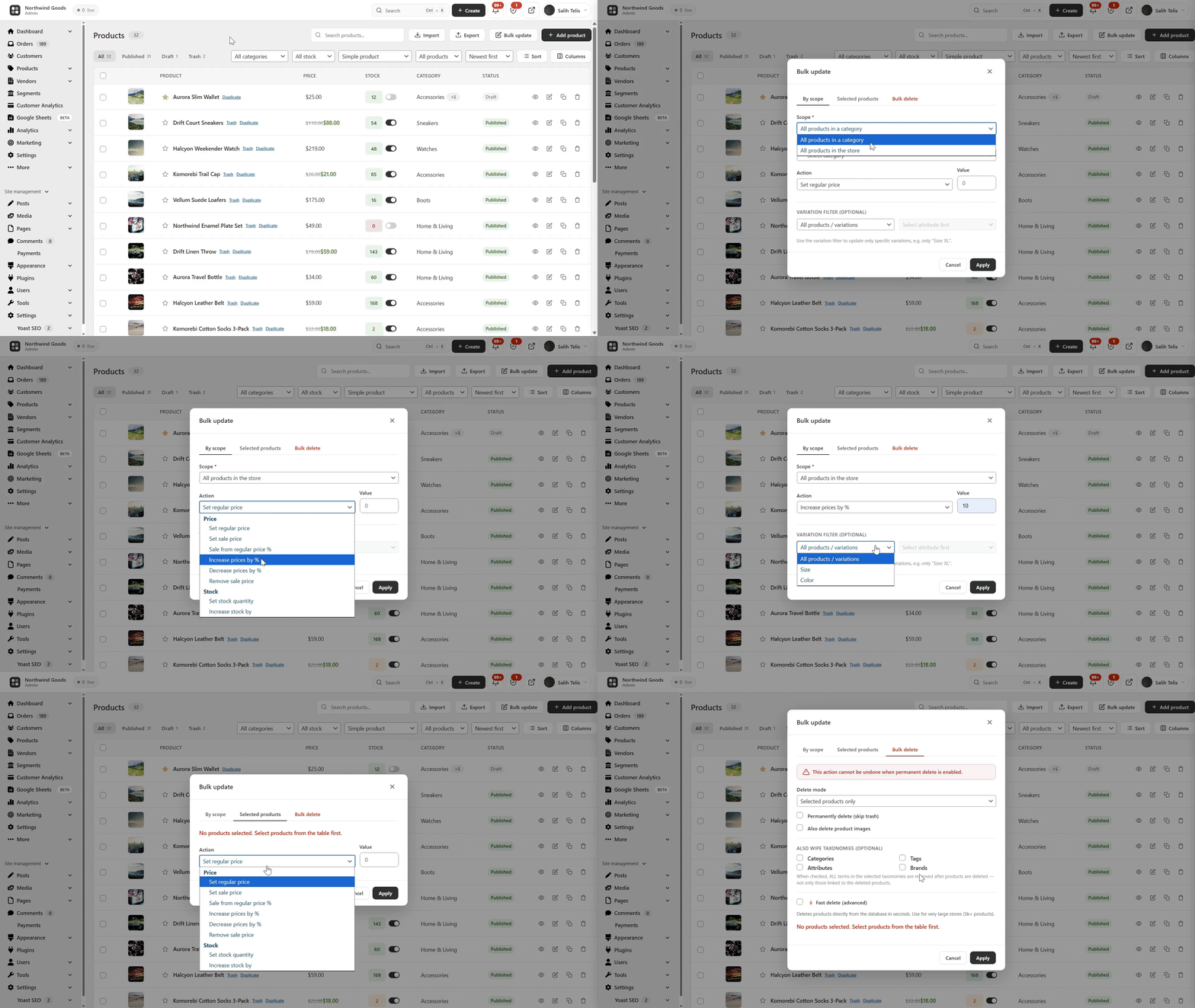
Bulk Edit WooCommerce Products — bulk update prices, sale prices and stock for the whole catalog, by category or by selection, with full variation support (e.g. only “Size: XL”) 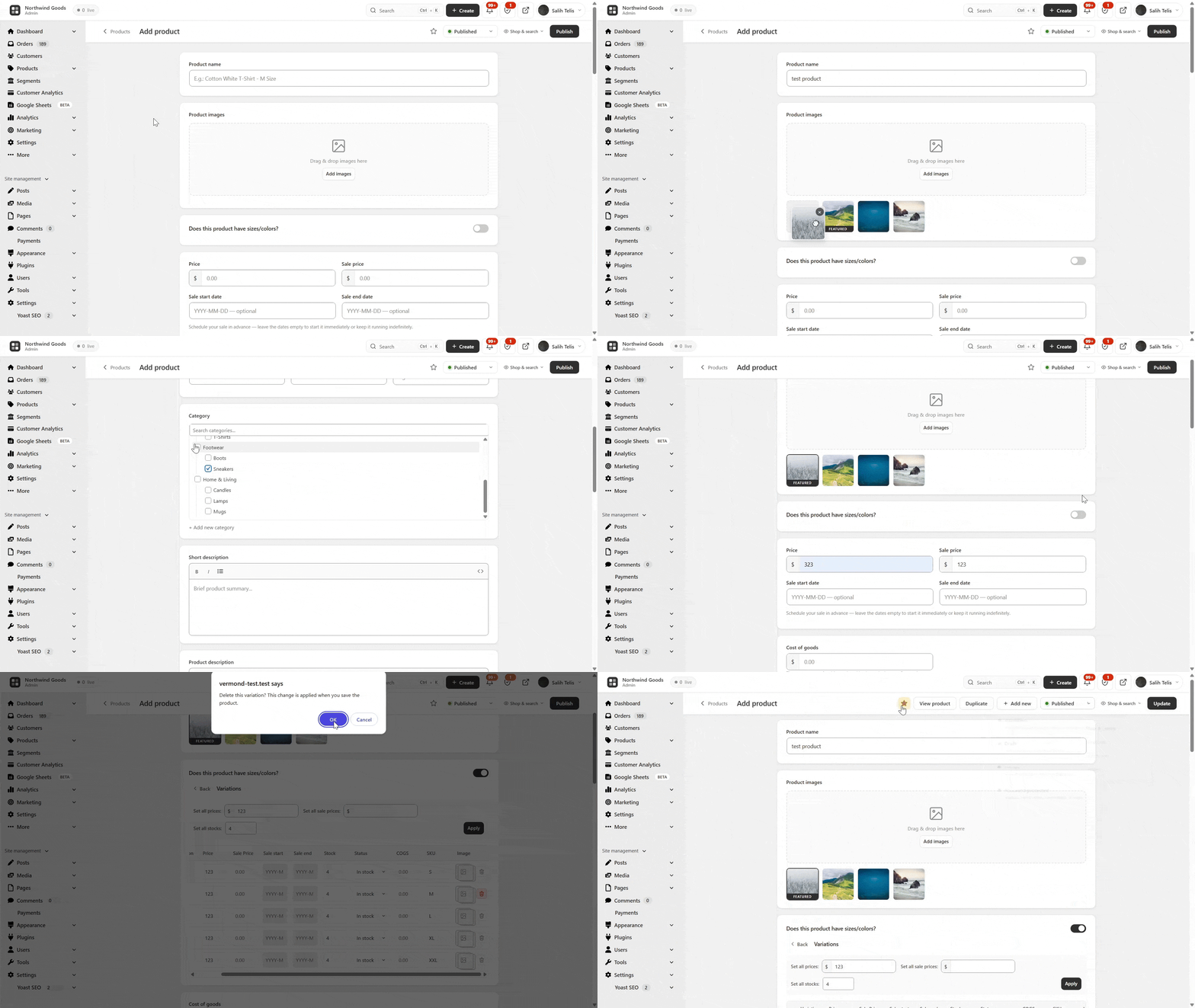
Simplified WooCommerce Product Editor — drag-and-drop image gallery, clean pricing and an inline variation builder for simple and variable products 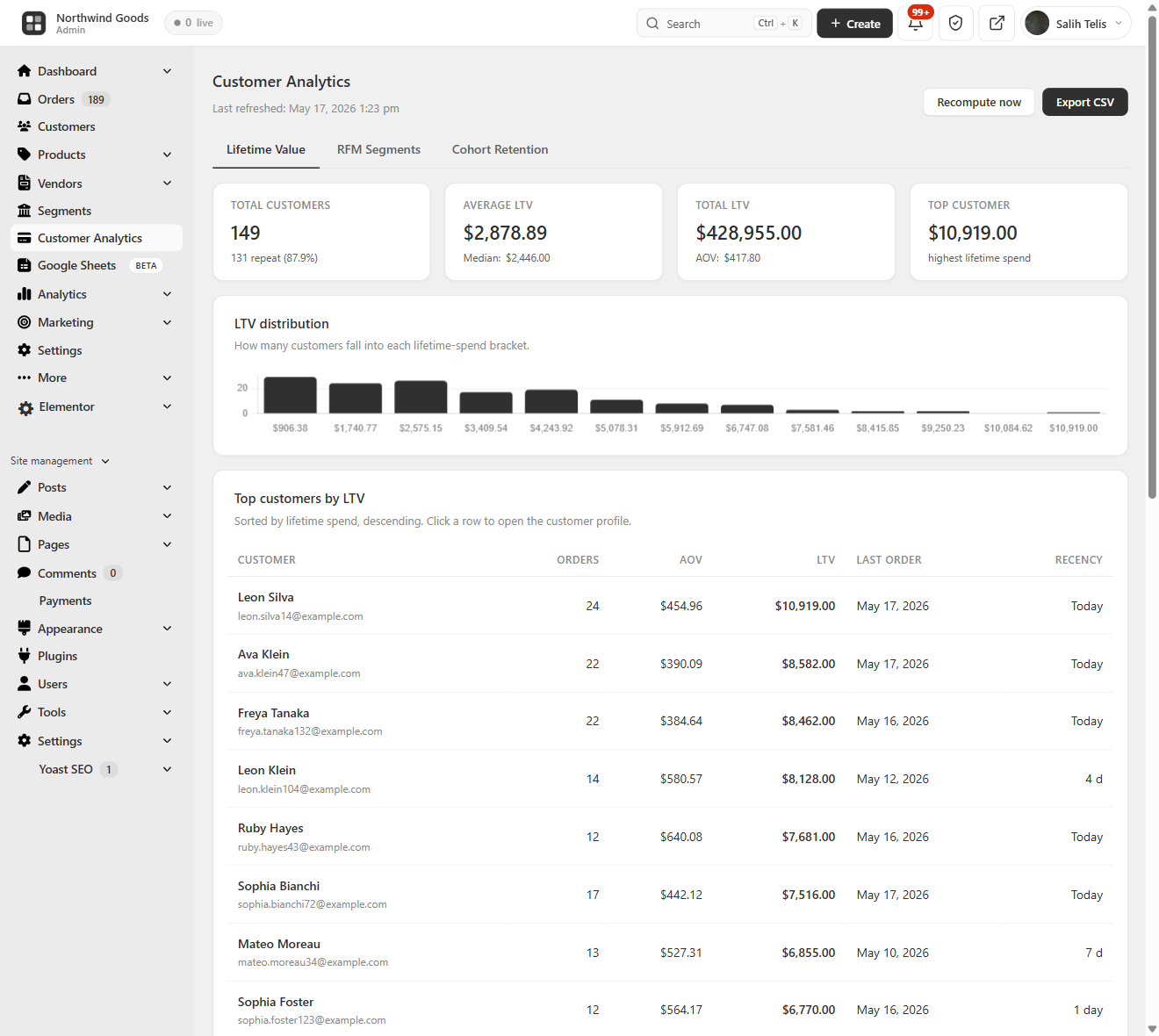
WooCommerce Customer Analytics — Lifetime Value (LTV) — total customers, average and top customer lifetime value, the full LTV distribution histogram, and a sortable top-customers table 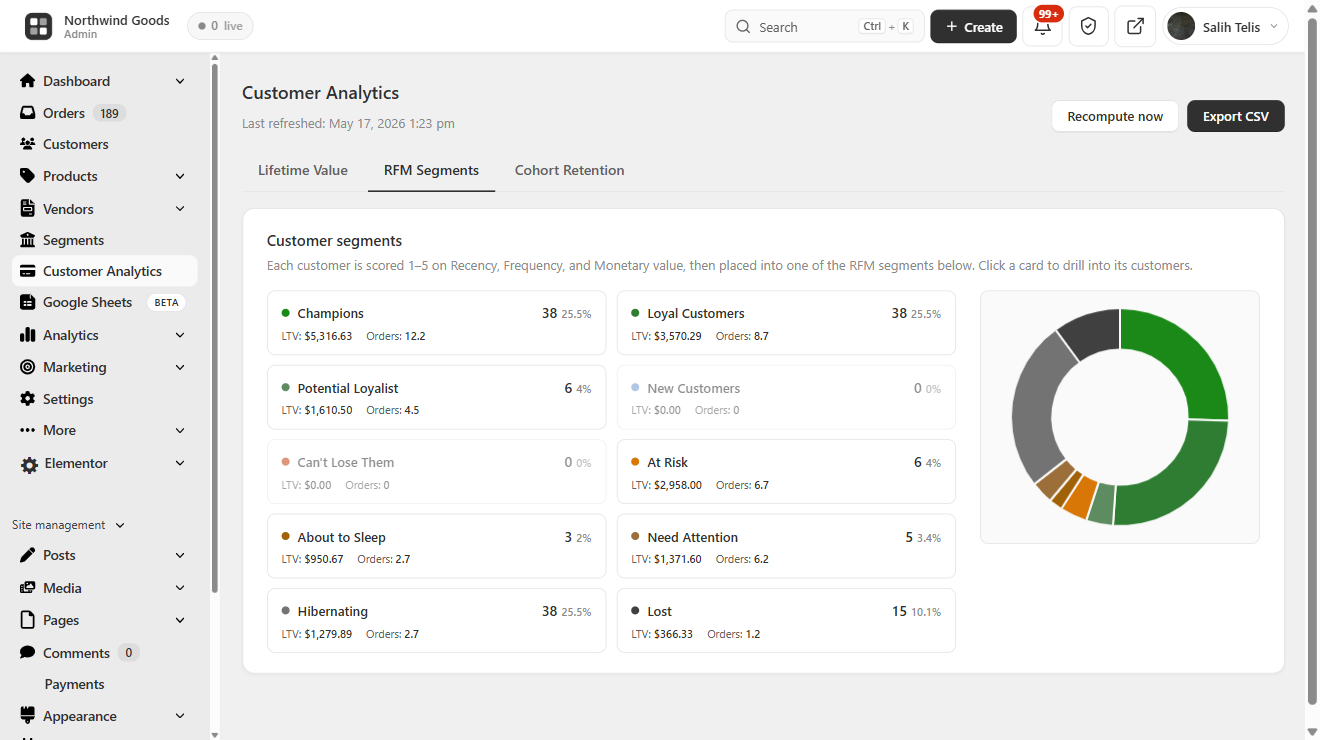
WooCommerce Customer Analytics — RFM Segmentation — every customer scored on Recency, Frequency and Monetary and grouped into Champions, Loyal, At Risk, Hibernating, About to Sleep and Lost, with revenue per segment 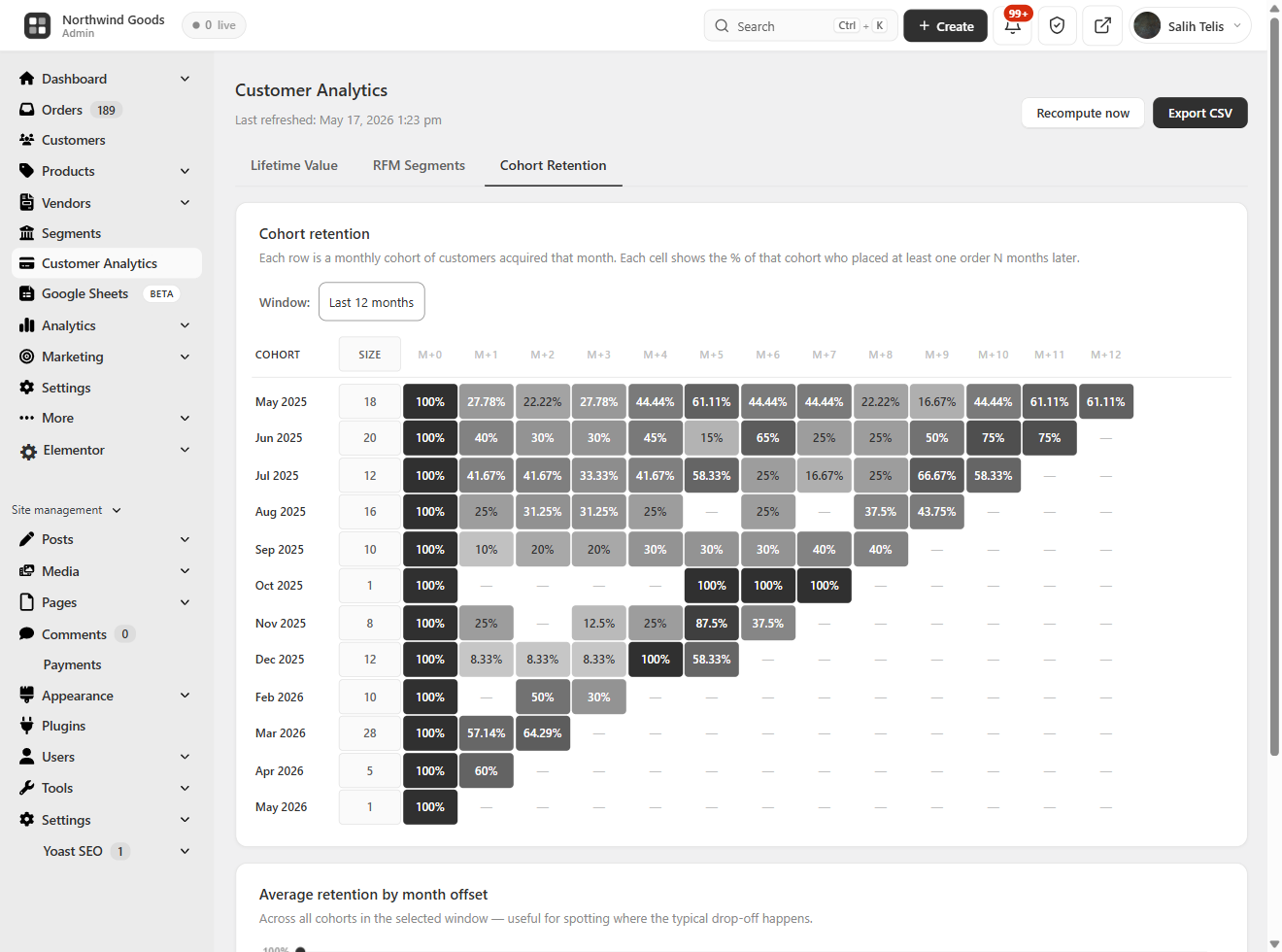
WooCommerce Customer Analytics — Cohort Retention — a month-by-month cohort retention grid plus an average retention by month-offset trend 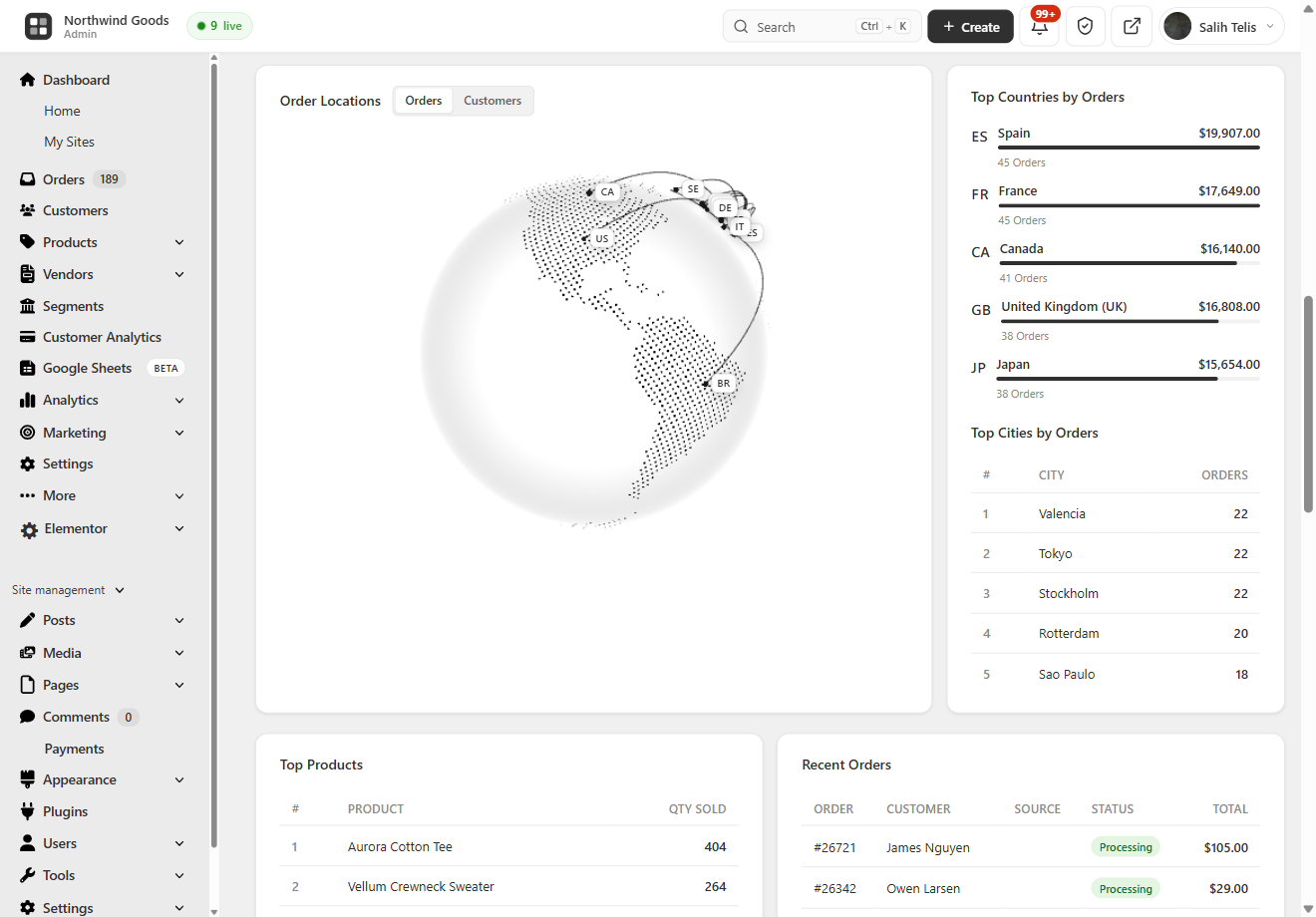
Geographic Analytics — WooCommerce Sales by Country — a 3D globe of order locations with Top Countries and Top Cities by orders and revenue 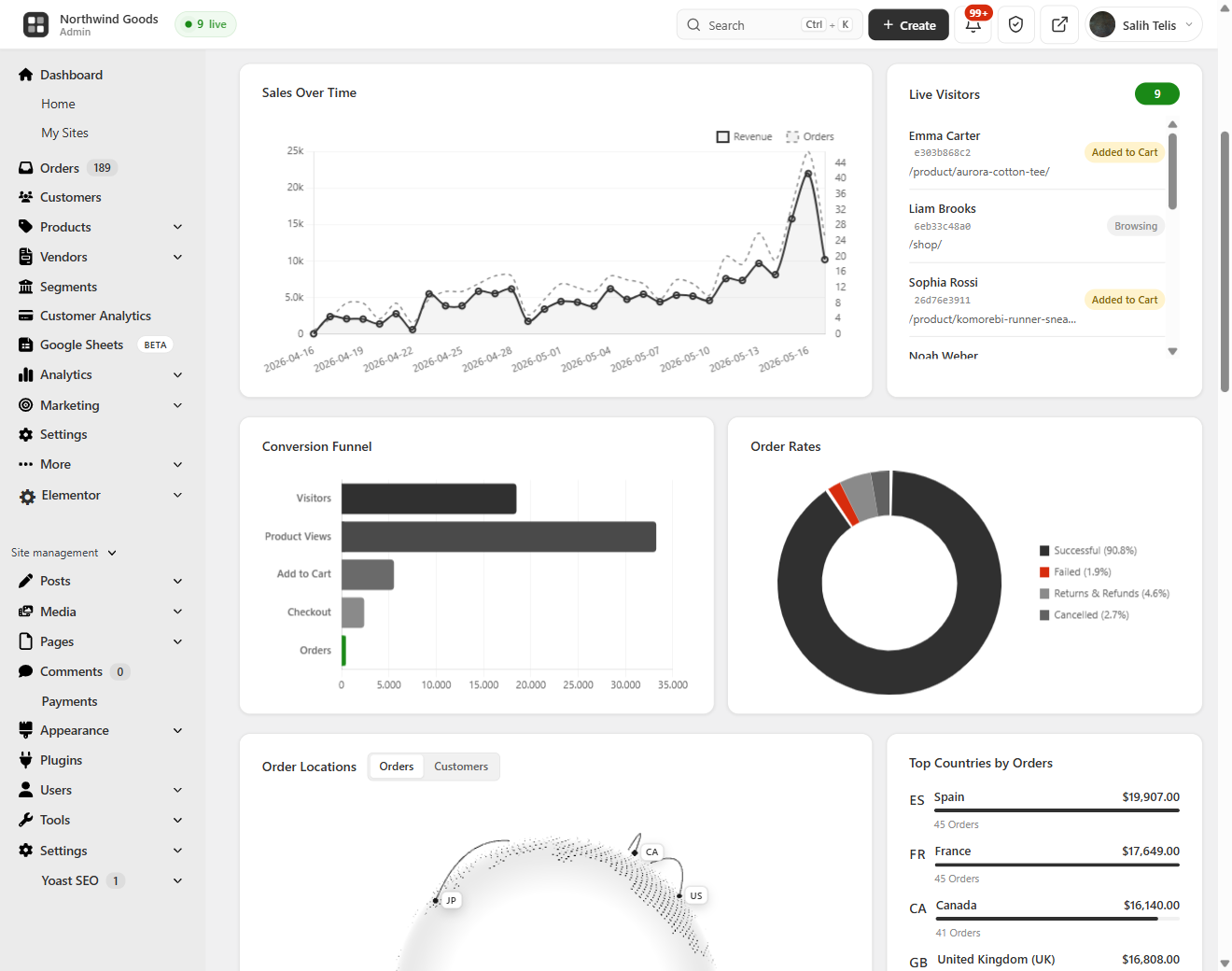
Live Visitors & Conversion Funnel — real-time WooCommerce live visitors with cart status, plus the Visitors Add to Cart Checkout Orders conversion funnel and order-status breakdown 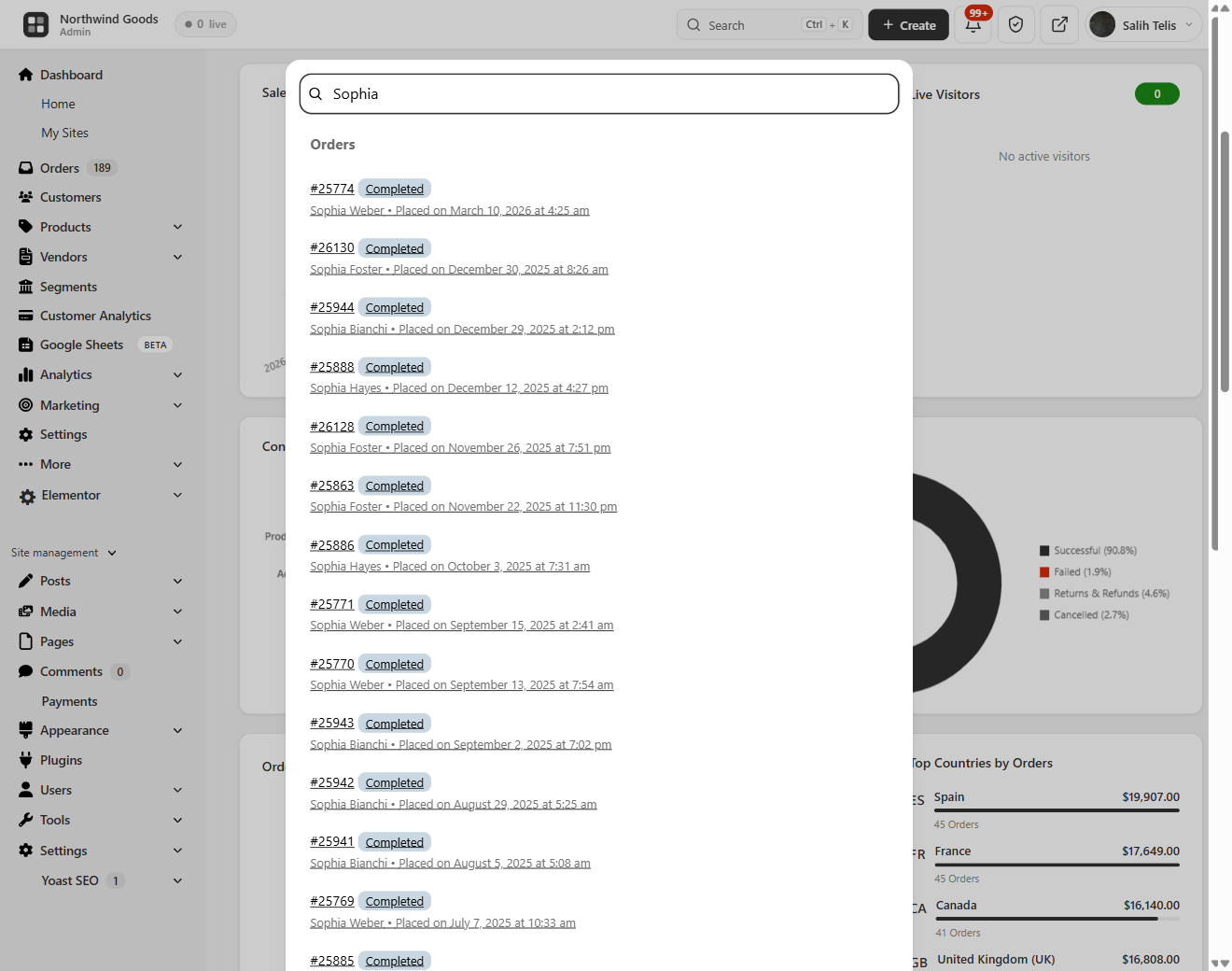
Lightning-Fast Order Search (Cmd/Ctrl + K) — an instant order search overlay across order ID, customer name, email, phone and product SKU from anywhere in wp-admin 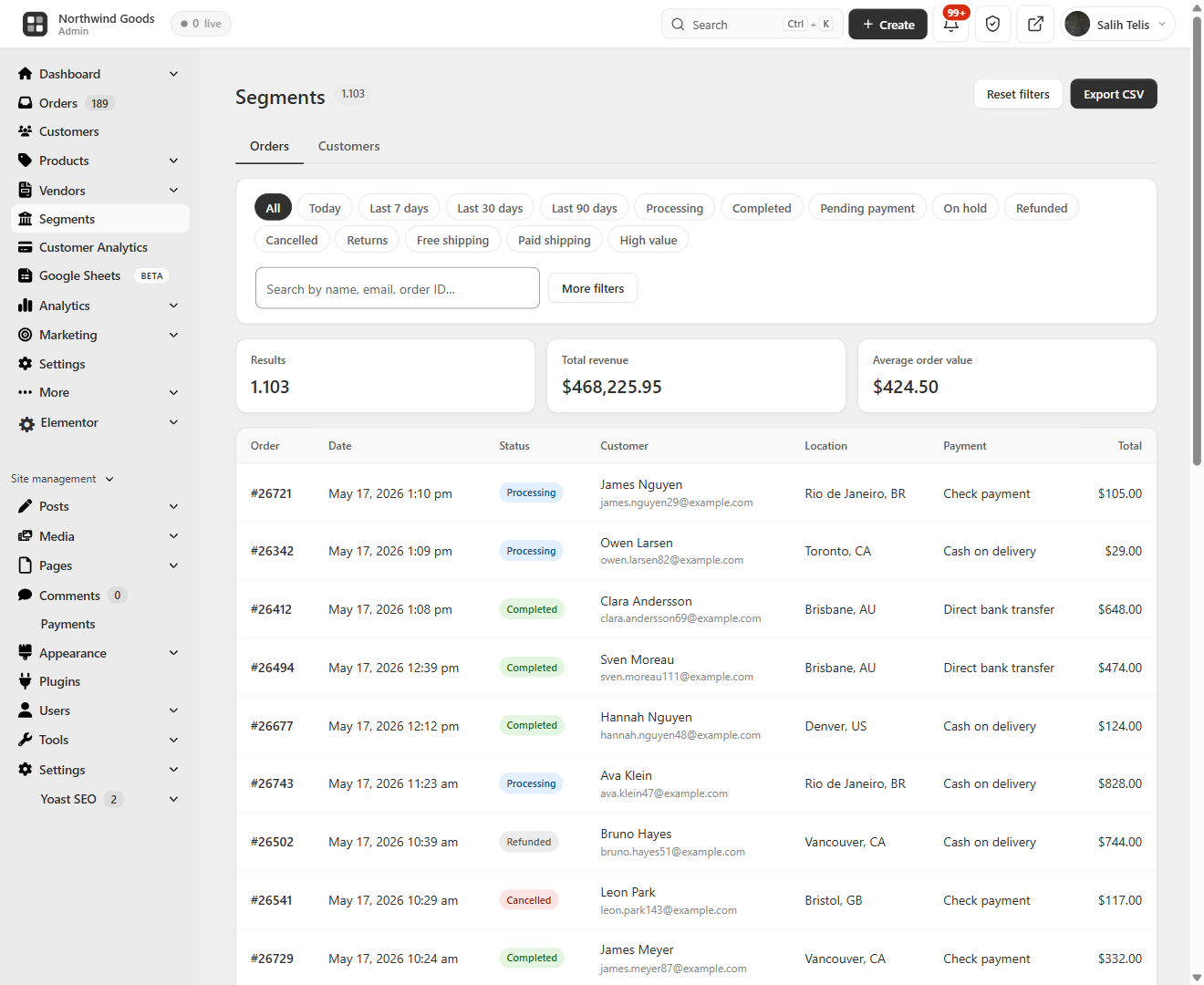
Segments — Orders Explorer — saved segments and quick filters with totals (orders, revenue, AOV) and a clean order list with location, payment method and status 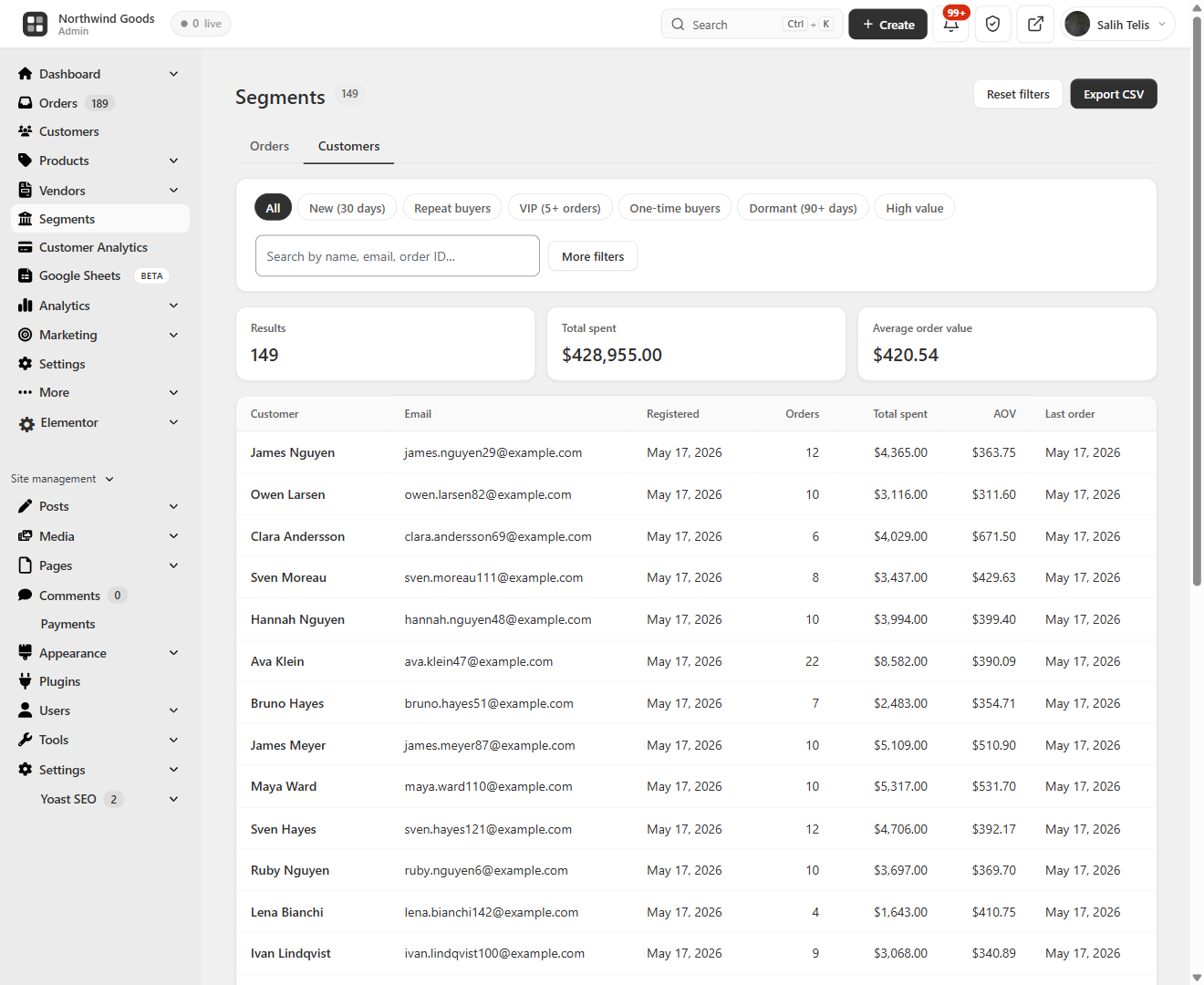
Segments — Customers Explorer — a segmentable customer list (new, repeat, VIP, dormant, high value) with total spent, AOV and first/last order 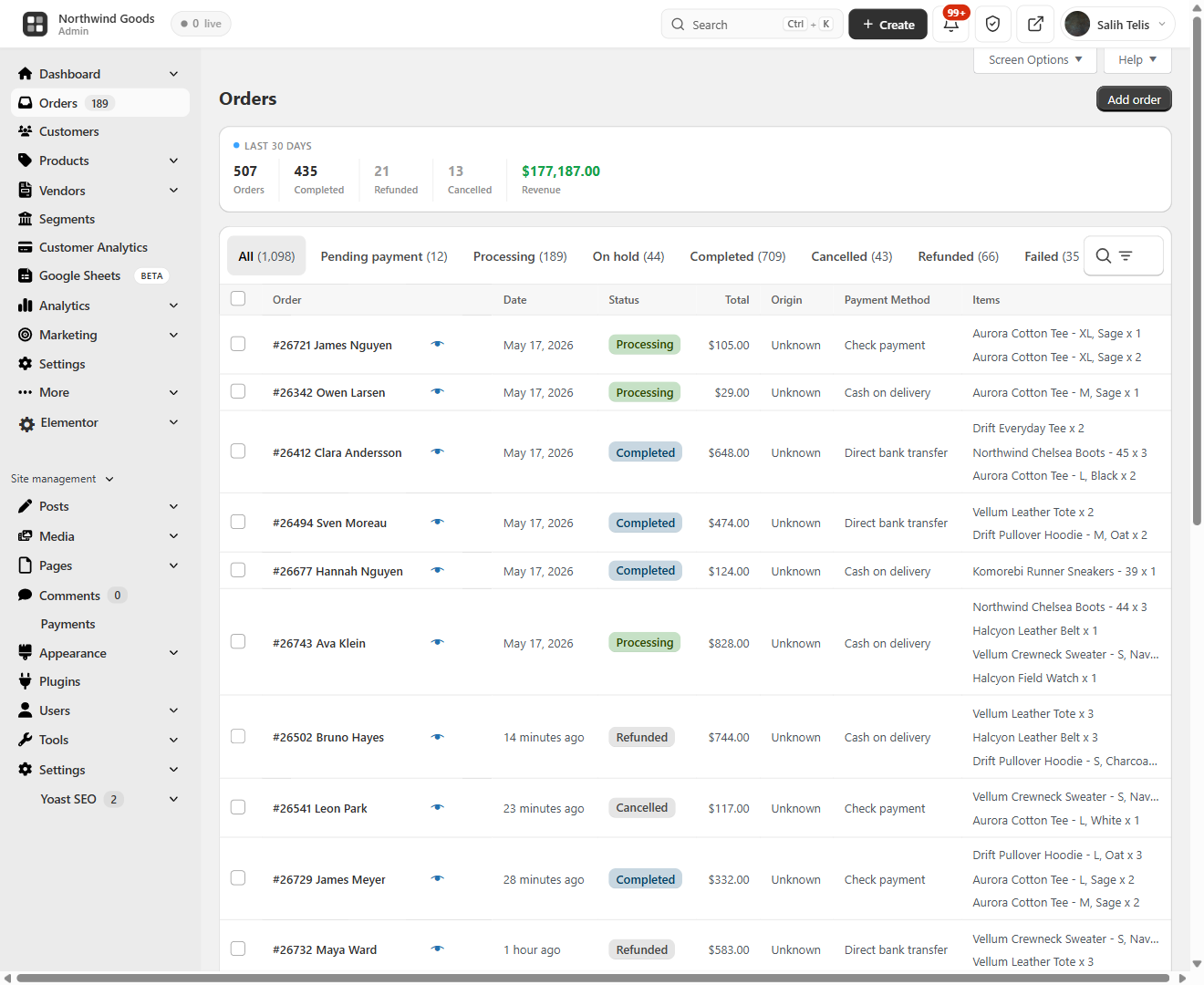
Modern WooCommerce Order Management — a redesigned orders page with a 30-day overview bar, color-coded status tabs and inline status change 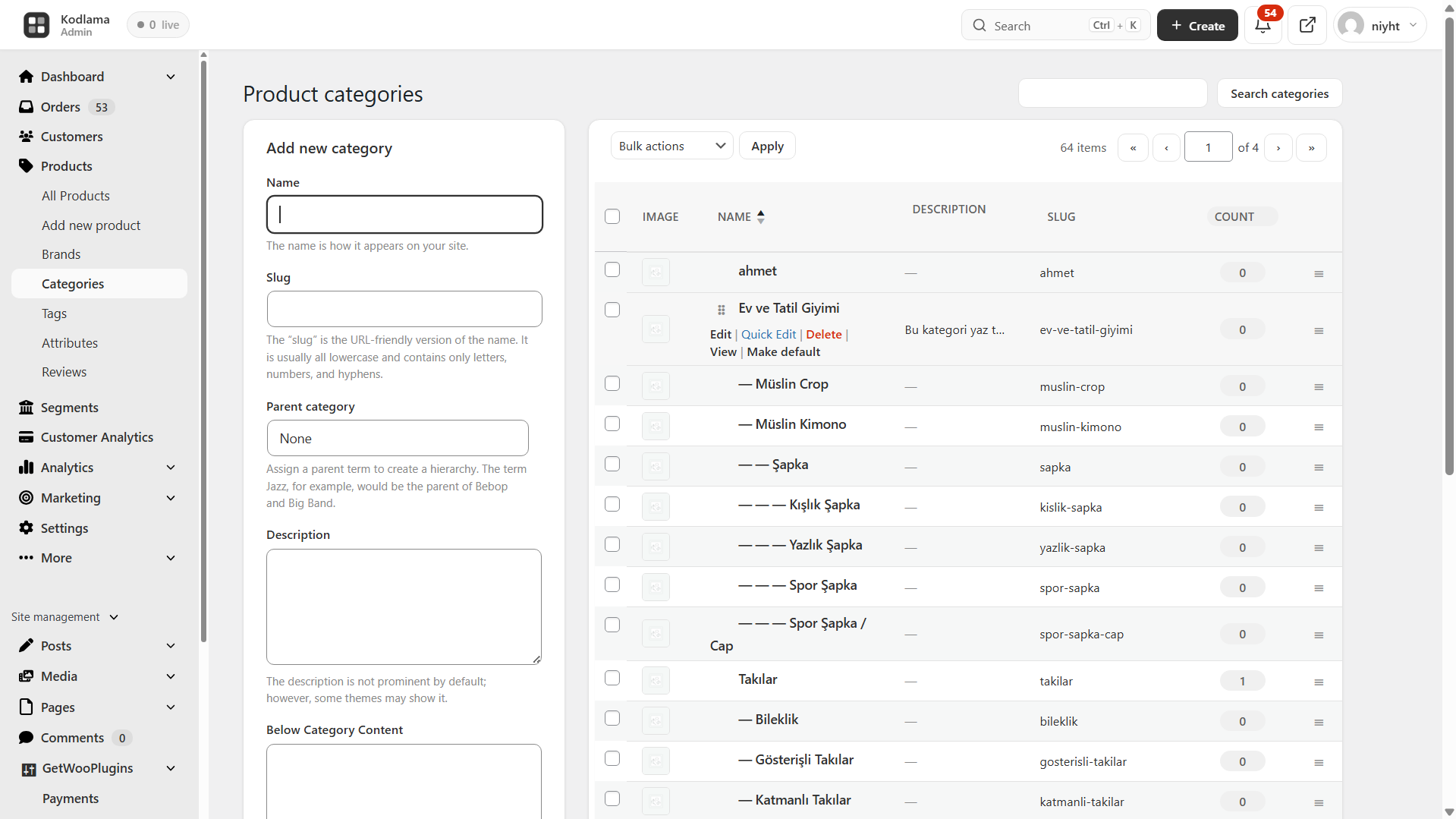
WooCommerce Categories Page — drag-and-drop parent/child category and tag management with circular-reference protection 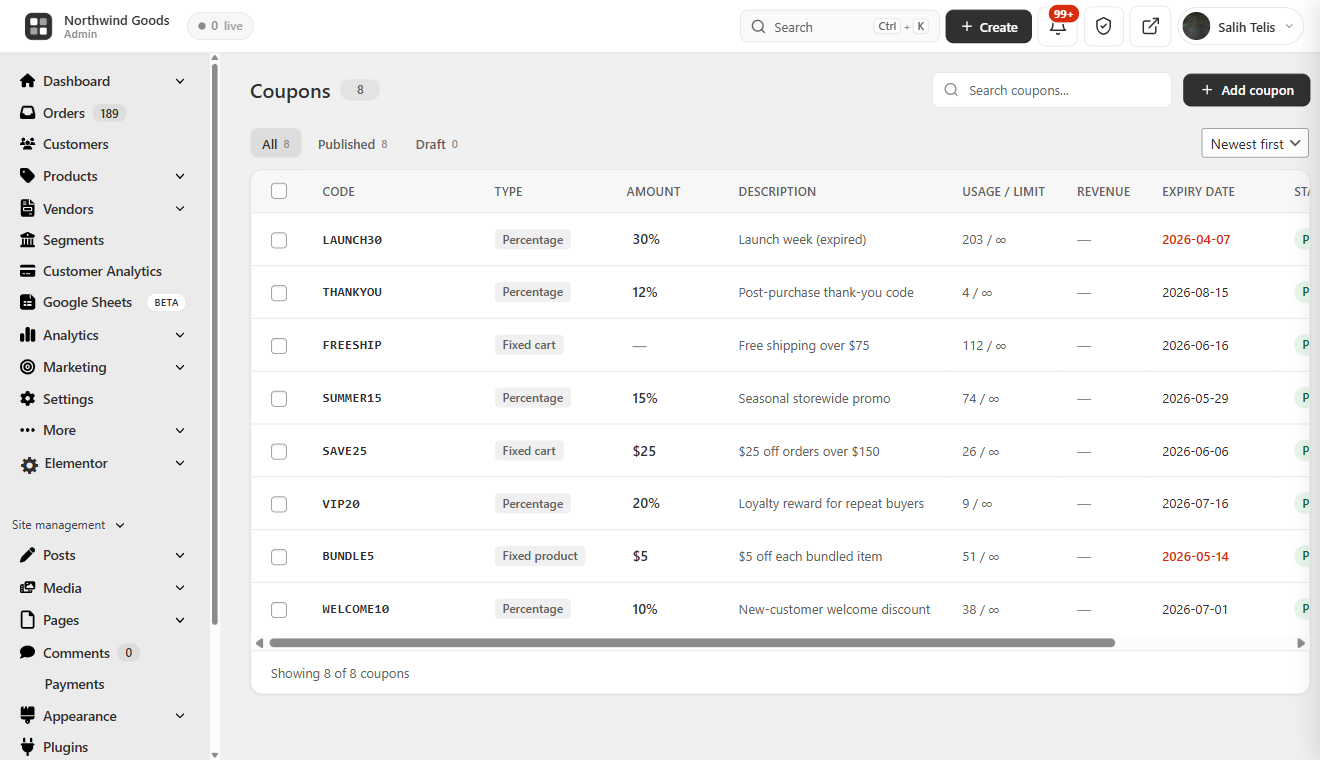
WooCommerce Coupon Manager — a clean coupon table with discount-type badges, usage stats, revenue and expiry highlighting 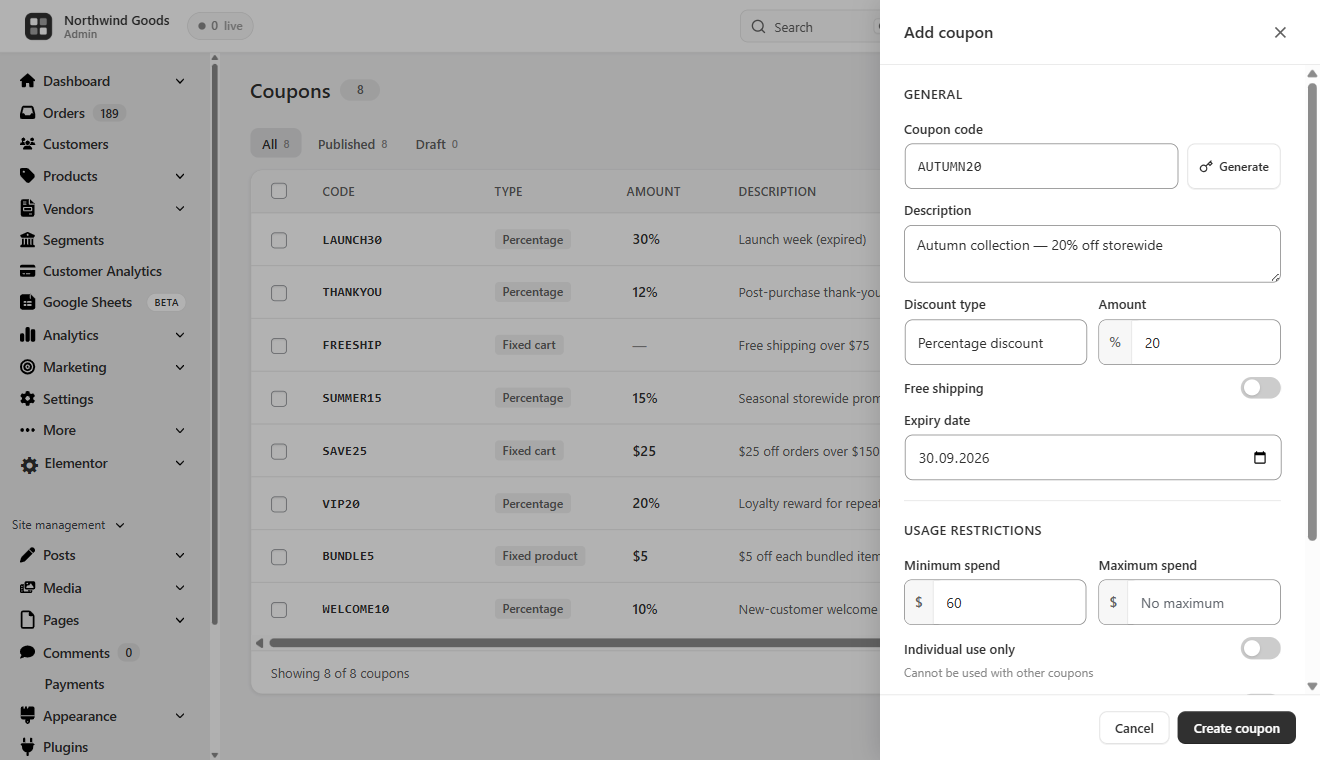
Add Coupon Slide-Over Panel — create or edit coupons with all WooCommerce coupon options without leaving the page 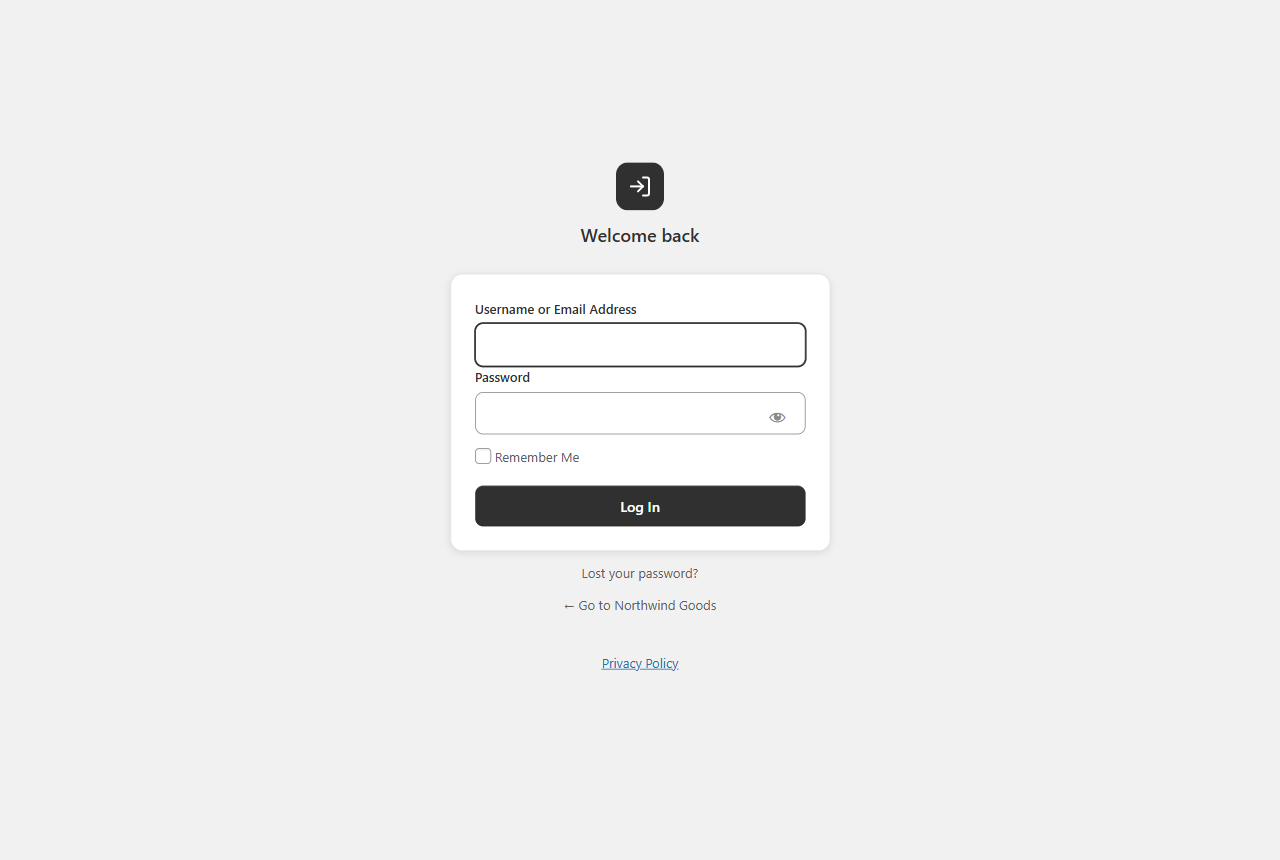
Custom WP Login Page — a modern, branded login screen that replaces the default WordPress login
安装
- Upload the plugin files to
/wp-content/plugins/brikpanel, or install via Plugins Add New Upload Plugin. - Activate through the Plugins menu.
- Open BrikPanel in the admin sidebar — the dashboard loads immediately.
- (Optional) Visit WooCommerce Settings BrikPanel to enable or disable specific modules.
That is it. No license key, no email signup, no external account.
常见问题
-
Is BrikPanel really 100% free?
-
Yes. Every feature on this page is in the free version. There is no premium tier, no feature lock, no trial period, no upsell. We built this because we needed it for our own 1000+ WooCommerce stores and decided to release it.
-
Is BrikPanel a self-hosted WooCommerce analytics solution?
-
Yes. BrikPanel gives you a complete WooCommerce analytics suite that runs entirely on your own server with no external dependencies. Sales analytics, product reports, conversion tracking, customer LTV, RFM segmentation, cohort retention and customer data are all included — nothing is sent to any third-party SaaS.
-
Does BrikPanel include a WooCommerce sales report?
-
Yes. The BrikPanel dashboard ships a complete WooCommerce sales report out of the box — total sales, total orders, average order value (AOV), refunds, and net revenue, each with a ±% period-over-period delta. Filter the sales report by today, yesterday, last 7 days, last 30 days, or any custom date range. The sales chart is rendered with Chart.js and pairs with the order status donut and conversion funnel for a full sales report you can read at a glance, without ever leaving wp-admin and without paying for an external analytics service.
-
Does BrikPanel show customer LTV, RFM segments and cohort retention?
-
Yes. BrikPanel ships a full WooCommerce customer analytics suite directly in the dashboard. Customer Lifetime Value (LTV) is calculated for every customer with average, top, and full distribution histogram. RFM segmentation scores every customer on Recency, Frequency and Monetary and groups them into Champions, Loyal, At Risk, About to Sleep, Hibernating and Lost. Cohort retention shows a month-by-month grid plus an average retention trend line. All three are computed from your own store data — no external service involved.
-
Is BrikPanel a free Shopify alternative for WooCommerce?
-
Yes, for store owners who want to stay self-hosted. BrikPanel gives your WooCommerce store the clean, modern admin experience of Shopify — product list with inline editing, bulk price and stock updates, live visitors, conversion tracking, geographic analytics, customer LTV / RFM / cohort reports, a branded login page — but your storefront, your customer data, and your orders stay on your own server. No monthly platform fee, no transaction fee, no vendor lock-in. If you were evaluating Shopify but want to own your stack, this is the Shopify alternative for WooCommerce we built for that exact use case.
-
Is BrikPanel an ATUM alternative for inventory management?
-
For most stores, yes. BrikPanel includes complete woocommerce inventory management — stock levels, low stock badges, bulk stock updates, variation stock updates — all integrated into the same dashboard you use for sales and orders. If you only need daily stock work without advanced supplier or purchase order features, BrikPanel is a much lighter ATUM alternative.
-
How do I get a faster WooCommerce product list with bulk actions and quick edit?
-
The default WooCommerce product list is built for browsing — searching, sorting and editing it is slow. BrikPanel ships a complete woocommerce product list plugin with thumbnail, SKU, regular and sale price, stock badge, category, AJAX pagination, live search, status tabs, one-click publish toggle and a slide-in quick edit panel for every row. Works on both simple and variable products, and the same woocommerce product list screen powers the bulk price and bulk stock updates so you never leave the page to edit your catalog.
-
How do I bulk edit WooCommerce products including variations?
-
Open BrikPanel Products and click the Bulk Update button in the toolbar. You can update prices, sale prices, and stock for all products, by category, or for selected products. For variable products, open any product, click Edit Variations, and bulk update prices and stock across every variation in one modal. This is the part most free WooCommerce bulk editor plugins do not handle — BrikPanel does.
-
Can I bulk edit variation prices in WooCommerce with the free version?
-
Yes. Bulk edit variation prices WooCommerce is a core BrikPanel feature, and it is free. Set a percentage rule, set a fixed price, or update by attribute (every “Red” variation, every “Large” size). The same modal handles bulk update variation stock for the same products.
-
Does BrikPanel slow down my WooCommerce store?
-
No. BrikPanel only loads inside wp-admin. It has zero impact on your storefront speed, customer experience, page weight, or Core Web Vitals. The frontend never loads any BrikPanel code.
-
Is BrikPanel compatible with HPOS (High-Performance Order Storage)?
-
Yes. Every order query has dual code paths —
wc_get_orders()for HPOS,WP_Queryfor legacy. BrikPanel declares HPOS compatibility viaFeaturesUtil::declare_compatibility('custom_order_tables', ...)and is tested on stores running both modes. -
How do I see WooCommerce sales by country?
-
Open the BrikPanel dashboard. Scroll to the geographic analytics section. The 3D globe shows every order on its real geographic location, and the Top 10 Countries and Top 10 Cities tables update in real time. BrikPanel extracts country and city from the billing or shipping address of every order, so this works with no extra setup.
-
How do I customize the WordPress login page for my WooCommerce store?
-
BrikPanel includes a built-in wordpress login customizer. Enable the custom wp login page module from BrikPanel settings and the default
wp-login.phpis replaced with a clean, branded login form that matches the rest of the BrikPanel admin. No CSS knowledge required. -
How do I search WooCommerce orders by customer name or phone number?
-
Press
Ctrl + K(orCmd + Kon Mac) anywhere inside wp-admin. The BrikPanel quick search overlay opens and searches across order ID, customer name, email, phone, and product SKU at the same time. This is the woocommerce search orders experience the WooCommerce admin should ship with by default. -
Can I see who is on my WooCommerce store right now?
-
Yes. BrikPanel includes a woocommerce live visitors widget on the dashboard that updates every 30 seconds. You can see what page each visitor is on, whether they have items in the cart, and whether they are an existing customer. This is real woocommerce real time visitors tracking, not estimates.
-
Does BrikPanel track WooCommerce conversion rate and conversion funnel?
-
Yes. BrikPanel includes a complete woocommerce conversion tracking system that records visitors, add-to-cart events, checkout starts, and completed orders. The dashboard shows your woocommerce conversion funnel as a four-step visual: Visitors Add to Cart Checkout Orders, with the conversion percentage at every step.
-
Is there a free WooCommerce conversion tracking plugin built into BrikPanel?
-
Yes. BrikPanel ships a free WooCommerce conversion tracking plugin that records every visitor, add-to-cart, checkout start and completed order in your own database — no Google Analytics setup, no Hotjar, no monthly fee. The funnel and conversion-rate widgets on the dashboard are computed from this same dataset in real time.
-
How do I sync WooCommerce orders to Google Sheets for free?
-
Open WooCommerce BrikPanel Google Sheets, click “Connect Google account”, pick or create a target spreadsheet, and toggle “Real-time order sync” on. Every new WooCommerce order is then appended to your Sheet within seconds, with one row per line item so variations land in their own columns. Status changes update the existing row in place. No Zapier, no Make, no monthly fee — a real woocommerce google sheets sync built into BrikPanel.
-
Does BrikPanel work as a free GSheetConnector or WPSyncSheets alternative?
-
Yes. BrikPanel includes a complete WooCommerce to Google Sheets integration in the free version — real-time order sync, scheduled bulk export, analytics snapshot tabs (Sales Summary, Daily KPIs, Top Products, Funnel) and a customer + RFM snapshot. All four flows ship free with no row limit, no premium tier, and OAuth-based authentication that requests minimum scopes only (
drive.file— never full Drive access). -
How do I see real ROAS and net profit in WooCommerce?
-
Connect Google Ads and/or Meta Ads from the BrikPanel Ad Platforms page. BrikPanel then pulls your daily ad spend and shows three new dashboard cards: Ad Spend (summed across every connected platform for the active date range), WooCommerce ROAS (store revenue ÷ ad spend), and Net Profit (revenue − COGS − ad spend − manual expenses). COGS comes from WooCommerce’s native order cost meta and expenses from the BrikPanel expenses table, so the woocommerce roas and net profit numbers are real, not estimates. The cards are multi-currency aware — if an ad account reports in a different currency than the store, spend is shown split and ROAS / Net Profit are omitted instead of printing a misleading converted number.
-
Is BrikPanel a free Triple Whale alternative for WooCommerce?
-
For self-hosted stores, yes. BrikPanel gives you the WooCommerce ROAS and net profit view store owners buy Triple Whale, TrueProfit or BeProfit for — daily Google Ads and Meta Ads spend pulled in next to store revenue, COGS and expenses — but it runs entirely on your own server with no monthly fee and no data sent to a third party. If you only need true ROAS and profit (not full multi-touch ad attribution), this is the free Triple Whale alternative built for that exact use case.
-
Does BrikPanel connect to Google Ads and Meta (Facebook / Instagram) Ads?
-
Yes. BrikPanel connects to both Google Ads and Meta Ads through a secure OAuth proxy (the plugin only ever stores encrypted tokens, never your password). It pulls daily spend per platform, backfills history, and re-syncs recent days automatically so the dashboard ROAS and net profit stay accurate. The integration is spend-and-profit focused — it does not install a Facebook pixel or do multi-touch attribution; it gives you true woocommerce roas and net profit without a paid SaaS.
-
Is there a free WooCommerce variation editor for bulk price and stock updates?
-
Yes. BrikPanel includes a complete WooCommerce variation editor in the free version. Open any variable product, click “Edit Variations”, and you can bulk update every variation’s price, sale price, stock and SKU in one modal — with attribute filtering when a product has 50+ combinations. The same woocommerce variation editor also supports per-attribute rules (“set every Red variation to $X”).
-
What makes BrikPanel different from the built-in WooCommerce analytics?
-
The built-in WooCommerce analytics are slow, refresh on a delay, only show historical data, and have no live visitor tracking, no conversion funnel, no geographic globe, no customer LTV / RFM / cohort reports, no Cmd+K order search, no quick edit sidebar, no variation bulk editor, no custom login page, and no coupon manager. BrikPanel adds every one of those features inside a single free plugin.
-
Is BrikPanel just a CSS reskin of the WooCommerce admin?
-
No. BrikPanel is a real woocommerce admin dashboard plugin with custom database tables for visitor tracking, custom AJAX endpoints for every interaction, real conversion analytics, a working bulk editor, a real product editor, a real coupon manager, and a real custom login system. Other plugins (Dashify, UiPress) only restyle the admin. BrikPanel rebuilds the parts of WooCommerce that needed to be rebuilt.
-
Does BrikPanel work with Yoast SEO, RankMath, Elementor, WPML, and Polylang?
-
Yes. BrikPanel does not interfere with frontend rendering, so it works with every page builder and SEO plugin we have tested. Yoast SEO, Rank Math, All in One SEO and SEOPress metaboxes (including their SEO score panels) render and save inside the BrikPanel product editor. It also has its own translation files and is fully compatible with WPML and Polylang for multilingual stores.
-
Does BrikPanel work with WooCommerce Subscriptions and membership plugins?
-
Yes. BrikPanel is compatible with WooCommerce Subscriptions, Subscriptions for WooCommerce (WP Swings), MemberPress, Paid Memberships Pro, WooCommerce Memberships, YITH WooCommerce Subscription, SUMO Subscriptions, WebToffee Subscriptions for WooCommerce and Restrict Content Pro. Subscription products and member orders show up in the same product list, order screens and customer analytics as the rest of your catalog.
-
Where does BrikPanel store data?
-
Everything stays in your WordPress database. BrikPanel creates three custom tables:
wp_brikpanel_visitors,wp_brikpanel_cart_tracking, andwp_brikpanel_visited_pages. Live visitor data is stored in a transient that auto-expires every 2 minutes. No data is sent to any external server, ever. -
Will BrikPanel always be free?
-
Yes. The dashboard, the bulk editor, the inventory tools, the order management, the coupon manager, the custom login, the conversion tracking, the customer analytics suite, and every other feature listed above will remain free forever. We may release a separate paid product (BrikMentor) on top of BrikPanel in the future, but it will be additive — BrikPanel itself stays 100% free.
评价


贡献者及开发者
「BrikPanel — WooCommerce Dashboard, Sales Report, Google Sheets Sync, Inventory Management & Bulk Editor」是开源软件。 以下人员对此插件做出了贡献。
贡献者
更新日志
3.1.13 (2026-06-06)
- New: Exclude staff or point-of-sale accounts from customer analytics. If you also ring up in-person sales through one or two staff or POS logins, those accounts can rack up hundreds of orders and quietly distort every per-customer number: they inflate the average lifetime value, dominate the RFM segments, and skew cohort retention, so the figures stop describing your real customers. A new “Exclude customers” button on the Customer Analytics page opens a simple picker where you can search and choose specific accounts and/or whole roles to leave out. Excluded accounts still count fully toward your shop totals (revenue, order counts, the dashboard sales figures and the Segments “Orders” tab are all unchanged), they are only removed from the customer-level views: lifetime value, RFM segments, cohort retention, the Customer Analytics tables and the Segments “Customers” tab. Saving recomputes the metrics immediately so the page reflects the change at once, and a small badge on the button shows how many accounts are currently excluded. Works the same on stores with simple and variable products
- Fix: Stale customer rows are now pruned reliably after a recompute. The nightly customer-metrics rebuild marks the run with a timestamp and then deletes any customer row it did not touch (for example someone whose orders were all refunded out, or who is now excluded). On servers whose database session time zone is not UTC, that marker was taken from PHP in UTC while the rows were stamped in the database’s local time, so the cleanup compared two different clocks and left stale rows behind for up to the time-zone offset. The run marker is now read from the database itself, so the comparison always uses one clock and stale rows are removed on the first recompute
3.1.12 (2026-06-01)
- Fix: Variable products no longer stay “out of stock” once their variations are back in stock. If a variable product had ever been switched to manage stock at the parent level with a quantity of 0 (so the parent was pinned to “out of stock”), turning the variations back on and raising their stock left the whole product reading out of stock, because WooCommerce trusts a parent that manages its own stock and never looks at the children. BrikPanel never manages stock at the parent level for variable products (each variation owns its own stock), so the editor now clears that leftover parent-level stock flag on every save and lets the stock status be derived from the variations: when any variation is in stock, the product is in stock. A one-time, self-healing migration runs in the background on upgrade and repairs already-saved products in the same situation (parent managing stock, marked out of stock, but with at least one in-stock variation), in safe batches so large catalogs are never slowed; products that are genuinely out of stock are left untouched. Applies to both simple and variable products
3.1.7 (2026-06-01)
- New: Desktop Mode compatibility. BrikPanel now plays cleanly inside the “Desktop Mode” plugin, which turns /wp-admin into a desktop-style workspace where each screen opens in its own draggable window. Whenever a page renders under the Desktop Mode shell (either inside a window or on the shell host), BrikPanel stands down its own global chrome, the top bar and the custom navigation sidebar, so it does not duplicate the window title bar, paint a redundant strip over the desktop, or leave an orphaned content margin where the sidebar used to be. Desktop Mode’s dock takes over navigation and its Cmd/Ctrl + K palette covers search, while every BrikPanel screen (dashboard, orders, the product editor, …) fills its window edge to edge with all of its styling intact, on both simple and variable products. The integration is fully scoped: a page detached to a classic tab keeps the complete BrikPanel chrome, and when Desktop Mode is not installed nothing changes at all
- Fix: Custom fields added through the
brikpanel_product_editor_boxeshook are saved again. Inputs a developer renders inside their own editor card (including ACF fields viaacf_render_fields()) were drawn on the page but never reached the save request, so they silently dropped on every save. The product editor’s save collector now also gathers every named input inside.brikpanel-pe-ext-card(alongside the metabox, WooCommerce-field and per-variation collectors) and forwards it to the server, where the save handler firessave_post/save_post_productso the owning plugin’s own listener persists the value. ACF’s hidden#acf-form-datanonce block is emitted once per page and travels with the payload so ACF can verify its nonce and runacf_save_post(). Works on both simple and variable products - Improvement: Silent auto-save no longer runs on a product that has not been published yet. The editor’s 60-second background auto-save used to fire on any dirty form, which could quietly write a brand-new or draft product to the database before the user was ready. It is now gated on a live flag (
#bpe-product-id[data-live], set server-side only forpublish/privateproducts) so a work-in-progress draft or an auto-draft is never persisted behind the user’s back, auto-save only protects an already-live product from losing edits. The flag flips on the moment you publish from the editor and reverts if you move the product back to draft, on both simple and variable products
3.1.6 (2026-05-30)
- New: Master on/off switch for the whole BrikPanel interface. A single store-wide toggle (WooCommerce -> Settings -> BrikPanel -> Access control, “BrikPanel interface”, on by default) flips every back-office user between BrikPanel and the stock WordPress / WooCommerce admin in one click. You can also flip it from the on/off switch in the BrikPanel top bar, or from the native WordPress admin bar while BrikPanel is off, so you can always get back in. Only administrators see and control it, the control is nonce-checked and
manage_options-gated, and its styling is inlined so it survives even when all BrikPanel assets are swept off. This is the global, all-users axis that sits above the existing per-user / per-role Access control - New: Reworked mobile and tablet layouts across the interface. The dashboard, product list, product editor, orders and top bar were all given proper responsive breakpoints (960 / 782 / 600 / 480 / 380px). KPI and profit cards reflow from four to three to two columns as the screen narrows, the product editor’s sticky header folds into two rows with the status menu re-anchored as a near-full-width sheet that stays on screen, the product list table and filter bar compress for phones, and the top bar collapses to icon-only on the smallest screens. Pure CSS, no markup or query changes, and it covers both simple and variable product screens
- New: Bulk editor now covers categories, brands, weight, dimensions and tags. The product list bulk update gained shipping fields (Set weight / length / width / height, shown in your store’s configured weight and dimension units) and per-taxonomy actions that are generated for every product taxonomy on the store: Set / Add to Categories, Tags, Brands (any registered brand taxonomy is auto-detected) and any custom product taxonomy. “Set” replaces the terms, “Add to” appends them, with a searchable hierarchical term picker. Each taxonomy is capability-gated, runs in safe batches via the existing job runner (prepare / process / cancel AJAX), and works on both simple and variable products
3.1.5 (2026-05-29)
- New: Google Ads is now live for everyone. Google approved the
adwordssensitive-scope verification for our OAuth project, so the “Coming soon” skin on the Google Ads card is off by default and the full flow works out of the box: Connect Google Ads, account picker, Manager (MCC) account support, Sync now, and Disconnect. Daily spend, impressions and clicks flow into the dashboard for real ROAS and Net Profit, exactly like Meta. The skin is kept only as an operator escape hatch (a singlewp-config.phpconstant or option) in case Google ever revokes the verification, so it can be re-hidden without a code change. Meta Ads stays in its own pending-review state, unchanged - New: “Imported spend data” panel on the Ad Platforms page. A month-by-month breakdown plus an all-time summary for each connected platform, so you can see exactly what BrikPanel has pulled behind the dashboard figures: total spend, impressions, clicks, average CTR / CPC / CPM, the number of days with data, and the full date span. Rows are grouped by currency so a rare mid-life account-currency switch stays visible instead of being silently summed, and a Refresh button re-reads the latest. Backed by two new read-only store queries (
account_summary()/monthly_breakdown()) and a nonce-checked,manage_woocommerce-gatedbrikpanel_ads_spend_breakdownAJAX endpoint - New: Restrict BrikPanel settings to administrators. A new “Restrict settings to administrators” toggle under WooCommerce -> Settings -> BrikPanel -> Access control keeps the settings tab administrator-only and is on by default. Shop managers and other roles that can manage WooCommerce keep the full BrikPanel interface but are kept out of the settings tab itself, even by direct link: the tab is removed from the WooCommerce settings nav, a direct hit on
?tab=brikpanellands silently on WC General (no PHP notice), and defense-in-depth 403 guards sit on the render and save paths. This is a separate, narrower axis from the existing interface Access control, so a shop manager can keep BrikPanel while only administrators touch its configuration. Turn it off to hand the settings page back to everymanage_woocommerceuser. Super admins on multisite always pass - Fix: Loading accounts for a Google Ads manager (MCC) user no longer floods the “Recent errors” log. Manager-only sub-accounts routinely return a 403 on the customer-info enrichment call (the account is visible in the list but only reachable through the manager), which is an expected outcome, not a failure. That specific 403 is now silenced from the error log while genuinely unexpected errors (for example a 500) are still recorded
- Tweak: The Ad Platforms dashboard ROAS labels are now fully translatable, and a number of user-facing strings across the Ad Platforms screens were reworded for clarity
3.1.1 (2026-05-24)
- New: Google Sheets two-way sync — Sheets edits now flow back into WooCommerce. The Sheets integration is no longer push-only. Two new flows ship alongside the existing one-way pushes: (1) Orders pull — the Orders tab is polled every 2 / 5 / 15 minutes (your pick), and any change to the Order status column is applied to the matching
WC_Orderviaupdate_status()with a “Status changed via Google Sheets sync.” order note; status text is normalised so “Processing”, “wc-processing” and the localised label all map back to the right WC key. (2) Products pull — a new dedicated Products tab pushes every simple product and every variation (variations get their own row, parent_id column points to the parent) with id / SKU / name / price / stock / status; the Stock column is the only writable cell and changes flow back into WooCommerce on the next poll. Last-write-wins conflict resolution compares each cell against a sha256 snapshot stored on product/order meta AND against_date_modified, so a stale poll cannot clobber a fresh Woo edit (a 10s grace window absorbs same-second push/save races); divergence detected mid-poll is logged and the row is re-pushed instead. Push side is event-driven (woocommerce_product_set_stock,woocommerce_variation_set_stock_status,woocommerce_new_product, etc.) with a 5-second debounce so bulk inventory updates coalesce into one Sheets API call; a “Pull now” button next to “Sync now” runs the reverse direction synchronously and a structured toast reportschecked / applied / conflicts. Tabs are dropdown-validated with the real WC status set on first push so merchants pick from a list instead of free-typing a status that would be silently skipped. Off by default per flow (the toggles say “Two-way sync: apply status / stock edits from Sheets”) — the existing one-way push behaviour is unchanged for stores that don’t opt in. Works identically on simple and variable stores - New: ACF (Advanced Custom Fields) field groups now auto-render in the BrikPanel product editor — reported by a user who created ACF fields targeting
productand never saw them appear. Root cause: BrikPanel relied on the merchant to hand-pick every metabox via the “Third-party plugin metaboxes” multiselect, but the multiselect was built fromadd_meta_boxessnapshots that fire only onload-post.php/load-post-new.php, neither of which runs on the BrikPanel editor page, so ACF’s per-group metaboxes were never even registered to be picked. The editor now bootstraps ACF metaboxes directly (ACF_Form_Post::add_meta_boxes()) when rendering, AND auto-resolves every ACF field group whose Location Rules match the current product viaacf_get_field_groups( [ 'post_type' => 'product', 'post_id' => $id ] )so the matching groups appear without the merchant touching the multiselect. A new “Auto-include ACF field groups” toggle (default on) lives directly above the metaboxes multiselect under WooCommerce Settings BrikPanel Products; abrikpanel_pe_auto_include_acffilter lets developers gate it programmatically per product. Save round-trips already work because the editor emits ACF’s hidden_acf_nonce/_acf_post_id/_acf_screen/_acf_changedblock. Applies to both simple and variable products - New: Eight popular-language translations bundled in the plugin — fully translated UI for German (
de_DE), Spanish (es_ES), French (fr_FR), Italian (it_IT), Dutch (nl_NL), Polish (pl_PL), Brazilian Portuguese (pt_BR) and Russian (ru_RU), shipped alongside the existing Turkish (tr_TR) and refreshed to cover every string introduced in this release (Two-way sync UI, ACF auto-include toggle, Pull now / Poll interval controls, conflict toasts, etc.). PO + MO + WP 6.5+.l10n.phpfiles are all included so stores using any of these locales get a localised admin out of the box, no manualwp i18nstep required
3.0.9 (2026-05-22)
- Fix: Foreign-plugin icons rendered as empty squares when a non-default Interface font was selected — the Appearance feature applied the chosen typeface with
[class*="brikpanel-"] *, and the topbar feature tags both<body>and<html>withbrikpanel-has-topbarso its layout offsets can apply. Together those two facts made the broad selector match every descendant of<body>on every admin page that rendered the topbar, including third-party plugin screens. Icon-font glyphs (Font Awesome, Material Icons, etc.) lost theirfont-familyto the Interface font and rendered as tofu boxes. The selector now excludesbodyandhtmlso real BrikPanel wrappers like.brikpanel-dashboardand.brikpanel-topbar-*still receive the font while foreign plugin UIs are no longer touched. Reported on a WP Mobile Bottom Menu (WP BNav) icon picker; the same root cause affected any third-party admin screen using icon fonts. No change at the default “System default” font setting
3.0.9 (2026-05-19)
- New: Site-wide Cmd/Ctrl + K command palette. The palette no longer scans only orders; it now searches four sources in one place: Orders (customer name, email, phone, order ID, or a product SKU inside the order), Products (simple and variable, by name or SKU, variations included), Customers (registered users by name, email, or username), and Navigation (jump to any admin page, including screens added by third-party plugins). Every source has its own on/off toggle under a new WooCommerce Settings BrikPanel “Search” section, so the palette can stay orders-only or open up to a full admin-wide search, and a
brikpanel_search_sourcesfilter lets developers add, remove, or reorder sources. The admin menu is indexed per user on real page loads (admin-ajax never builds the menu, so it is read back from a per-user transient during the search request), every source is independently capability-checked, and the placeholder stays “Search orders” while orders is the only active source so existing users see no change. Resolves the report that Cmd/Ctrl + K only found orders and could not reach the rest of the site or third-party plugin pages
3.0.5 (2026-05-19)
- New: GTIN column on the products list — the BrikPanel product list can now show a GTIN column reading WooCommerce’s native
_global_unique_idfield (WC_Product::get_global_unique_id()). Off by default; flip it on per-user from the Columns popover (persisted in user meta, like every other column). Variable products show the parent GTIN, or the aggregated variation GTINs when the parent has none — so it works for both simple and variable products - New: Search products by SKU — the product list live-search box now matches on SKU as well as title. A
posts_searchfilter rewrites the query so a search term hits a product’s own_skuand surfaces a parent product whenever one of its variation SKUs matches, with$wpdb->esc_like()escaping throughout. Resolves the user report that SKU search did not work on the product list - New: Yoast SEO for WooCommerce compatibility — the WooCommerce-specific Yoast addon (detected via
WPSEO_WOO_VERSION) ran its identifier/GTIN analysis against#product-typeand#_skuDOM nodes that the simplified BrikPanel editor never rendered, so it errored out. The editor now emits hidden shim nodes mirroring the real product type and SKU and keeps the hidden#product-typein sync when the BrikPanel type selector changes, so the Yoast Woo SEO analysis and score panel run correctly inside the BrikPanel product editor for both simple and variable products - New: Dashboard export button — a new export button next to the dashboard date-range presets downloads the full dashboard as a multi-sheet Excel workbook (Summary, conversion funnel, order status, devices, customer segments, top products, most-viewed, most added-to-cart, sales-over-time, countries, cities, low stock, subscriptions and full order records) for the active date range. Built from the exact payload the dashboard renders so the file can never drift from the screen; streamed via
admin-post.php(brikpanel_dashboard_export, nonce-checked,manage_woocommerce-gated) with real numeric cells so the spreadsheet can sum and sort - New: Shipping class in the product editor — WooCommerce’s
product_shipping_classtaxonomy is now selectable in the simplified product editor as an opt-in Shipping class section (enable it from WooCommerce Settings BrikPanel via the editor section list; hidden by default). Simple products get one selector; variable products additionally get a per-variation shipping class column with a “Same as parent” inherit option, so every variation can override individually. Closes the migration gap reported by users who relied on WooCommerce shipping classes - Fix: Bullet points now render in the product editor and on the storefront — bulleted and numbered lists created in the editor were being wrapped in an invalid
<p> > <ul>structure so they did not display as a list. After an insert-list command the editor now unwraps the list from its surrounding paragraph, and explicitlist-style/display:list-itemCSS for nestedul/ol/li(disc circle square) makes lists render correctly in both the editor and the front-end product description - Improvement: Richer product description editor — the description and short-description editors gained a block-format dropdown (Paragraph, Heading 2, Heading 3, Heading 4) that reflects and applies the current selection’s block, plus heading CSS so the formatting is visible while editing. Combined with the existing visual ⇄ HTML source toggle, content pasted from a website (which keeps its markup) can now be retagged with proper headings from the toolbar instead of only being fixable in the code editor
- Fix: Google Sheets “Choose existing spreadsheet” 403 right after connecting: Google’s consent screen presents the Drive permission as an optional checkbox, so a user could complete OAuth with a perfectly valid token while the
drive.filescope was never actually granted. The connection then showed a green “Connected”, but the Picker, “Create new spreadsheet” and every sync failed with a raw Google 403 until the user disconnected and reconnected. BrikPanel now verifies the granted scope after consent and refuses a connection that is missing Drive access with a clear, actionable message; surfaces a prominent warning on an already broken connection; and blocks the Picker and create-sheet actions with a fix-it prompt instead of leaking a scope-less token to a raw Google 403. Behaves identically on simple and variable stores
3.0.4 (2026-05-18)
- New: Access control — a new WooCommerce Settings BrikPanel “Access control” section lets you keep the BrikPanel interface for some users while leaving others on the stock WordPress / WooCommerce admin. Disable for administrators with one toggle (the common agency setup: clients who are shop managers get BrikPanel, the agency’s own administrator account stays vanilla), and/or for any roles or hand-picked individual users. Disabled users get the native admin menu, dashboard, product/order/coupon screens and zero BrikPanel styling; everyone else is unaffected. Enforced in two layers — every interface toggle is short-circuited to “off” so each module renders the native screen, and all always-on BrikPanel assets, the extra order-list columns and the font/accent/brand-logo theming are swept — so the result is pixel-for-pixel the default experience. BrikPanel analytics, tracking and background jobs keep running for the store regardless. The BrikPanel settings tab is always reachable (with the real toggle states) even for an excluded administrator, so you can never lock yourself out
3.0.2 (2026-05-16)
- Security: Signed proxy responses — every reply from the brksoft.com proxy (Google Ads, Meta Ads and Google Sheets OAuth) is now HMAC-SHA256 signed with a freshness timestamp. The plugin verifies the signature on every successful response and refuses to act on any unsigned, tampered, replayed or stale body instead of trusting it — closing cache-poisoning / transport-tampering / log-only attack paths
- Security: Remote kill-switch — a signed
revokedirective lets the proxy operator make all installs immediately wipe their stored Google / Meta / Sheets tokens and stop calling the proxy until the user reconnects, so a suspected proxy compromise can be contained without a plugin update - Security: Google Ads query allow-list on the proxy — only the exact daily-spend query is accepted; any attempt to pull search terms, PII or other resources through a connected account is rejected
- Security: Hostile
raw_datahandling — ad-spend API payloads are depth-, size- and charset-capped before they are stored, so a malicious response cannot bloat the table or smuggle content to later consumers - Security: Proxy global off-switch,
no-store/noindexresponse headers, and operational hardening notes for the brksoft.com proxy - Tweak: Version bump to 3.0.2; no functional changes to the dashboard, sync or UI
3.0.0 (2026-05-15)
- New: Google Ads & Meta Ads integration — BrikPanel now pulls daily ad spend from Google Ads and Meta (Facebook / Instagram) Ads into a local table so the dashboard can show real ROAS and Net Profit next to store revenue. Three new KPI cards render under the existing dashboard metrics: Ad Spend (summed across every connected platform for the active date range), ROAS (store revenue ÷ ad spend), and Net Profit (revenue − COGS − ad spend − manual expenses). The cards are multi-currency aware — when an ad account reports in a different currency than the store, spend is shown split as “₺X + $Y” and ROAS / Net Profit are intentionally omitted (UI shows “—”) instead of printing a misleading converted number. COGS is read from WooCommerce’s native order COGS meta through a dedicated HPOS-compatible query; manual expenses come from the existing BrikPanel expenses table. The cards only appear once the first sync has written real data
- New: One-click OAuth connect per platform through the same brksoft.com proxy pattern as Google Sheets — PKCE-protected handoff, and the Google developer token / Meta app secret / OAuth client secret never ship inside the plugin (the proxy injects them server-side). Tokens are kept in a single encrypted multi-platform vault (
sodium_crypto_secretbox, AES-256-GCM fallback, key HKDF-derived from the site’s WP salts) with platform-aware refresh: Google uses the standardrefresh_tokengrant, Meta uses thefb_exchange_tokenlong-lived-token swap. A revoked /invalid_grantconnection auto-clears so the UI shows a clean “reconnect” state instead of looping on errors - New: Per-platform primary account picker — Google enumerates accounts via
listAccessibleCustomerswith manager-account (MCC)login-customer-idsupport; Meta lists/me/adaccountsincluding accounts under a Business Manager. On first account selection BrikPanel backfills 3 years of history, split into 90-day Action Scheduler chunks scheduled most-recent-first so today’s spend appears on the dashboard within minutes while the full history fills in behind it. A daily sync re-pulls the trailing 7 days to absorb the late revisions ad platforms apply to recent-day numbers; every write is an idempotent UPSERT so re-syncing or overlapping windows never duplicate a day - New: Dedicated Ad Platforms page under the WooCommerce menu (Beta badge), a “Connect ad accounts” call-to-action on the dashboard, a per-platform manual Sync now button, backfill progress, and a token-redacted error log viewer. A master toggle under WooCommerce Settings BrikPanel Ad Platforms (default on) makes the whole module dormant when off — no admin page, no scheduled sync, no dashboard cards — while saved connections are kept. Google Ads stays locked behind a switch until its Google-approved developer token is live so users never hit a dead “Connect” button; Meta is unaffected. A new
wp_brikpanel_ad_spendtable is created on activation alongside the other BrikPanel tables, and the raw API payload is retained per row for the planned BrikMentor analysis - Developer: New proxy-tunnelled Google Ads API and Meta Marketing API clients (
Brikpanel_Ads_Google_Client,Brikpanel_Ads_Meta_Client) built onwp_remote_*with one-shot 401 refresh-and-retry, infrastructure-only backoff (HTTP 429 / 502 / 503 / 504 plus Meta rate-limit codes 4 / 17 / 32 / 613) and no retry on application-level 500s so a misconfigured proxy fails fast instead of hanging the settings UI — no Composer dependency added, reusing the foundation laid by the 2.9.0 Sheets client
For the full release history of older versions, see changelog.txt bundled with the plugin.