

描述
Finally, WordPress analytics you’ll actually use
Google Analytics is overkill. Most other WordPress statistics plugins are cluttered and confusing. You just want to track visitors and know what’s happening on your site, without a data science degree.
Burst Statistics gives you a clean, intuitive analytics dashboard focused on the metrics that actually matter. No external analytics accounts. No complex setup. Install, activate, and understand your website traffic in seconds.
Trusted by 200,000+ WordPress sites. Built by the team behind Team Updraft, known for UpdraftPlus, WP-Optimize, and All-In-One Security (AIOS).
用户怎么说
“Finally, an analytics plugin I can actually explain to clients.”
— @anguskeystone on wordpress.org“I tried WP Statistics and Independent Analytics, but they’re overloaded and confusing. Burst’s UI is intuitive and focused on what matters to me.”
— @vallered on wordpress.org
为什么选择 Burst Statistics?
Analytics designed to be actionable
Other analytics plugins throw everything at you. Burst shows what matters, visitors, pageviews, referrers, top pages, in a dashboard you’ll actually use. No data overload. No confusing menus. See why Burst is perfect for bloggers.
Privacy analytics by design
All site stats stay on your server, making Burst a true local analytics solution. No external tracking. Your data is yours, we never see it without your explicit permission. Designed for GDPR compliant analytics out of the box. Read why Burst Statistics is privacy-friendly.
Zero setup friction
Install, activate, done. No Google Analytics account, no GA4 setup, no tracking codes, no configuration headaches. Start seeing live visitors immediately. New to analytics? Start with our guide on WordPress analytics.
WordPress-native analytics
Not a port from another platform. Built specifically for WordPress with native performance and seamless integration. Works with WooCommerce, blogs, business sites and membership sites.
Lightweight analytics, fast by default
Optimized database queries. A tiny tracking script under 4 KB. No external dependencies slowing down your pages. Designed to track accurately even when using aggressive server-side caching. See the proof in does Burst slow down my website.
功能
Understand your website traffic
- Top performing pages and posts at a glance
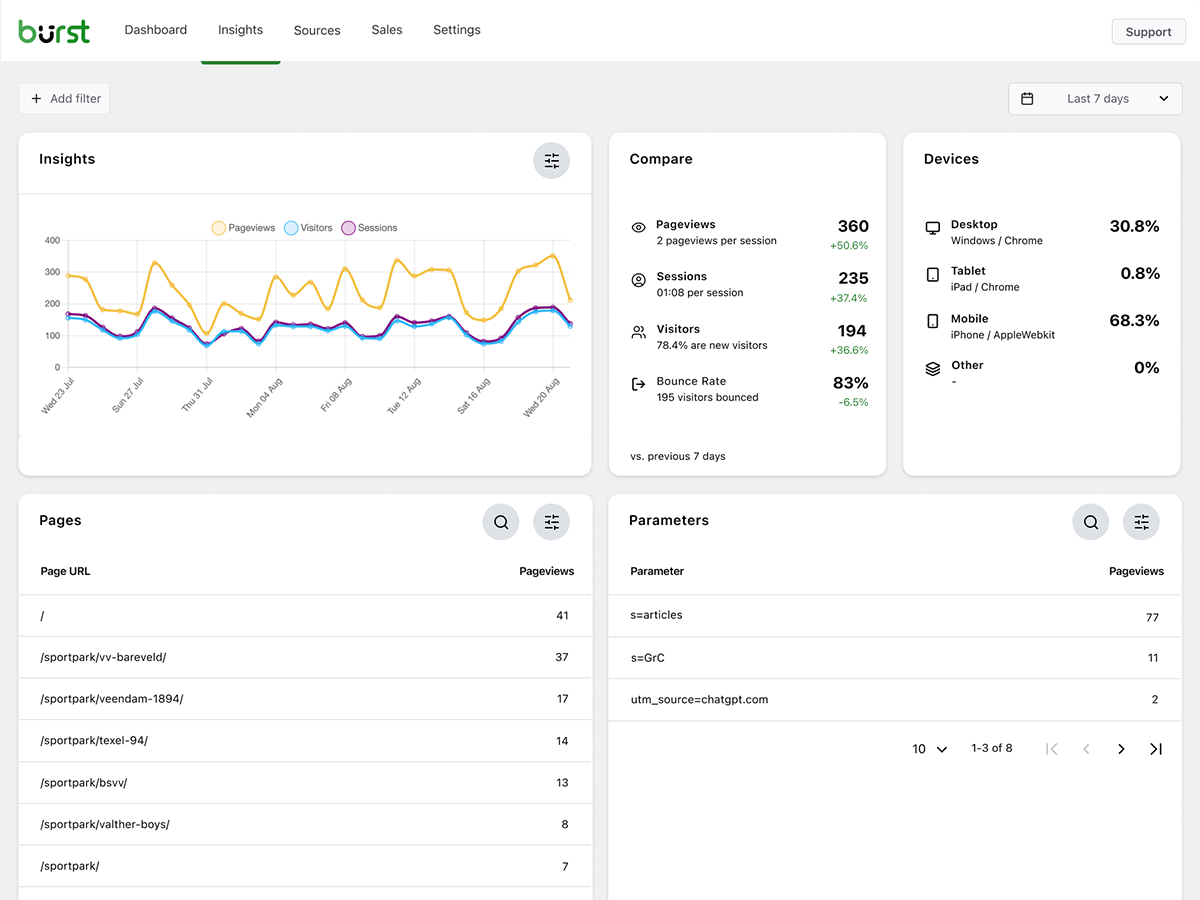
- Track key metrics: visitors, sessions, pageviews, bounce rate
- Breakdown of visitors by device (desktop, tablet, mobile)
- 按自定义日期范围筛选数据
- Compare traffic between periods
实时分析
- 识别实时访客的来源
- See the specific pages users are visiting now
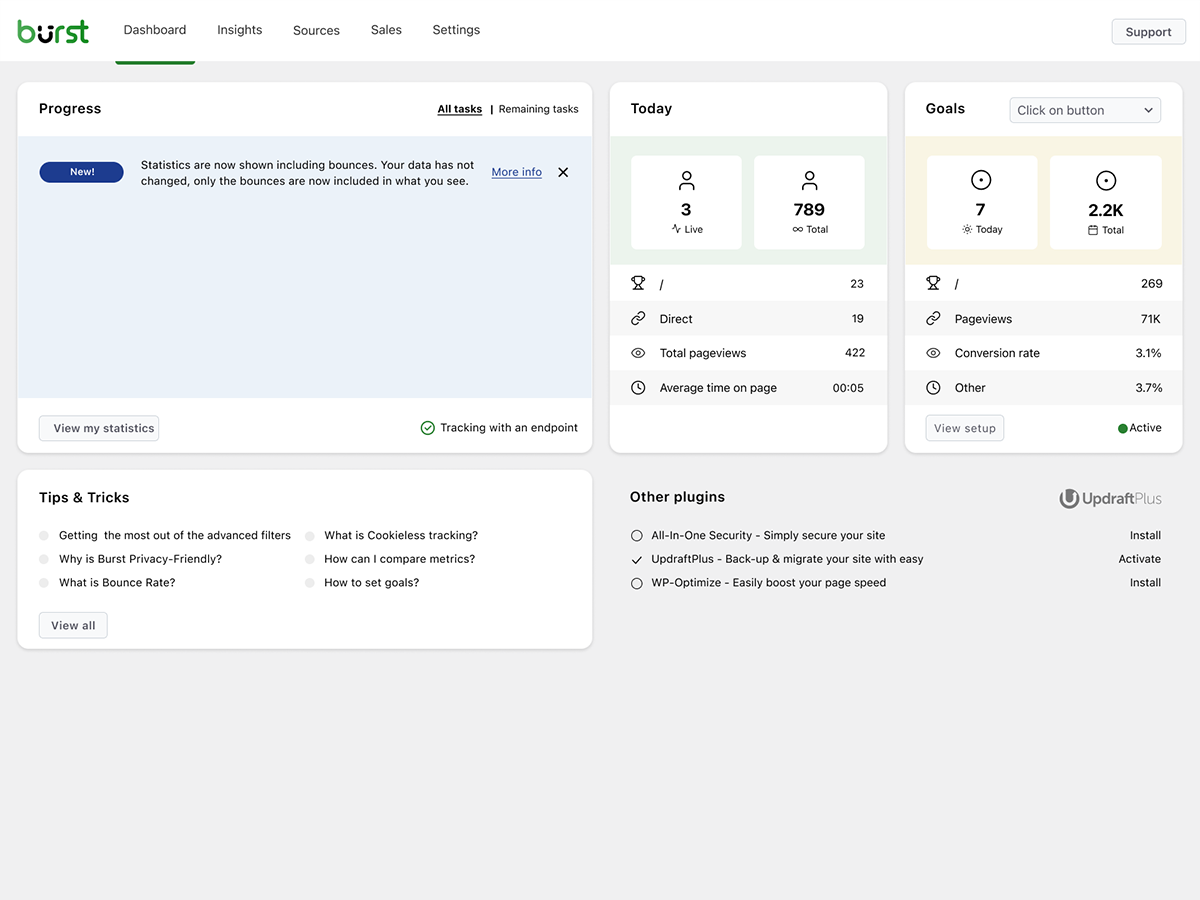
- Live count of active users on your site
看看哪些内容表现出色
- 按浏览量排名的热门页面和文章
- 比较任意日期范围
- 追踪单个页面的表现
Custom conversion and goal tracking
- Track views, clicks and WordPress hooks
- Track WooCommerce analytics & sales (Burst Pro Business)
- Track custom events and conversions
- Step-by-step setup in our goals guide
Privacy-friendly analytics without compromise
- 100% self-hosted, all statistics stored locally in your WordPress database
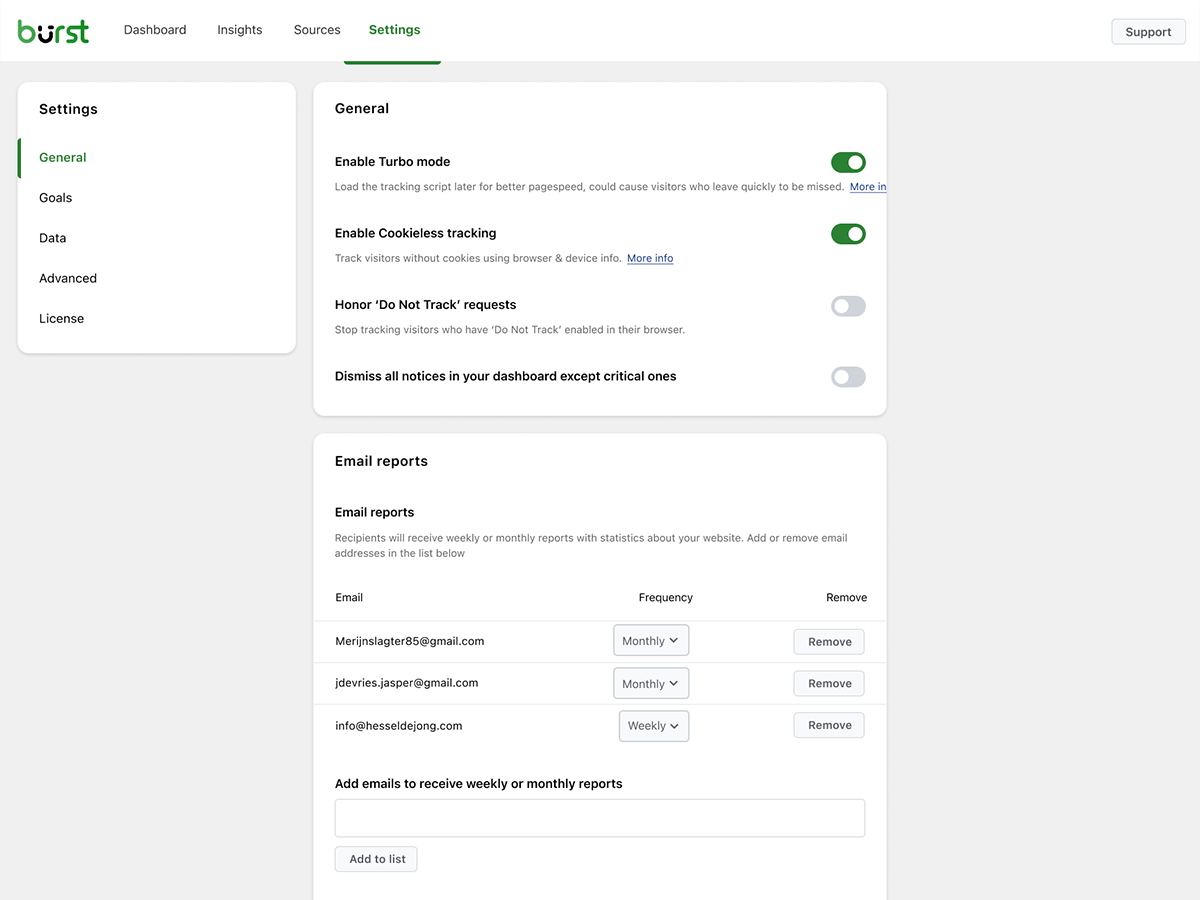
- Cookieless tracking option, a cookie free analytics setup with no consent banner required in many countries
- Analytics designed to support GDPR, CCPA, DSGVO, AVG, RGPD and PECR compliance
- No data shared with Google, Facebook or any third party
保持知情状态
- 每周或每月的电子邮件报告直接发送到您的收件箱
- 比较不同时间段以发现趋势
- 当追踪不起作用时收到通知
A WordPress-native Google Analytics alternative
If you’ve outgrown Google Analytics, or never wanted GA4 in the first place, Burst is built for you. As a Google Analytics alternative, Burst trades GA4’s complexity for clarity. You get the metrics that matter on a single dashboard, without sampling, without data thresholding, and without sending your visitors through Google’s ad network.
GA4 is built to make Google’s ad business better. Burst is built to make your website better.
Curious about the full picture? Read why WordPress site owners are leaving Google Analytics behind or the head-to-head Burst Statistics vs Google Analytics.
From the team behind UpdraftPlus, WP-Optimize and All-In-One Security
Burst Statistics is part of Team Updraft, the team behind some of the most installed WordPress plugins on the market:
- UpdraftPlus – WP backup and migration plugin
- WP-Optimize – cache, image compression, minification and database cleanup
- All-In-One Security (AIOS) – security and firewall
Who is Burst Statistics for?
Burst works for any WordPress site, but we’ve built specific solutions for the four audiences who get the most out of it:
- Bloggers and content creators, see which posts resonate with your audience
- Entrepreneurs and small business owners, understand your traffic and campaigns without complexity
- WooCommerce stores, track visitor behavior, revenue and product performance
- Agencies and freelancers, manage analytics and reporting for multiple client sites
- Privacy-conscious site owners, GDPR compliant analytics without consent banners
- Anyone tired of Google Analytics, get clarity instead of confusion
免费版 vs 专业版
Burst Statistics (free) includes everything you need to understand your website traffic. Visitors, pageviews, referrers, top content, device stats, goal tracking, email reports and more.
Burst Pro adds advanced features for businesses and professionals. Compare all plans on the pricing page.
CREATOR PLAN
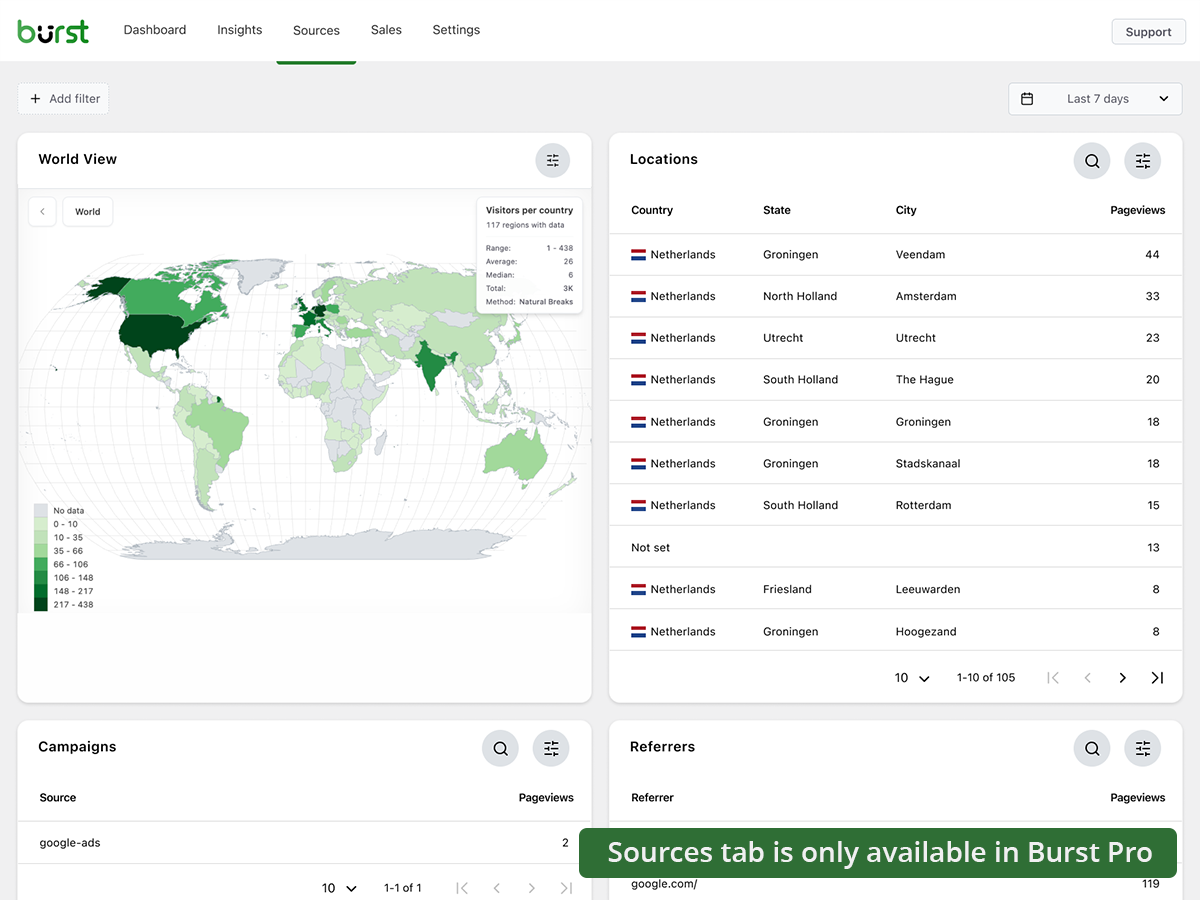
- UTM campaign tracking, see which marketing efforts drive results
- Geographic data, country and city-level visitor insights
- Advanced filtering, segment data by any dimension
- Data archiving settings, keep your database lean automatically
- Priority support, direct contact with our developers
BUSINESS PLAN
- Everything in the Creator plan, plus
- Full WooCommerce sales dashboard, see which content brings in the most revenue
- Revenue attribution, connect WooCommerce sales to traffic sources
AGENCY PLAN
- Everything in the Business plan, plus
- Reporting, generate shareable performance reports for clients
All Burst Pro plans include priority support. You’ll have direct contact with our developers, real humans, not a chatbot.
How Burst compares to other WordPress analytics plugins
We’re often asked how Burst stacks up against other tools. Honest, short version:
- Google Analytics / GA4, GA4 is powerful but built for advertisers, not site owners. It’s complex, applies sampling and thresholding to your numbers, and requires a cookie banner in most countries. Burst is a simpler, privacy-friendly GA4 alternative that shows real numbers without the setup. Read the full comparison.
- MonsterInsights, MonsterInsights is a connector that pipes your data into Google Analytics. If you want a true MonsterInsights alternative that keeps data on your own site instead of sending it to Google, Burst is a better fit.
- Independent Analytics, a respectful competitor with a similar privacy-first, WordPress-native approach. Burst leans harder into actionable dashboards, deeper UTM and goal tracking, WooCommerce revenue analytics and Agency-tier reporting. Try both and pick the one that clicks.
- Koko Analytics, a clean, lightweight option that focuses on the basics. Burst goes further with goal tracking, real-time analytics, UTM campaigns, WooCommerce analytics and email reports.
- WP Statistics, a long-standing WordPress stats plugin with a lot of options. Many users find the interface cluttered. Burst focuses on a single, clear dashboard designed for clarity over feature count.
- Matomo, self-hostable and feature-rich, but heavier and more complex to run. Burst is the simpler, faster, fully WordPress-native option.
Useful guides and resources
Learn the metrics, fix common problems, get more out of your analytics. All free, all on burst-statistics.com.
Getting started
- WordPress analytics and the metrics that actually matter
- How to install Burst Statistics from the WordPress Repository
- How to set up your first goal
Privacy and GDPR
- Why Burst Statistics is privacy-friendly
- How to configure your website without a cookie banner
- How Burst tracks website visitors without cookies
Metrics and data interpretation
- How to reduce bounce rate in WordPress
- What is bounce rate?
- What is a pageview?
- What is conversion rate?
Campaigns and conversions
- How to track UTM (and Burst) parameters
- Campaign URL builder
- How to create and A/B test marketing campaigns with Burst
WooCommerce
- 10 proven ways to reduce WooCommerce cart abandonment
- Introducing sales analytics for WooCommerce in Burst Pro
Browse the full Learn hub for more.
安装
- Go to Plugins → Add New in your WordPress dashboard
- 搜索 Burst
- 点击立即安装,然后激活
- Visit Statistics → Dashboard to see your analytics
That’s it. No external accounts. No tracking codes to paste. Burst starts collecting site stats immediately.
Prefer installing manually or via Composer? See installing Burst Statistics with Composer.
屏幕截图
区块
该插件提供了 1 个区块.
- Pageviews Counter
常见问题
Is Burst Statistics really free?
Yes. Burst Statistics is 100% free with no tracking limits. Burst Pro is optional for users who need advanced features like UTM tracking, revenue attribution, geographic data or client reporting. That’s how we keep Burst Statistics free for most users.
数据存储在哪里?
All statistics are stored in your own WordPress database. Unlike Google Analytics or cloud-based tools, we have zero access to your data. Your data never leaves your server, unless you manually opt in to share anonymous usage insights with us. Read more about how Burst handles your data.
Burst 是一个不错的 Google Analytics 替代品吗?
Yes. If you find GA4 too complex, or you’re concerned about sending visitor data to Google, Burst is a clean replacement. You get the website traffic stats you actually need, visitors, referrers, top pages, conversions, without the overwhelm. Read our Google Analytics alternative guide for the full comparison.
Is Burst a good GA4 alternative?
Yes. Burst was built as a privacy-friendly GA4 alternative for site owners who want clarity instead of complexity. No Google account, no tag manager, no cookie banner in most cases. See why WordPress site owners are leaving Google Analytics behind.
Is Burst a MonsterInsights alternative?
Yes. MonsterInsights connects your WordPress site to Google Analytics, so your data still flows to Google. Burst keeps everything on your own server, with its own dashboard inside WordPress. If you want analytics that don’t depend on Google, Burst is the simpler MonsterInsights alternative.
How is Burst different from WP Statistics, Independent Analytics or Koko Analytics?
Burst focuses on clarity over quantity. While some other WordPress analytics plugins can feel cluttered, Burst’s dashboard is designed to show you what matters without the noise. Independent Analytics is closest in spirit, with a shared privacy-first, WordPress-native approach. Burst differentiates with deeper UTM tracking, WooCommerce analytics and Agency-tier reporting. WP Statistics offers a wider feature set, but many users find it overwhelming. Koko Analytics is intentionally minimal, so it works well for very basic needs.
How is Burst different from Matomo?
Matomo tries to be a full Google Analytics replacement. Burst tries to be the clearest, most actionable WordPress analytics tool. If you want simplicity, fast setup and a native WordPress experience, Burst is the better fit. If you need granular configuration and a full GA-style feature set, Matomo may suit you better.
我需要一个账户吗?
No, you don’t need an account, no data is sent to another website.
我可以跟踪的访客数量是否有限制?
No. The only limiting factor is your own database and server.
There is an option to use cookieless tracking if you prefer. By default, Burst uses cookies because they’re more accurate and lightweight. Even with cookies, Burst remains privacy-friendly because all data is anonymous and stored on your server. Read more about why cookies are misunderstood.
Burst Statistics can be used without setting cookies or storing data in browsers. This can affect accuracy slightly, so a hybrid option with cookies after consent is also possible. See how Burst tracks visitors without cookies.
Is Burst GDPR compliant?
Burst is designed to support GDPR, CCPA, DSGVO, AVG, RGPD and PECR compliance. Data stays on your server, tracking is anonymous, and you can disable cookies entirely. For most setups, no consent banner is needed for analytics. See how to configure your website without a cookie banner.
我可以同时使用 Burst 和 Google Analytics 吗?
Yes. Many users run both during a transition period, or keep GA4 for historical data while using Burst for daily insights. There’s no conflict.
Does Burst Statistics slow down my website?
No. Burst is built for performance with optimized database queries, a minimal tracking script and a Turbo Mode if speed matters more than perfect accuracy. The full breakdown is in does Burst Statistics slow down my website.
Burst 能和 WooCommerce 一起用吗?
Yes. Basic pageview tracking works in the free version. For full WooCommerce analytics, revenue tracking, product performance and sales attribution, you’ll need Burst Pro Business.
我该如何从其他分析插件迁移过来?
Install and activate Burst, it starts tracking immediately. Historical data from other plugins can’t be imported, but you can run both side-by-side during a transition period.
可以用 Composer 安装 Burst Statistics 吗?
Yes. Both the free and premium plugins can be managed with Composer. Read the Composer installation guide for more information.
我可以对插件提供反馈吗?
我们重视您的反馈。您可以在WordPress论坛提交支持请求,我们会及时回复。
评价


贡献者及开发者
「Burst Statistics – Simple WordPress Analytics (Google Analytics Alternative)」是开源软件。 以下人员对此插件做出了贡献。
贡献者


更新日志
3.5.0
- June 3rd 2026
- Improvement: AI chat availability checks and ability registration, preventing PHP notices and duplicate ability registrations.
- Fix: AI Chat integration with AI plugin.
- Fix: missing GROUP BY in a statistics query.
3.4.3
- May 20th 2026
- Fix: AI chat enablement and MainWP integration reminder tasks can now be dismissed permanently.
- Fix: AI chat assistant is now hidden for users without the manage_burst_statistics capability.
- Fix: modal position calculation in the shared viewer.
- Fix: scope application password auth probing to Burst REST endpoints, so authentication on unrelated REST routes (e.g. WooCommerce) is no longer affected.
- Security: harden rest api optimizer, Props Sanjay Singh Jhala.
- Improvement: performance of background aggregated table build, time out guards on sql queries, additional indexes on the burst_statistics table.
- Improvement: AI chat enablement task now links to the “Ask Burst anything” setup guide.
3.4.2
- May 12th 2026
- New: AI chat integration via the WordPress Abilities API, including granular datatable abilities with metric allow-listing for pages, parameters, referrers, countries, campaigns, sales and subscription products.
- New: granular datatable REST endpoints (data/datatable/{id} and data/ecommerce/datatable/{id}) so the dashboard and AI abilities can request a specific table by id.
- Improvement: refactor the Share class into dedicated Share_Tokens, Share_Routing, Share_Auth and Share_UI services for clearer responsibilities and easier maintenance.
- Improvement: dark mode initialization respects an explicit “light” preference so users on a dark OS no longer briefly see a dark skeleton when they have forced light mode.
- Improvement: upgrade routine corrects the stored activation time for sites with older data.
- Improvement: replace native checkboxes with Radix checkboxes in the Share dialog for consistent styling.
- Improvement: shared-link capability checks now reflect the currently requested dashboard tab instead of a single cached value, so per-tab permissions are enforced correctly during batch REST requests.
- Fix: dashboard route returns a 404 when the user is not allowed to load it, instead of rendering an empty page.
- Security: limit Share link viewer statistics access, props Sanjay Singh Jhala.
- Security: REST API optimizer now matches the Burst namespace strictly against the URL path (anchored at burst/v1), props Sanjay Singh Jhala.
- Security: harden MainWP proxy authentication. Props Sanjay Singh Jhala, Chloe Chamberland & PRISM – Wordfence
- Security: Auto Installer now requires the install_plugins capability instead of activate_plugins and only accepts download URLs from official Burst hosts. Props Sanjay Singh Jhala.
3.4.1.1
- May 5th 2026
- Fix: CSS styling regression due to obsolete javascript files being included in the dashboard build.
3.4.1
- April 29th 2026
- New: automated tests for subscription statistics dashboard.
- New: abilities API integration.
- Improvement: move plugin activation logic to bootstrap class.
- Improvement: split ajax fallback logic into do_action and get_action.
- Fix: broken upgrade url in report settings.
- Fix: When both Story report and share links are generated, the UX could generate an error.
- Security: increase minimum required capability from view to manage in get_posts endpoint, Props Sanjay Singh Jhala.
- Security: hardened MainWP proxy authentication and CORS origin validation, Props Sanjay Singh Jhala.
3.4.0
- April 22nd 2026
- New: dark mode support for the Burst Statistics dashboard.
- New: support for MainWP integration.
- New: all time date range for datepicker selection.
- New: support for application passwords. It is now possible to use the Burst Rest API endpoints with application passwords.
- Improvement: add detection for ad blockers. If an ad blocker breaks the Burst dashboard, show a warning about this.
- Improvement: PHP warning about not existing referrers table when clearing the table.
- Fix: restore bounces filter, allowing overriding the default time used to decide if a visit is a bounce.
- Fix: fixed a bug in the visitor calculation for referrers, caused by changes for the “exclude” option in filters, props @bikew1se.
- Fix: Share links sessions are now cleaned up daily, to prevent extended access to the link for longer than the set expiration time, Props Sanjay Singh Jhala.
- Security: ajax fallback for get_reports endpoint unintentionally allowed users with burst_view capability to see reports configuration, props Sanjay Singh Jhala.
3.3.0
- 2026年4月1日
- New: Time per session filter, allowing filtering by visit duration.
- 新增:支持电子邮件报告的深色模式。
- 改进:将统计数据中的列移到会话表中,减少数据存储并提高查询性能。
- 改进:会话数据已包含在归档 CSV 导出中。
- 改进:添加缺失的数据库索引以提升性能。
- 安全性:共享链接的查看者可以查看报告数据(收件人电子邮件地址、调度配置)。感谢 Sanjay Singh Jhala 的贡献。
- 安全性:分享链接的查看者可以查看电子商务/销售数据,即使分享链接仅限于非销售标签。感谢 Sanjay Singh Jhala 的贡献。
- 修复:Insights 图表按月分组不正确。
- 修复:Cron URL 协议不匹配可能导致在电子邮件报告中包含 http 链接,即使网站 URL 是 https。
- 修复:设备区块的过滤器类型问题导致过滤功能失效,感谢 Andrew 的贡献。
- 修复:SQL 哈希更新查询中的重复键错误。
- 修复:电子邮件报告的徽标居中和暗模式样式。
- 修复:一次突发测试命中可能被用来绕过内置的IP阻止,感谢 Sanjay Singh Jhala 的贡献。
3.2.3
- 2026年3月12日
- 修复:未登录用户的分享链接无法加载页面。
3.2.1
- 2026年3月9日
- 安全修复:修复了一个缺少授权检查的问题,该问题允许具有 Burst View 权限的用户管理报告。感谢 Sanjay Singh Jhala 的贡献。
- 改进:将 turbo 默认设置为启用,并在启用无 cookie 跟踪时添加通知以推荐启用它。
- 改进:检查服务器上是否安装了 PharData 类,以防止致命错误。
- 修复:在定时任务期间存储方案。定时任务中,site_url 是 http。为了生成 JavaScript,我们需要它反映实际的方案,通常是 https。
- 修复:当管理员用户打开共享链接时,报告设置中出现重复字段的问题。
- 修复:生成经典高级报告时出现的URL未找到警告。
- 修复:过于严格使用清理器导致表前缀变成小写。感谢 @parkentosh 的贡献
3.2.0
- 2026年2月25日
- 新功能:匿名分享数据,帮助我们改进 Burst Statistics:建立行业基准、开发针对性功能和提升性能。
- 新增:添加关于 Discord 的通知,邀请用户加入我们的 Discord 服务器。
- 新功能:在 Burst Statistics 仪表板中使用分享按钮,轻松与您的团队或客户分享统计数据。
- 修复:在 Rest API 跟踪中捕获非 JSON 编码的数据,感谢 @rajkumarreddyv 的贡献
- 修复:现在,跳出和跳出率的计算会正确地统计不同的跳出会话,而不是简单地累加跳出标记,从而避免了数字膨胀。
- 修复:’合并变量和脚本’ 的默认值逻辑导致无法禁用该设置。
3.1.6
- 2026年1月20日
- 修复:由于 SQL 语法错误,归档功能中删除旧数据无法正常工作。
- 修复:在洞察区块中未按设备过滤浏览器/操作系统数据,感谢 @alisontaylorbc 的贡献。
- 改进:添加数据删除的自动化测试。
- 改进:为数据表格块添加持久排序功能,感谢 @ankush 的贡献。
- 改进:按大陆过滤。
3.1.5
- 2026年1月7日
- 改进:自动关闭屏幕右下角的通知。
- 改进:一些小的移动端响应性改进。
- 改进:扩展自动化测试,加入实时访客测试。
- 改进:在实时访客视图中换行显示长网址。
- 改进:扩展了 PHPCS 覆盖范围。
- 修复:当浏览器的本地存储已满时,添加过滤器可能会导致错误。
- 修复:强制在组合变量和脚本URL上使用https,以防止混合内容警告。
- 修复:RTL 语言的引导过程尝试加载不存在的 RTL CSS 文件。
3.1.4
- 2025年12月23日
- 改进:数据表格块和加载状态的样式。
- 改进:提升引荐查询的性能。
- 改进:参数查询性能提升。
- 改进:从 Burst Rest Api 优化器中排除通过 Rest Api 的跟踪命中,这样在命中期间所有插件都会被加载,这是实现钩子目标所需的。
- 改进:增加了一个备用方案,当上传目录不可写入时,使用默认方法来合并变量和脚本。
- 改进:由于“cron 未运行”是一个严重问题,该通知现在无法关闭。
- 改进:允许在数据表中搜索格式化的数据,例如,现在可以在位置数据表中搜索“United States”而不是US。
- 改进:添加参数过滤。
- 修复:设备区块的过滤问题。
3.1.0.3
- 12月1日
- 修复:在保存初始更改后保存设置更改需要重新加载。
- 性能:通过在跟踪期间将资源密集型进程分批卸载到 cron 来提升性能
- 改进:用户代理解析器的改进,移除无效的浏览器
- 修复:高级筛选器的下拉菜单无法过滤列表。
- 修复:当未检测到 WooCommerce 或 EDD 时,销售菜单未完全移除导致的未定义标签问题。
- 修复:页面计数的对象缓存导致页面计数更新缓慢,感谢 @fveits 的贡献
3.0.2
- 2025年11月25日
- 修复:在验证过程中,一些通知被错误地忽略了。
- 改进:为 hook 目标添加了自动化测试。
- 改进:添加了归档恢复的自动化测试。
3.0.0
- 2025年11月11日
- 修复:与未知插件的兼容性问题,允许在 WooCommerce 产品概览中的 get_timerange_dropdown() 中使用空值,感谢 @tegid 的贡献
- 修复:在检测多个域名设置时,不要将带www和不带www的域名视为不同的域名。
- 修复:删除加载目标脚本时多余的斜杠,这在某些设置中会导致脚本被阻止,感谢 @jhndkrvzc
- 修复:顶部栏计数没有显示千位的“k”、百万的“M”等,只显示1,而不是1k。
- 新增:将 PHP 的最低版本要求提高到 8.0,将 WordPress 的最低版本要求提高到 6.4