
描述
This plugin allows you to customize and insert text links from the Commission Junction affiliate program into a post or page using a simple shortcode. This prevents the WordPress WYSIWYG editor from messing up the links and simplifies your HTML code. Inserting the shortcode [cj] with the parameters below will output the proper link HTML code in your published post or page.
Readme Generator
- This plugin’s readme.txt file was generated by the bitacre Readme Generator for WordPress Plugins.
Support
Donations
Donations are graciously accepted to support the continued development and maintenance of this and other plugins. We currently accept Paypal and kind words.
屏幕截图
安装
- Download the latest zip file and extract the ‘cj-link-shortcode’ directory.
- Upload it to your ‘/wp-content/plugins/’ directory.
- Activate ‘Commission Junction Link Shortcode’ on the ‘Plugins’ menu in WordPress.
- Insert
[cj url="link-url" img="tracking-img-url"]Example link[/cj]in your post or page (replacing your link’s information).
常见问题
- How do I use the shortcode?
-
Simply type
[cj url="link-url" img="tracking-img-url"]Example link[/cj]into your post. Replacelink-url,tracking-img-url, andExample linkwith your Commission Junction link’s information. - Where do I find my link’s information?
-
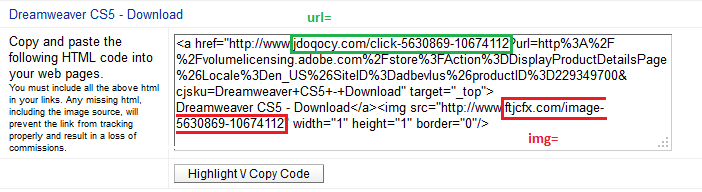
The relevant urls are contained within the HTML code of any of the Commission Junction links you are instructed to copy and paste. See the screenshot or visit this plugin’s help page for more detailed instructions on finding your link information.

贡献者及开发者

更新日志
1.0.1
- Fixed help page link using generic function (which may prevent it from being activated).
1.0
- First released version.
- There may still be bugs, but I can’t find any.