

描述
Modules Kit – Beaver Builder Modules is a powerful collection of Beaver Builder Modules with unlimited possibilities to design a webpage. You can build professional, elegant websites using Beaver Builder with great ease and without any code. It is a large variety of beautiful Beaver Builder Modules that can develop and design your best web pages with just a few clicks.
Modules Kit – Beaver Builder Modules is a bunch of additional modules for Editors, Content Writers, and Freelancers to provide all possible options using the Beaver Builder page builder.
Where is Modules Kit Plugin Useful?
Below is one small list for which purposes you can use the Modules Kit.
- Modules for Editors
- Modules for Content Writers
- Modules for Freelancers
- Modules for Designer
- Modules for Developer
Why Choose a Modules Kit for your Beaver Builder Project?
We carefully researched over minimum requirements of any website development. And then created a list of options over the selected modules that we are thinking of designing and provide it as free, and you can see the result here.
We offered all possible opportunities with all Beaver Builder modules. So, from beginner to freelance – designer, developer, writer, and content creator can create awesome stuff with the new Beaver Builder editor. We have 5+ Beaver Builder Modules available as a start.
Features of Modules Kit
- Designed for Editors, Content Writers and Freelancers
- Highly Optimized and Performance Focused Beaver Builder Modules
- Extensive Attributes for Each Module in Modules Kit
- Faster Designing Experience with Beaver Builder
- Seamless Interplay with the Core Beaver Builder Modules
- Cross-browser Compatibility
- No Coding Skill Needed
List of Beaver Builder Modules
Get 5+ flexible Beaver Builder Modules that are feature-rich and look right out of the box, and provide a robust foundation for any website even without a single line of code.
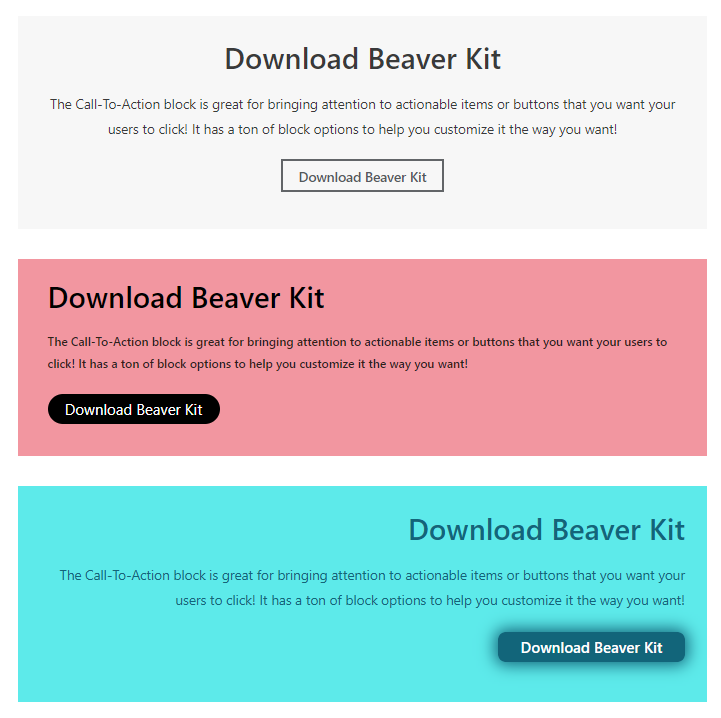
- Call to action
- Infobox
- Our Team
- Pull Quotes
- Testimonial
- Progress Bar
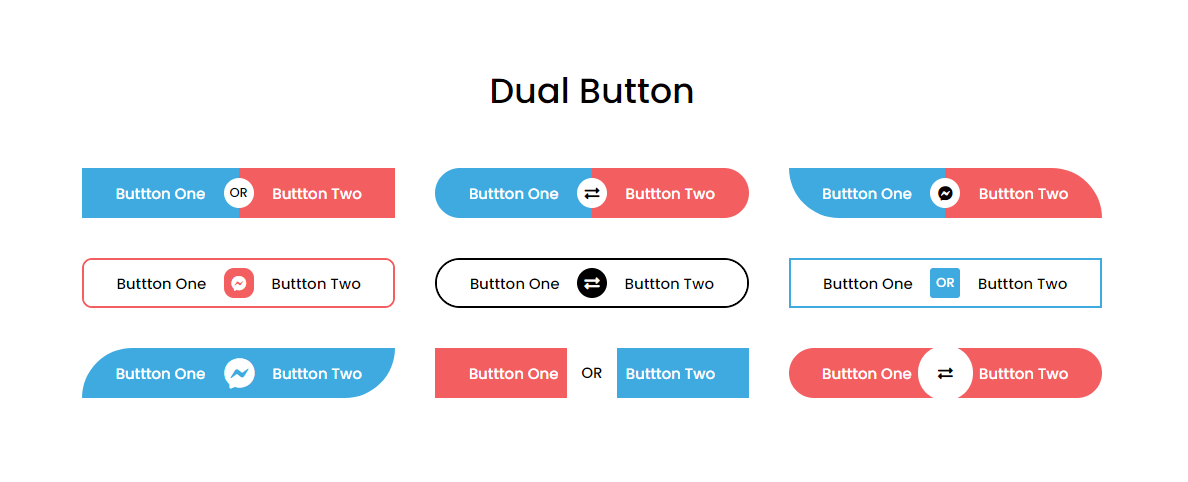
- Dual Button
- Flipbox
- Pricing Table
Technical Support
We’re active for any support issues and feature suggestions. So, I hope you will love it. If you have any more questions, visit our support on the Plugin’s Forum. Feel free to contact us if you want any custom widgets for your site.
Like Modules Kit Plugin?
Don’t forget to rate us on WordPress.
屏幕截图




安装
From Your WordPress Dashboard
- Go to Plugins >Add New
- Search for Modules Kit – Beaver Builder Modules
- Click on Install Now Button
- Click on Activate Now After Installed in the Backend
From WordPress.org
- Download Modules Kit – Beaver Builder Modules
- Upload the ‘modules-kit’ folder to the /wp-content/plugins/ directory
- Activate Modules Kit plugin from your plugins page
常见问题
-
How do I start using Modules Kit?
-
To get the full experience of the next-generation WordPress Page Builder, you’ll need the latest version of Beaver Builder installed on your website.
-
Do I Need Coding Skills To Use Modules Kit?
-
Not! Modules Kit for Beaver Editor is as easy to use as you can think. It works just like Beaver Builder Module, and you don’t need to code.
-
Will Modules Kit Slow Down My Site?
-
Not. We built Modules Kit with performance in mind. It’s built to the standards of Beaver Builder. Hence all the required styling is compiled when you use Modules.
-
Is Modules Kit free to use?
-
Yes! Modules Kit core features are free.
-
Where can I ask for help?
-
Please reach out via the official support forum on WordPress.org.
评价


贡献者及开发者
「Modules Kit – Beaver Builder Modules」是开源软件。 以下人员对此插件做出了贡献。
贡献者


更新日志
1.1.3
Release Date: May 11th, 2026
* Improved overall plugin security
1.1.2
Release Date: December 19th, 2025
* [Updated] Latest WordPress 6.9 compatibility Check
1.1.1
Release Date: April 22nd, 2025
* [Updated] Latest WordPress 6.8 compatibility Check
1.1
Release Date: November 22nd, 2024
* [Updated] Latest WordPress 6.7 compatibility Check
1.0.9
Release Date: July 26th, 2024
* [Updated] Latest WordPress 6.6.1 compatibility Check
1.0.8
Release Date: April 15th, 2024
- [Updated] Latest WordPress 6.5.2 compatibility Check
- [Resolved] Security, Performance, and Accessibility issue
1.0.7
Release Date: October 5th, 2023
- [Updated] Latest WordPress 6.3.1 compatibility Check
1.0.6
Release Date: December 8th, 2022
- [Updated] Latest WordPress 6.1 compatibility Check
1.0.5
Release Date: May 25th, 2022
- [Updated] Latest WordPress 6.0 compatibility Check
1.0.4
Release date: March 13th, 2021
- [Updated] Latest WordPress 5.7 compatibility Check
1.0.3
Release Date: December 24th, 2020
- [Added] New Elements – Progress Bar, Dual Button, Flipbox, Pricing Table
- [Updated] Latest WordPress compatibility Check
1.0.2
Release Date: August 16th, 2020
- [Updated] Latest WordPress compatibility Check
1.0.1
Release Date: March 31st, 2020
- [Updated] Latest WordPress compatibility Check
1.0
Release Date: Feburary 4th, 2020
- Initial release on WordPress.org. Enjoy!