
描述
SDAweb Channels for YouTube is a lightweight, privacy-friendly way to showcase YouTube content on your WordPress site. Add any number of public YouTube channels and display their videos using shortcodes or a Gutenberg block. Videos are cached locally so visitor page views consume zero API quota.
Layouts & Playback
- Grid — Responsive multi-column grid (1–4 columns)
- Tabs — Channel-tabbed interface with 3 navigation modes: scroll, wrapping pills, and avatar strip
- Slider — Horizontal carousel with arrow navigation
- Auto player (default) — Adapts to screen size: inline on desktop, lightbox on mobile phones
- Lightbox player — Fullscreen overlay with keyboard shortcuts (arrow keys, Escape), swipe gestures, and prev/next navigation
- Inline player — Play directly inside the video card with expand-to-lightbox
- Link mode — Opens videos on YouTube in a new tab
- Avatar strip — Compact row of channel avatars with labeled names and smart truncation
- Mobile bottom sheet — Touch-optimized player with swipe-to-dismiss
- Landscape mobile — Optimized layouts: horizontal cards for live streams, 2-column grid for regular content
Live & Upcoming Streams
- Automatic detection of live broadcasts and scheduled upcoming streams
- Smart sort order: live streams first, then all streams sorted by proximity to the current time — the most relevant broadcasts always appear first
- Dedicated
[sdawchfo_live]shortcode for live and upcoming content - Live badge with concurrent viewer count and pulse animation
- Upcoming badge with scheduled start time countdown
- Toggleable “Live now” and “Coming up” section headings
- Stale guard: upcoming streams auto-expire after 6 hours, live after 24 hours — no stuck statuses
- 5-minute background polling keeps live status current (1-minute with Broadcast Boost)
- Live Broadcast Boost — configurable day/time window for 1-minute polling during scheduled broadcasts
- Zero-quota RSS feed discovery catches scheduled broadcasts not in the uploads playlist
- Live and upcoming streams are automatically excluded from regular shortcodes
Channel Management
- Add channels by URL, handle (@username), or channel ID
- Drag-and-drop reordering controls tab and section display order
- Custom labels per channel for friendly display names
- Automatic video caching with configurable 1–24 hour refresh intervals (up to 3 channels per cron run)
- Manual refresh per channel or all channels at once
- Import and export channels and settings as JSON
Shortcodes
Four shortcodes cover every use case:
[sdawchfo_channel]— Videos from a single channel (by id, handle, or label)[sdawchfo_channels]— Multiple channels in grid, tabs, or slider layout[sdawchfo_feed]— Combined feed mixing videos from all channels[sdawchfo_live]— Live and upcoming streams with empty-state message
All shortcodes support these attributes: count, columns, layout, sort, player, pagination, per_page, show_stats, show_duration, show_channel, and live_only.
Additional Features
- Gutenberg block with live preview and inspector controls
- Shortcode builder in the admin dashboard — no coding required
- Customizable frontend labels (26 strings) for full translation support
- Customizable appearance: badge styles, button styles, tab colors, and time text colors with color pickers
- Load More pagination with configurable batch size
- Video stats: views, likes, duration, publish date
- Detects and labels YouTube Shorts
- Up to 100 videos per channel with automatic API pagination
- Import/export for easy migration between sites
- Tab navigation modes: scroll, wrapping pills, or avatar strip
- REST API endpoints for custom and headless integrations
- Server cron setup guidance in the admin settings
- Channel name truncation setting for the avatar strip
- Automatic cleanup of private and deleted videos from cache
- Dark theme support via CSS custom property (–sdawchfo-card-bg)
- Admin settings: tabbed Plugin Overview with 7 sections, quick-access links, and info tooltips explaining technical terms
Privacy & Performance
- All video data is cached in your local database
- Visitor page views make zero external API calls
- No cookies are set and no visitor data is sent to third parties
- YouTube embeds use the privacy-enhanced
youtube-nocookie.comdomain - YouTube embeds load only when a visitor clicks play
- Lazy loading: thumbnail images load only when they scroll into view
Third-Party Services
YouTube Data API v3
This plugin connects to the YouTube Data API v3 to fetch channel information and video data. API calls are made server-side only when:
- An admin adds or refreshes a channel
- The scheduled cron refresh runs (configurable interval, default 6 hours)
- The live status cron runs (every 5 minutes, or every 1 minute during a configured Broadcast Boost window)
No API calls are made during normal visitor page views — all data is served from the local cache.
- Service provider: Google LLC
- API endpoint:
https://www.googleapis.com/youtube/v3 - YouTube API Terms of Service
- Google Privacy Policy
A YouTube Data API v3 key is required. You can obtain one for free from the Google Cloud Console.
YouTube RSS Feeds
This plugin fetches public YouTube RSS feeds (https://www.youtube.com/feeds/videos.xml) to discover recently published and scheduled videos. These requests are read-only, use no API quota, and contain only publicly available video IDs.
- Service provider: Google LLC (YouTube)
- YouTube Terms of Service
- Google Privacy Policy
YouTube Embeds
When a visitor clicks play on a video, an iframe loads from YouTube’s privacy-enhanced domain (youtube-nocookie.com). No embed loads until the visitor initiates playback. No cookies are set by this domain.
- Service provider: Google LLC (YouTube)
- YouTube Terms of Service
- Google Privacy Policy
YouTube IFrame Player API
When a visitor opens the lightbox player, the YouTube IFrame Player API script (https://www.youtube.com/iframe_api) is loaded to enable programmatic playback control (mute/unmute toggle). This script is only loaded when the lightbox is first opened — not on page load. No data is sent to YouTube beyond what the standard embed already transmits.
- Service provider: Google LLC (YouTube)
- API documentation: YouTube IFrame Player API
- YouTube Terms of Service
- Google Privacy Policy
屏幕截图
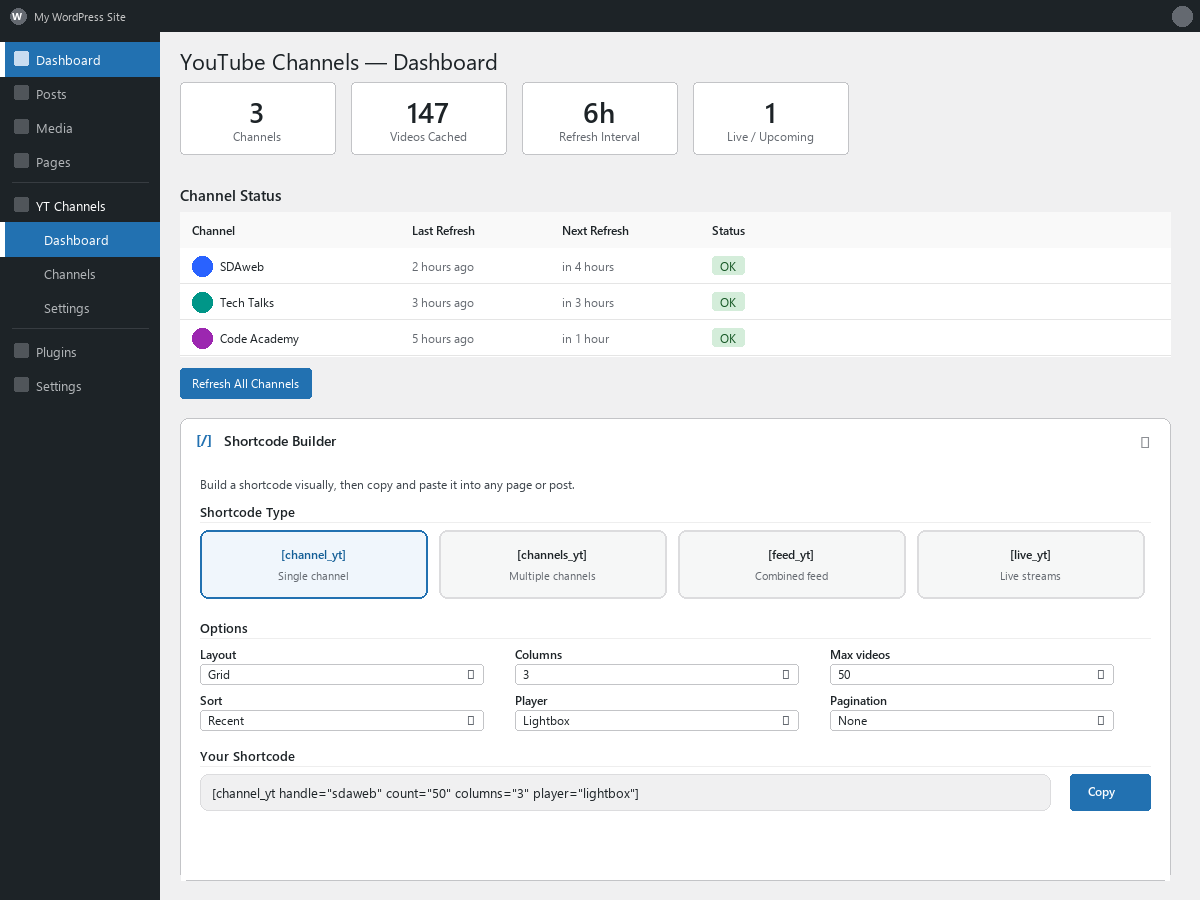
Dashboard with shortcode builder and channel status overview 
Grid layout displaying videos from a single channel 
Tabbed layout with multiple channels 
Lightbox video player with navigation 
Live and upcoming stream display with badges 
Admin settings page with customizable labels
安装
- Upload the
sdaweb-channels-for-youtubefolder to/wp-content/plugins/ - Activate the plugin through the Plugins menu in WordPress
- Go to YouTube Channels > Settings and enter your YouTube Data API v3 key
- Click Test Connection to verify the key works
- Go to YouTube Channels > Dashboard or Channels to add your first channel
- Use the Shortcode Builder on the Dashboard to generate shortcodes, or add the Gutenberg block in the editor
常见问题
-
Where do I get a YouTube API key?
-
Visit the Google Cloud Console, create a project, enable the YouTube Data API v3, and create an API key. Step-by-step instructions are included on the plugin’s Settings page.
-
Is the API key free?
-
Yes. Google provides 10,000 free quota units per day. A typical site with 10 channels uses 300–500 units per day. Visitor page views use zero quota.
-
How often are videos refreshed?
-
By default every 6 hours. You can change this to anywhere from 1 to 24 hours in Settings. Live stream status is checked every 5 minutes automatically.
-
How does the live stream detection work?
-
The plugin checks for live and upcoming broadcasts every 5 minutes using the YouTube API and RSS feeds. Currently live streams show a red LIVE badge with viewer count. Upcoming streams show a blue UPCOMING badge with a countdown to the scheduled start time. Streams are automatically sorted by proximity to the current time, so the most imminent broadcasts always appear first regardless of when they were originally scheduled.
-
Do live streams appear in regular shortcodes?
-
No. Live and upcoming streams are automatically excluded from
[sdawchfo_channel],[sdawchfo_channels], and[sdawchfo_feed]. Use[sdawchfo_live]to display them separately, or addlive_only="true"to any shortcode to show only live content. -
How do I control the tab order?
-
Drag channels into the desired order on the Channels page. This order is used for tabs and sections site-wide. To set a different order on a specific page, list channel IDs in the shortcode:
[sdawchfo_channels layout="tabs" ids="UCabc,UCxyz"]. -
Can I display more than 50 videos?
-
Yes. Set
countto up to 100 in the shortcode or Shortcode Builder. The plugin paginates through the YouTube API automatically. -
Can I migrate settings between sites?
-
Yes. Use the Import/Export section on the Settings page to download a JSON file with your channels and settings, then upload it on another site. Videos are not included — they are re-fetched automatically.
-
Does this plugin work with caching plugins?
-
Yes. The plugin uses WordPress transients for its own internal cache, which is compatible with object caching plugins and page caching plugins.
-
What are the player modes?
-
The plugin offers four player modes, selectable in the Shortcode Builder or via the
playerattribute:- Auto (default) — Adapts to screen size: plays inline on desktop, opens a lightbox on mobile phones. Best for sites with mixed audiences.
- Lightbox — Always opens a fullscreen overlay with prev/next navigation. Best for desktop-heavy audiences.
- Inline — Always plays directly inside the video card with an expand-to-lightbox button. Best for mobile-heavy audiences.
- Link — Opens the video on YouTube in a new tab. No on-site playback.
-
What happens to private or deleted videos?
-
The plugin automatically detects and removes them. When a channel is refreshed, any cached videos that YouTube no longer returns (because they were made private, deleted, or removed from the uploads playlist) are purged from your local database.
-
The tabs layout offers three navigation modes, configurable in Settings > Appearance:
- Scroll (default) — A horizontally scrollable tab bar with arrow indicators. Works well with any number of channels.
- Wrapping Pills — All channels are shown as pill buttons that wrap to multiple rows. Best when you have many channels and want them all visible at once.
- Avatar Strip — A compact row of channel avatars with labeled names below. Long channel names are automatically truncated with a configurable truncation direction (show beginning or end).
-
What is Live Broadcast Boost?
-
Broadcast Boost increases the live status polling frequency from every 5 minutes to every 1 minute during a configurable time window. This is useful if your channels have a regular broadcast schedule (e.g. every Saturday from 10:30 to 13:00). Enable it in Settings and choose the day and time range. Outside the boost window, normal 5-minute polling continues. For best results, set up a real server cron that runs every minute.
-
How do I set up a real server cron?
-
WordPress uses a pseudo-cron that only runs when someone visits your site, which can cause delays. For reliable scheduling:
- Add
define('DISABLE_WP_CRON', true);to yourwp-config.php(before “That’s all, stop editing!”). - Set up a cron job on your server (via cPanel, Plesk, or SSH) to run every minute:
*/1 * * * * wget -q -O /dev/null https://yoursite.com/wp-cron.php?doing_wp_cron >/dev/null 2>&1
The plugin’s Settings page shows your current cron status and provides the exact command for your site.
- Add
-
Videos don’t play in Vivaldi. What’s wrong?
-
As of version 1.4.9, the plugin uses YouTube’s privacy-enhanced embed domain (
youtube-nocookie.com) which resolves most Vivaldi playback issues. If you still experience problems, Vivaldi’s built-in tracker and ad blocker may be blocking the embed. Click the shield icon in the address bar and disable the blocker for your site.
评价
此插件暂无评价。
贡献者及开发者


更新日志
1.5.1
- Performance: Upgraded resource hints from dns-prefetch to preconnect for youtube-nocookie.com and i.ytimg.com on pages that use the plugin. Preconnect performs the full TCP and TLS handshake ahead of time (not just the DNS lookup), saving an additional ~50-150ms on first interaction with the third-party host. Browser support is universal since 2018.
- Cleanup: Plugin header author corrected to “Rune Stake Stavdal” — the original spelling, restored after a previous propagated error in a sibling plugin’s checklist template.
1.5.0
- Developers: Introduced 5 filter hooks and 3 action hooks for extending the plugin without forking. See docs/hooks.md in the plugin folder for full documentation and examples.
- Developers: New filter sdawchfo_video_query_args lets you modify the video database query (sort, filter, exclude channels) site-wide.
- Developers: New filter sdawchfo_video_card_classes lets you add CSS classes to individual video cards based on the video data.
- Developers: New filter sdawchfo_thumbnail_url lets you rewrite thumbnail URLs (CDN, image proxy, local sideload).
- Developers: New filter sdawchfo_inline_css lets you append or modify the generated appearance CSS.
- Developers: New filter sdawchfo_rest_videos_response lets you add custom fields to the public REST videos endpoint.
- Developers: New action sdawchfo_before_refresh_channel and sdawchfo_after_refresh_channel fire around channel refreshes — useful for cache busting, logging, or notifications.
- Developers: New action sdawchfo_stale_videos_purged fires when stale videos are removed from the local cache.
- No user-visible changes — if you don’t write code against the new hooks, the plugin behaves identically to 1.4.38.
1.4.38
- Accessibility: Honors prefers-reduced-motion — animations, transitions and smooth-scroll are disabled inside plugin elements when the visitor’s OS requests reduced motion (WCAG 2.3.3)
- Accessibility: Added :focus-visible outlines for keyboard users on grids, sliders, tabs, lightbox controls and the Load More button
- Accessibility: Load More now announces “X more videos loaded” to screen readers via an aria-live region
- Accessibility: Lightbox now exposes a screen-reader hint describing the Escape and arrow-key shortcuts via aria-describedby
- Performance: Added explicit width and height attributes to thumbnail images so browsers reserve layout space before the image loads (improves Cumulative Layout Shift)
- Performance: Added DNS-prefetch hints for youtube-nocookie.com and i.ytimg.com on pages that use the plugin, shaving the connection setup off the first interaction
- Privacy: Privacy policy content now also discloses that video thumbnails are loaded directly from i.ytimg.com on every page render
- i18n: Added translator comments to the {time} placeholder strings (Starts in / Live for) so translators preserve the placeholder
1.4.37
- Fixed: Lightbox now explicitly calls playVideo() on player ready for reliable autoplay on Android tablets
- Fixed: Expand-to-lightbox button now visible on all touch devices (was hidden without hover)
1.4.36
- Improved: Regenerated POT file with correct file paths and line numbers (was referencing wrong files since 1.4.28)
- Improved: Added block.json title and description to POT for full translation coverage
- Improved: Added 17 block editor strings to POT
1.4.35
- Flipped play button toggle: button is now visible by default, checkbox hides it
- Added exclude_shorts parameter to REST API /videos endpoint
- Fixed channel ID routing: direct channel IDs are now matched before handle fallback
- Version constant now reads from plugin header (single source of truth)
- Inline CSS is now cached in a transient for better performance
- Added Cache-Control headers to public REST API responses
- Added sanitize_file_name() defense-in-depth to template rendering
- Used wp_list_pluck() instead of array_column() for object arrays
- Added sdawchfo_ytc_migrated to uninstall cleanup
1.4.34
- Added 1-tap unmute button overlay in lightbox player for iPad/tablet/mobile — no more 3-tap pause-unmute-play cycle
- Lightbox now uses YouTube IFrame Player API for programmatic mute/unmute control
- YouTube IFrame API is lazy-loaded only when lightbox opens (no external scripts on page load)
- SVG mute/unmute icons with pulse animation on touch devices, hover-only on desktop
- Reduced swipe zone width on touch devices (50px to 30px) to reduce tap interference
- Split admin settings page (1,302 lines) into 6 maintainable partials
- Wrapped all bare database queries in $wpdb->prepare() with %i identifier placeholder
- DRY: transient cleanup now uses a single shared method across Channel Manager, Cache, and uninstall
- Minimum WordPress version bumped to 6.2 (required for %i placeholder support)
1.4.29
- Added “Live now” section heading to the editable Labels list in admin settings — was missing from the labels form despite having backend support
- Fixed block.json version mismatch (was 1.4.26, now synced with plugin version)
1.4.27
- Fixed lightbox fullscreen button not responding to clicks on desktop — swipe navigation zones no longer intercept mouse events
1.4.26
- Fixed auto player not responding to taps on tablets in portrait orientation (iPad, iPad Mini)
- Breakpoint alignment: devices at exactly 768px width now correctly use lightbox instead of inline playback
1.4.25
- Added OAuth consent screen dismissal note to API Key Guide in admin settings
1.4.24
- Fixed API key not saving on some browsers due to password manager interference — field now uses CSS masking instead of type=”password”
- Added show/hide toggle button for API key field
- Fixed block render: layout attribute now passed to combined feed shortcode
- Removed dead maybe_refresh() method from cache class
- Fixed orphaned docblock on hex_to_rgba/safe_color methods
- Added YouTube Embeds disclosure to Third-Party Services in readme
- Updated POT file version
1.4.23
- Added play button customization: color with transparency, hover color, size (small/medium/large), shape (rounded/circle), and visibility toggle
- Added wp-color-picker-alpha for RGBA color picker support in admin settings
- Admin preview cards for play button shape and size options
1.4.22
- Added play button color picker with transparency (RGBA) support in Settings > Appearance
- New RGBA sanitization for server-side color validation
1.4.21
- Mobile live/upcoming view redesigned: YouTube-app-style vertical stacked cards replace cramped horizontal layout
- Full-width thumbnail with rounded corners, channel avatar left of title/meta below
- New .sdawchfo-video-info-text wrapper and .sdawchfo-video-channel-name element for mobile layout
1.4.20
- Fixed author header format to match WordPress.org SDAweb standard
- Added Tested up to header in main plugin file
- Added constant definition guards to prevent redefinition conflicts
- Added phpcs:disable comments to all template files to suppress false-positive global variable warnings
- Added justification comments on public REST API permission callbacks
1.4.19
- Increased avatar-strip profile image size on mobile and desktop for better visibility
- Replaced extract() in template rendering with explicit data array access
- Added defense-in-depth CSS color escaping with sanitize_hex_color() at output time
- Migration SQL now uses $wpdb->prepare() for all queries
- Added translators comments for placeholder strings in dashboard
- Added privacy policy suggestion via wp_add_privacy_policy_content()
- Gutenberg block video count now respects the admin Default Video Count setting
1.4.18
- Redesigned Plugin Overview in admin: tabbed interface with 7 sections (Layouts, Players, Live Streams, Customize, Privacy, Management, Shortcodes)
- Added quick-access pill buttons at the top of Settings for Overview, API Key Guide, and Import/Export — click to scroll and expand
- Added info tooltips explaining technical terms (API quota, cron, cache, lightbox, RSS, lazy loading, etc.)
- Added missing features to overview: stale guard, lazy loading, REST API, dark theme, Shorts detection, privacy-enhanced embeds, heading toggles
- Fixed auto player description: inline on desktop, lightbox on mobile (was incorrectly reversed)
- Updated wordpress.org description with appearance customization, stale guard, REST API, lazy loading, and dark theme support
1.4.17
- Added toggles to show/hide “Live now” and “Coming up” section headings in Settings > Labels
1.4.16
- Added “Coming up” section heading as an editable label in Settings
- Added description hints for upcoming, coming_up, and live_now labels in the admin Labels section
1.4.15
- Fix: stale guard now handles videos with NULL scheduled_at/actual_start_at by falling back to published_at
- Fixes upcoming streams stuck as “PLANLAGT” indefinitely when YouTube omits scheduling data
1.4.14
- Fix: stale upcoming/live streams now auto-expire — upcoming resets after 6 hours past scheduled time, live resets after 24 hours
- Stale guard runs on every live check cron cycle as a safety net against missed API updates
- Shortcode query also filters out stale entries for instant effect without waiting for cron
1.4.13
- Play button redesigned: YouTube-style dark rounded rectangle, turns red on hover — visible on all thumbnail backgrounds
- Subtle dark scrim overlay on thumbnails for guaranteed contrast on icons and badges
- YouTube link icon moved to top-right, always visible with drop-shadow, turns red on hover
- YouTube link icon enlarged (20px) with native tooltip on hover
1.4.12
- Added YouTube link button on video cards — opens video on YouTube in a new tab
- Live shortcode now groups live and upcoming streams with section headings
- Compact horizontal card layout for live streams on mobile (≤600px)
- Lightbox playlist now scoped to the nearest container — navigates only within the same grid/section
- Swipe hints in lightbox now show clean arrows instead of hand icons
- Added bottom padding to live-wrap to prevent overlap with external accessibility widgets
- New translatable labels: “Watch on YouTube”, “Live now”, “Coming up”
1.4.11
- Fixed lightbox not visible on themes with CSS transform on body (e.g. The7, Visual Composer vc_transform)
- Lightbox now rendered via wp_footer outside all theme containers
- Shortcode transient caches are cleared automatically on plugin upgrade
1.4.10
- Fixed lightbox not appearing on themes that use CSS transforms on content containers (stacking context issue)
1.4.9
- Switched YouTube embeds to privacy-enhanced domain (youtube-nocookie.com) for better compatibility with privacy-focused browsers like Vivaldi
- Updated FAQ for Vivaldi playback
1.4.8
- Fixed shortcode reference: player attribute default now correctly shows “auto” instead of “lightbox”
- Updated player attribute description to include all four modes (auto, lightbox, inline, link)
- Added Getting Started guide on the Dashboard for new users with step-by-step setup instructions
- Improved admin documentation and inline help text
1.4.7
- Maintenance release with minor internal improvements
1.4.6
- Fixed landscape mobile: auto player now uses inline playback instead of broken lightbox on phones in landscape
- Fixed expand-to-lightbox button always visible on landscape mobile (no hover needed)
- Added landscape-specific lightbox CSS so player fits within the short viewport
1.4.5
- Security: Channel reorder now uses $wpdb->update() to pass Plugin Check validation
1.4.4
- WordPress.org Plugin Review compliance: escaping, WP_Filesystem, directory silencers
- Added index.php silencer files to all subdirectories to prevent directory listing
- Replaced file_get_contents with WP_Filesystem API in import handler
- Added esc_attr() escaping to all dynamic class and attribute outputs
- Standardized license format to GPL-2.0-or-later across all files
- Block editor strings are now translatable via wp.i18n
- Added wp_set_script_translations() for Gutenberg block i18n support
- Updated .pot file with 17 new block editor translatable strings
1.4.3
- Performance: Channel reorder now uses a single SQL query instead of one per channel
1.4.2
- Performance: Eliminated N+1 database queries when displaying channel names on video cards
- Performance: Load More now uses a single query instead of two for pagination check
- Security: REST API /videos endpoint now enforces a maximum count of 200
- Security: API key field in settings now uses password input type
- Security: Import handler rejects files larger than 1 MB
- Security: Video ID validated in frontend before iframe embed
- Fixed duration calculation for videos longer than 24 hours
- Fixed channel handle lookup using exact match instead of fuzzy LIKE
- Fixed timezone mismatch between MySQL and PHP in cache staleness check
- Fixed shortcode cache key collision between sdawchfo_channels and sdawchfo_feed
- Fixed RSS feed priority in live check — new broadcasts no longer cut off at 50-video limit
- Fixed purge of cached videos when all channel videos are made private
- Fixed Test API Key button now tests the entered key, not the previously saved one
- Improved Refresh All to process channels one at a time with progress indicator, preventing timeouts
- Improved cron scheduling: delayed first run after activation to allow setup time
- Added slider layout option to Gutenberg block
- Added lightbox focus trap and focus restoration for keyboard accessibility
- Added CSS custom property –sdawchfo-card-bg for dark theme compatibility
- Removed duplicate stopAllInline() function in frontend JS
1.4.1
- Added transient caching for YouTube RSS feeds (15-minute TTL) to reduce unnecessary HTTP requests during live checks
1.4.0
- Added Auto player mode (new default) — lightbox on desktop & tablet, inline on mobile phones
- Added landscape mobile optimization: horizontal cards for live streams, 2-column grid for regular content
- Added automatic cleanup of private and deleted videos from cache on each refresh
- Added tab navigation modes: scroll (default), wrapping pills, and avatar strip
- Added avatar strip layout with labeled channel names, smart truncation, responsive behavior, and hint text
- Added Live Broadcast Boost — configurable day/time window for 1-minute live status polling
- Added server cron setup guidance in admin settings with auto-detection of current cron status
- Cron improvements: custom schedules, automatic reschedule on settings change, up to 3 channels refreshed per cron run
- Added customizable labels: “Channels” heading and “Tap a channel to switch” hint
- Added channel name truncation setting (show beginning or end) for the avatar strip
- Fixed missing
sdawchfo_one_minutecron schedule registration that prevented Broadcast Boost from working
1.3.1
- Live and upcoming streams are now sorted by proximity to the current time — streams closest to now appear first
- Currently live broadcasts always appear above upcoming streams
- Fixes display order for channels that schedule streams far in advance
1.3.0
- Added live and upcoming stream support with automatic 5-minute status polling
- Added
[sdawchfo_live]shortcode for displaying live and upcoming broadcasts - Added
live_onlyattribute to all shortcodes for filtering to live content - Added live badge with concurrent viewer count and pulse animation
- Added upcoming badge with scheduled start time countdown
- Added zero-quota RSS feed discovery to catch scheduled broadcasts
- Added import/export for channels and settings (JSON format)
- Live and upcoming streams are now automatically excluded from regular shortcodes
- Added customizable labels: upcoming, starts in, live for, no live videos
- Added
per_pageshortcode attribute to control Load More batch size - Shortcode Builder: added
[sdawchfo_live]type card and per-page selector - Gutenberg block: added Live Only toggle in inspector panel
- Database: added live_status, scheduled_at, actual_start_at, concurrent_viewers columns
1.2.0
- Added mobile bottom sheet player with swipe-to-dismiss gesture
- Added mobile navigation buttons in lightbox for easier touch control
- Added drag handle for bottom sheet interaction on mobile devices
- Improved horizontal swipe detection to prevent accidental navigation
- Shortcode builder now defaults to tabs layout for multiple channels
- Tab order follows drag-and-drop channel order with per-page override via ids attribute
- Settings changes now clear shortcode output cache automatically
- Increased maximum video count to 100 (default changed to 50)
- Fixed lazy-load race condition causing thumbnails to disappear in tabbed layout
- Removed conflicting native loading=”lazy” attribute from thumbnails
- Added ordering tips on Channels page and Shortcode Builder
1.1.0
- Added slider layout
- Added inline video player option
- Added customizable frontend labels
- Added Gutenberg block with live preview
- Added Load More pagination
- Improved accessibility (ARIA roles, keyboard navigation, touch swipe)
1.0.0
- Initial release