

描述
Use spoilers to hide some content on the page using shortcode. On the settings page, you can specify the color of the spoiler.
How to use
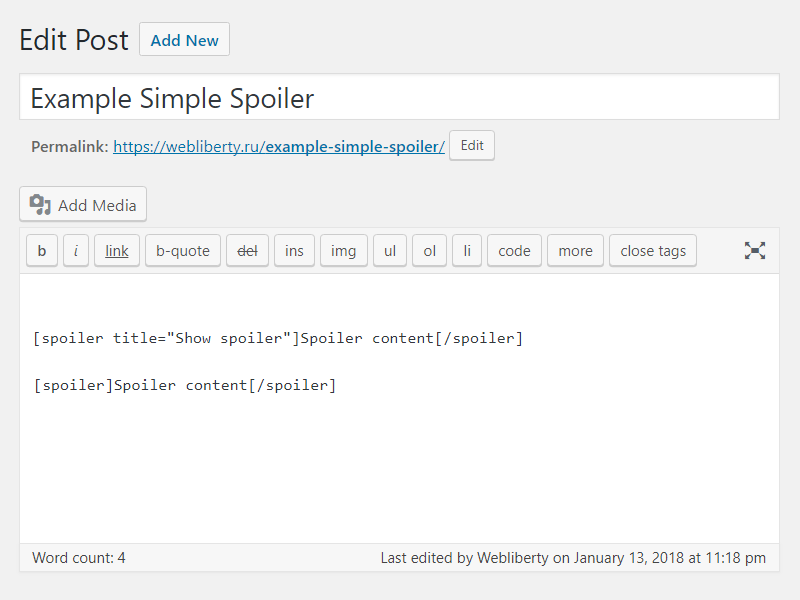
Example: [spoiler]Spoiler content[/spoiler]
Example: [spoiler title="Show spoiler"]Spoiler content[/spoiler]
Translations
You can translate Simple Spoiler on translate.wordpress.org.
屏幕截图


安装
- Upload folder
simple-spoilerto the/wp-content/plugins/directory; - Activate the plugin through the ‘Plugins’ menu in WordPress;
- Place shortcode in your content.
常见问题
-
How do I can customize design of the spoiler?
-
To change color layout of a spoiler, please, go to options page.
评价

2021 年 5 月 15 日
Thank you for developing this plugin. I wanted something simple with minimal configuration and this shortcode and control over the colors is wonderful. Thank you.

2020 年 4 月 13 日
1 回复
Легко поддается дополнительной стилизации.
Есть необходимая документация по CSS.
Отличная техподдержка, реагирует мгновенно.
Спасибо.

2020 年 4 月 12 日
в середині спойлера не працють інші теги

2020 年 4 月 9 日
2 回复
Спасибо за плагин и быструю техподдержку!

2019 年 3 月 3 日
Great.

2018 年 12 月 31 日
Задумка хорошая, но не увидел кнопку в редакторе. Каждый раз в ручную прописывать, это прошлый век.
贡献者及开发者

更新日志
1.5
- Fixed Cross Site Scripting (XSS) vulnerability.
- Improved code performance and security.
1.4
- Fixed Unauthenticated Arbitrary Shortcode Execution vulnerability in comments.
1.3
- Fixed Cross Site Scripting (XSS) vulnerability.
1.2
- Added support spoiler shortcode for comments.
- Added settings for change spoiler border color.
1.1
- Fix undefined constant ‘title’.
1.0
- Initial release.