
描述
This is the First Urdu writing keyboard Plugin for WordPress. Now you can easily write Urdu posts and pages directly in WordPress without installing Urdu keyboard on your system.
This Urdu Keyoboard (Phonetic) for WordPress, enables you to easily type Urdu in WordPress without installing Urduphonetic keyboard in your system.
Note
The plugin works with the WordPress Classic editor.
Compatible Browsers
Chrome, Firefox, IE10, IE11, Safari and Opera.
屏幕截图

Urdu Writing in WordPress posts / pages 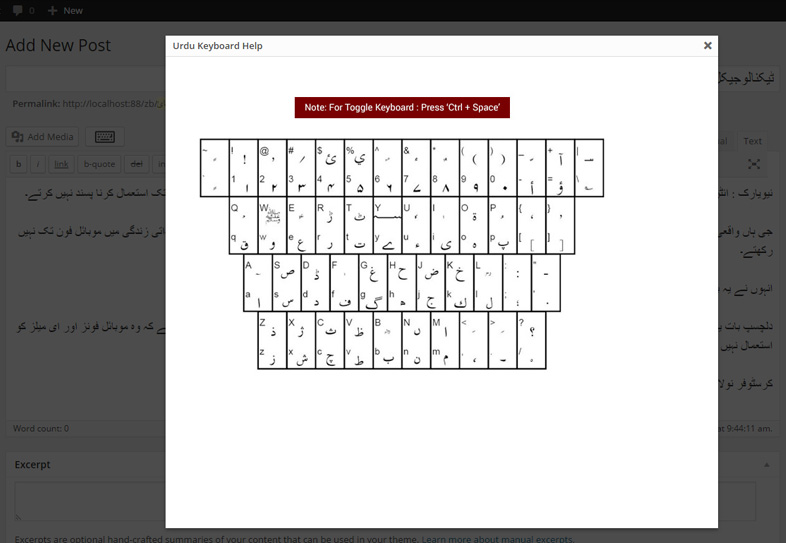
Keyboard layout 
标签
安装
- Unzip the download package
- Upload
urdu-keyboardto the/wp-content/plugins/directory - 通过WordPress的的“Plugins”菜单激活插件
Manual Plugin Installation
- Download Urdu Keyboard Plugin to your desktop.
- If downloaded as a zip archive, extract the Plugin folder to your desktop.
- With your FTP program, upload the Plugin folder to the
wp-content/pluginsfolder in your WordPress directory online. - Go to Plugins screen and find Urdu Keyboard Plugin in the list.
- Click Activate Plugin to activate it.
常见问题
-
How to use Urdu Keyboard in WordPress
-
Simple and easy same as writing the posts or pages in WordPress. When plugin is enabled you can write Urdu text in post/page title and content using your system keyboard.
Keyboard layout help available in posts screen and as well as option page.
-
How to change keyboard language?
-
Pressing
Ctrl + Spaceto change keyboard writing fromEnglish to UrduorUrdu to English.
评价


贡献者及开发者


更新日志
1.3
- Bug fixes.
1.1
- Fixed Urdu Keyboard writing in Post and Pages.
1.0
- First Release