

描述
With this Plugin you can easily overlay all of your iFrame video embeds with either a default image
provided by the Plugin or your own custom image. This is ideal for branding your videos, making them
load faster, look cleaner and respond to the width of the browser/device.
An alternate feature of this Plugin is to simply make your iFrame video embeds fully responsive
so that they perfectly fit any smaller browser window or device.
Either feature will wrap your iFrame video embeds in unique HTML divs which allow you to easily style
your videos independently or as a whole.
See more of my work over at CatalystTheme.com.
屏幕截图
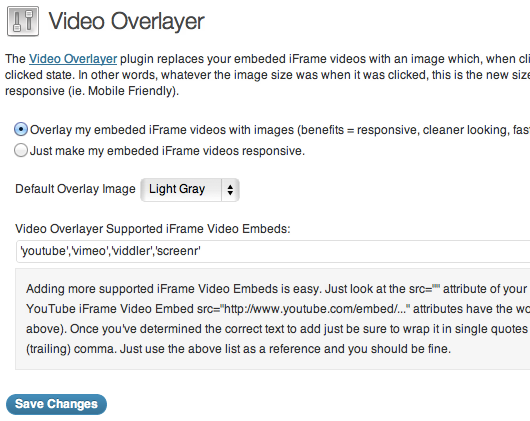
Video Overlayer keeps things simple, yet provides just enough control to work the way you want it to. 
You can overlay your iFrame video embeds with either the included images or your own custom image.
安装
- Upload the video-overlayer folder to the /wp-content/plugins/ directory
- Activate the Video Overlayer Plugin through the ‘Plugins’ menu in WordPress
- Configure the plugin by going to the Video Overlayer menu located in the “Settings” section of your WP Dashboard.
Using Video Overlayer
By default the Video Overlay Plugin, when active, will overlay all supported iFrame video embeds with a light-gray
video image. In the Video Overlay admin page you can either select an alternate image or select “Custom” and
then add a direct link to your custom overlay image.
You can also just set Video Overlay to make your iFrame video embeds fully responsive, leaving off the overlay image.
This is ideal for basic Responsive Video Embed functionality.
Removing the Video Overlayer plugin
To remove the Video Overlayer plugin just go to the Plugins page in your dashboard
(or the Network Admin dashboard if you’re running a multi-blog setup) and click
the “Delete” link.
常见问题
- Does Video Overlayer work with ALL iFrame video embeds?
-
By default, no (YouTube, Vimeo, Viddler and Screenr iFrame Video Embeds are supported), but any non-supported iFrame video embeds can easily be added!
- Can you exclude certain WordPress Pages or types of Pages from Video Overlayer?
-
Yes. You can use the following function as an example:
add_filter( ‘video_overlayer_exclusions’, ‘custom_video_overlayer_exclusions’ );
function custom_video_overlayer_exclusions() {
if( is_page( ‘About’ ) ) {
return 1;
} else {
return 0;
}
}You would just paste the above PHP code into your Themes’s functions file and then adjust it according to your needs. The above code, for example,
would exclude the Video Overlayer functionality from a page named ‘About’.
评价
此插件暂无评价。
贡献者及开发者

更新日志
1.0.1
- Fixed bug where an iFrame with no src=”” attribute could “break” the Plugin’s functionality.
1.0
- Initial release