

描述
This plugin adds a meta box on WooCommerce admin order pages where you can add waybill numbers on orders.
It then display a tracking action button on the admin order listing page and a customer can then view their orders on the orders page with tracking which will list the waybill number, recipient name and tracking events.
屏幕截图


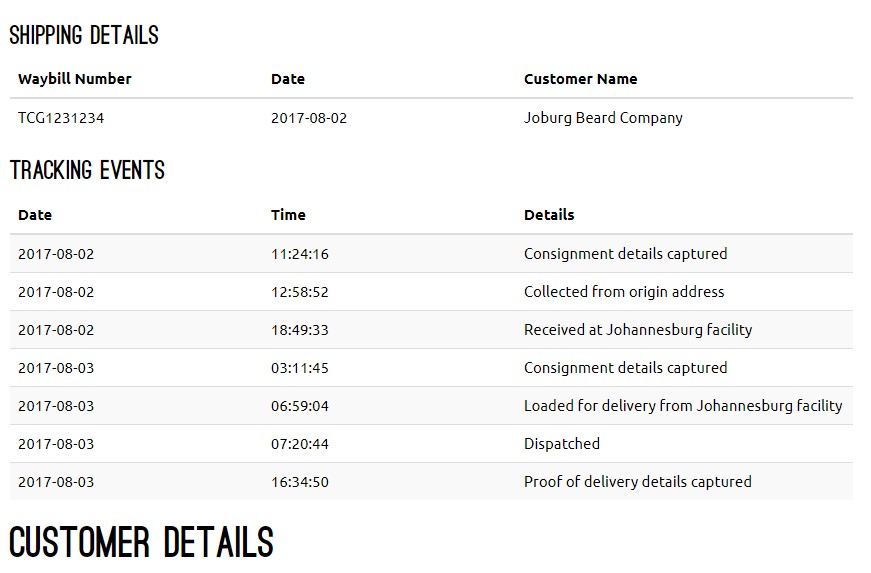
安装
- Upload
woo-tracking-the-courier-guyto the/wp-content/plugins/directory - You can also upload the zip file in the admin area in your WordPress installation
- Activate the plugin through the ‘Plugins’ menu in WordPress
- Enter the waybill number from The Courier Guy on your relevant order page
常见问题
- Installation Instructions
-
- Upload
woo-tracking-the-courier-guyto the/wp-content/plugins/directory - You can also upload the zip file in the admin area in your WordPress installation
- Activate the plugin through the ‘Plugins’ menu in WordPress
- Enter the waybill number from The Courier Guy on your relevant order page
- Upload
- A question that someone might have
-
An answer to that question.
评价

2021 年 7 月 11 日
Installed plug in and tested it. Page error when updating order in the shopping cart.

2018 年 9 月 28 日
No support and updates at all.

2018 年 8 月 27 日
Would seriously love to use this plugin, but I received a warning that the plugin generated 2 warnings when activating. This hasn’t been updated in 9months, so please update….

2017 年 8 月 23 日
Awesome plugin. Simple to install and enables the end-user to track their order.
Developer was quick to answer any questions I had 🙂
贡献者及开发者

更新日志
1.0.0
- Added simple plugin for WooCommerce tracking for The Courier guy with Bootstrap 3 modal and iFrame
1.0.1
- Removed iFrame and added API call to display tracking info on orders page and added settings page where you can enter your account username and password.
1.0.2
- Removed username and password settings page. You can now install the plugin without entering your account details and is not limited to one account.