

描述
Clone WordPress page, post, custom post types
This plugin adds an option to duplicate a page, a post, or any custom post type items.
It’s a plug and play & super easy to use.
We hate distraction, so we created a page/post copy plugin with a simple interface. When you hover over a post or a page in the Pages or Posts list, you’ll be able to select Duplicate to create a duplicate version.
Like this plugin? Check out FileBird – a great media manager plugin to make your WordPress life much easier. Good news: it creates a folder system for pages, posts, and custom post types, too!
⚡️ FEATURES
WP Duplicate Page is built to optimize dashboard appearance and drive positive impact for your WordPress admin workflow productivity:
- Designed with clean UI/UX
- Highly compatible with all themes and plugins
- One-click to duplicate any page or post
- Set permission based on user roles
- Custom text for Duplicate button
🚀 TYPICAL USE CASES
These are good ideas on how to exploit the WP Duplicate Page plugin:
- Create a replica of that particular page/post
- Retain a specific state of the original page/post
- Enhance multiple revision works
- Copy to a new draft with selected elements
- Keep a standard template of page/post
🎉 Supported Themes and Plugins
We have done extra work to ensure compatibility with all themes, page builders, and major plugins.
📝 Documentation and Support
If you’re having issues, do let us know and we’ll try to help you out.
You can always reach us at Ninja Team Support Center.
♥️ Like this WP Duplicate Page Plugin?
- Explore FileBird Cloud addon to connect WordPress media library to Dropbox and Google Drive
- Check out our Contact Form 7 extensions
- Try the #1 free WordPress booking system plugin 🌐
屏幕截图
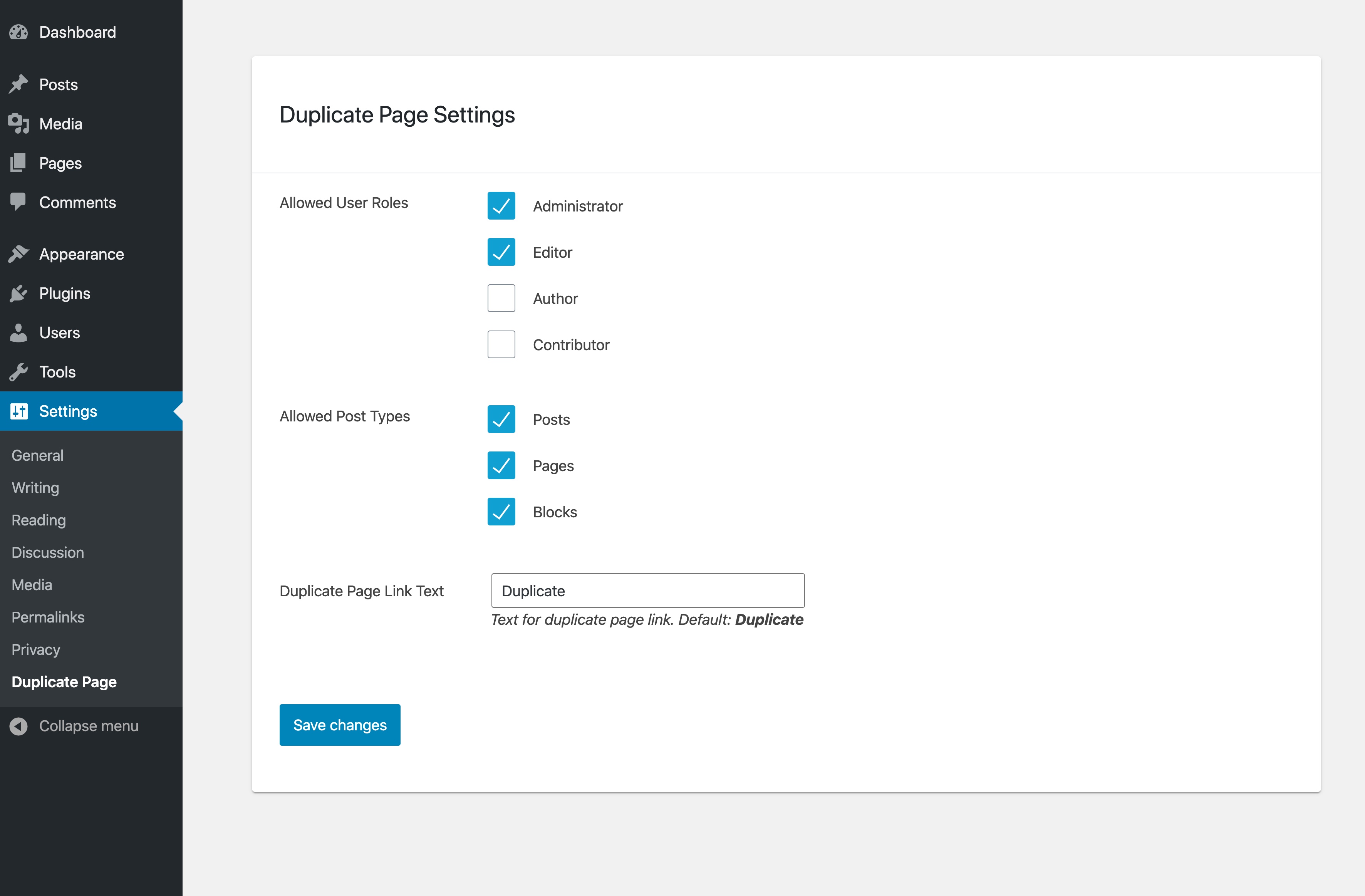
WP Duplicate Page Settings 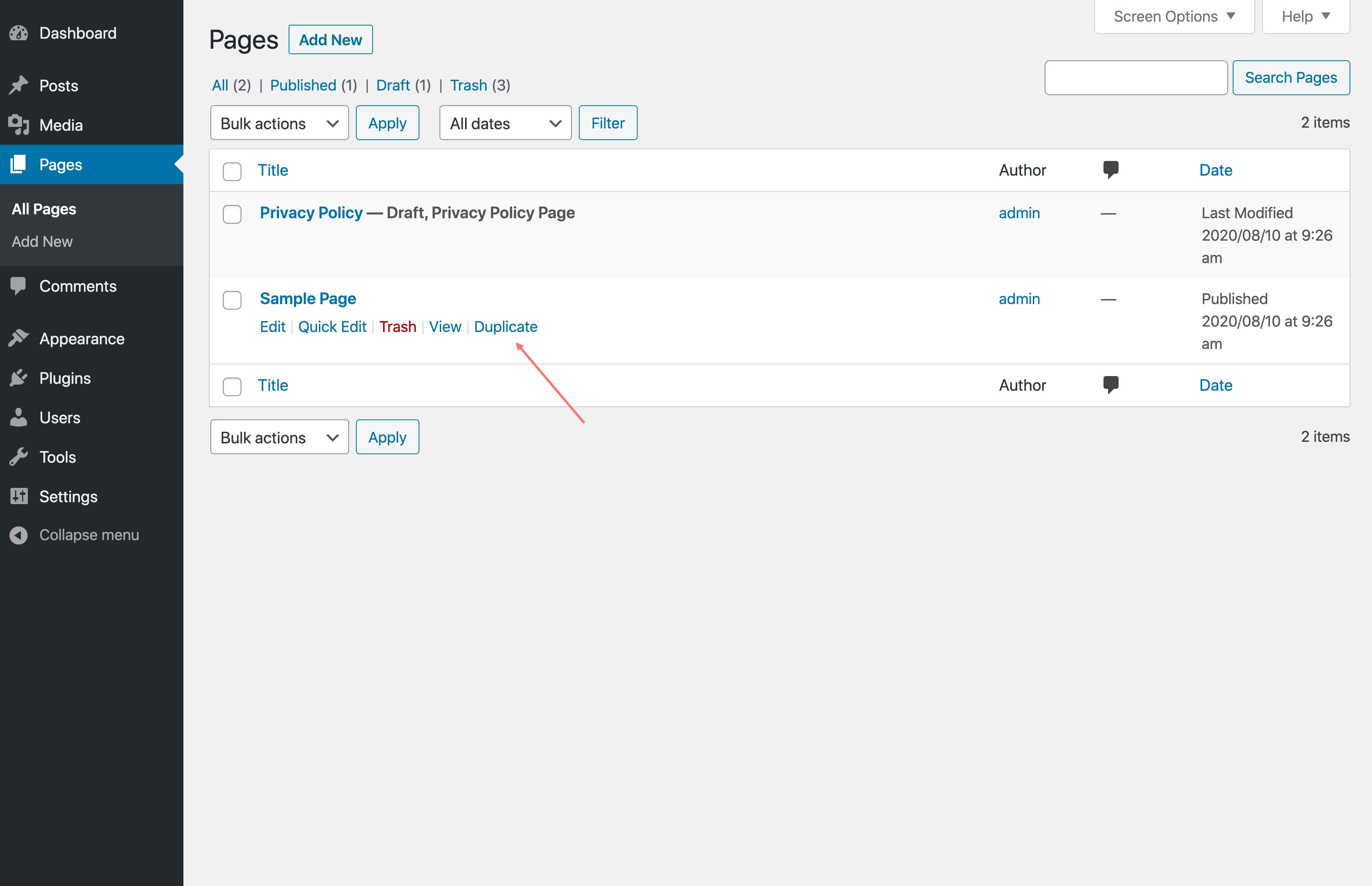
Duplicate button
安装
- Upload the entire plugin folder to the ‘/wp-content/plugins/’ directory.
- Activate the plugin through the Plugins menu in WordPress.
常见问题
-
Is this plugin compliant with GDPR?
-
Absolutely! WP Duplicate Page doesn’t collect or store any personal information. So rest assured.
-
Can I duplicate custom post types?
-
Yes, you can. In addition to pages, you can clone document galleries, popups, orders, WooCommerce coupons, templates, and so on.
-
Can I clone an HTML template?
-
WP Duplicate Page clones the content of any page or post. So if you’ve built a page using an HTML block or a custom HTML template via your page builder, duplicating it will copy all of that markup as-is. It’s a quick way to reuse a carefully structured layout without rebuilding it from scratch.
That said, if you’re specifically looking to clone and customize WooCommerce email templates (the HTML emails sent to customers on order confirmation, shipping, etc.), that’s outside the scope of WP Duplicate Page. In this case, YayMail handles that as it gives you a drag-and-drop builder to design and manage the library of email templates visually. -
Is WP Duplicate Page free?
-
Yes, it’s completely free of charge. WP Duplicate Page comes with all the features listed in the description above.
评价


贡献者及开发者

更新日志
Jun 2, 2026 – Version 1.8.4
- Improved: Confirmation dialog in WooCommerce email settings screen
Jun 1, 2026 – Version 1.8.3
- Improved: Check and append number to existing original-slug-copy
- Improved: Complement plugins panel
May 21, 2026 – Version 1.8.2
- Improved: Duplicate post gets a new unique slug as original-slug-copy
- Improved: Tested up to WP 7.0
Jan 05, 2026 – Version 1.8.1
- Improved: Security
Nov 13, 2025 – Version 1.8
- Added: Duplicate button in Editor
- Improved: Security
- Improved: UI
- Fixed: Small CSS issue
Oct 29, 2025 – Version 1.7
- Added: Copy directly from post edit
Dec 30, 2024 – Version 1.6
- Fixed: created_via metadata duplicated
Dec 4, 2024 – Version 1.5
- Fixed: Not duplicate order data with HPOS WooCommerce
Mar 22, 2024 – Version 1.4.1
- Fixed: Change text-domain
May 31, 2023 – Version 1.4
- Added: Duplicate in Bulk actions
Jun 16, 2022 – Version 1.3
- Fixed: Security issues
July 19, 2021 – Version 1.2
- Fixed: Bug of duplicated slug
Jun 2, 2021 – Version 1.1
- Fixed: Duplicate media in library
November 29, 2020 – Version 1.0
- Initial Release