描述
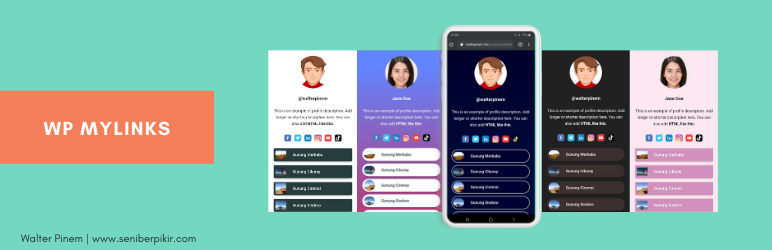
Build a fully customizable micro landing page for your business and personal brand.
WP MyLinks can help you create a micro landing page that contains all the links you want to share to your audience with the tool you’re currently using and the domain name that reflects your own brand.
One Single Link for Everything!
Your most favorite social media usually limits you from showing multiple links on your profile. And you’re forced to use third party services.
Worry no more!
Now, you can build your own landing page to market your content, brand, products and anything under a single URL with the tool and resource you currently have.
Don’t lose your precious traffics!
Put the generated link on your external channels such as social media profiles and drive 100% traffics to your micro landing page.
The Awesome Features You’ll Love
- [New in 1.0.8]: Schema.org JSON-LD output. Pick
PersonorOrganizationschema globally or per page so search engines can identify you. Defers to Yoast SEO automatically when Yoast is handling schema. - [New in 1.0.8]: Open Graph & Twitter Card meta tags. Share previews on Facebook, X (Twitter), LinkedIn, and Discord now look correct. Configure a default 1200×630 share image globally, or override it per page.
- [New in 1.0.8]: Additional Social Platforms metabox. Add Threads, Bluesky, GitHub, Mastodon, WhatsApp, Telegram, Signal, or any other platform via a flexible repeater — alongside the existing 8 hardcoded platforms.
- [New in 1.0.8]: WCAG 2.2 accessibility. Skip-to-content link, ARIA labels on every social icon and link button, “opens in new tab” hints for screen readers, and graceful avatar alt fallbacks.
- [Feature]: Enhanced Media Embedding (oEmbed). In addition to embedding YouTube videos, you can seamlessly embed media from any site supported by WordPress.
- [Feature]: Organized Link Collections. Easily save and access important links in a dedicated collections page, eliminating the need to repeatedly enter the same links manually.
- [Feature]: Searchable Link Lists. The Link input field includes a search function, allowing you to find previously defined links from your Links Collection, existing posts, or pages by default.
- [Feature]: YouTube video embed. Easily embed any YouTube video on your MyLinks page. Demo here.
- [Feature]: Card layout. Transform any link into a card layout with the image as background. Demo here.
- One Link for Everything: Set a MyLink page and show all the important links. Get the MyLink page URL and place it anywhere.
- Unlimited Landing Pages: Easily target your audience by building unlimited custom landing pages for every channel wherever you want to engage them.
- Unlimited Links: Fill your landing page(s) with links to market your contents, products, or anything you want to build your own brands.
- Add Thumbnails: Add a thumbnail to each link that best represents it.
- And more awesome features to come!
For more info, please refer to WP MyLinks Introduction.
For Indonesian users, please refer to WP MyLinks instead.
Watch the Complete Overview and Tutorial
It’s really easy to get started. Here’s the complete overview and tutorial:
Theme Demos
- Default
- Merbabu
- Cikuray
- Ciremai
- Slamet
- Papandayan
- Sindoro
- Krakatau
- Bromo
- Prau
- Polos
- Datar
- Pastel
- Kopi Hitam
- Kopi Susu
- Klepon Viral
Further Questions and Feature Requests?
Premium-quality support without having to spend a dime. Just send your inquiry or feature request on Walter Pinem Projects and I’ll gladly help you out.
屏幕截图
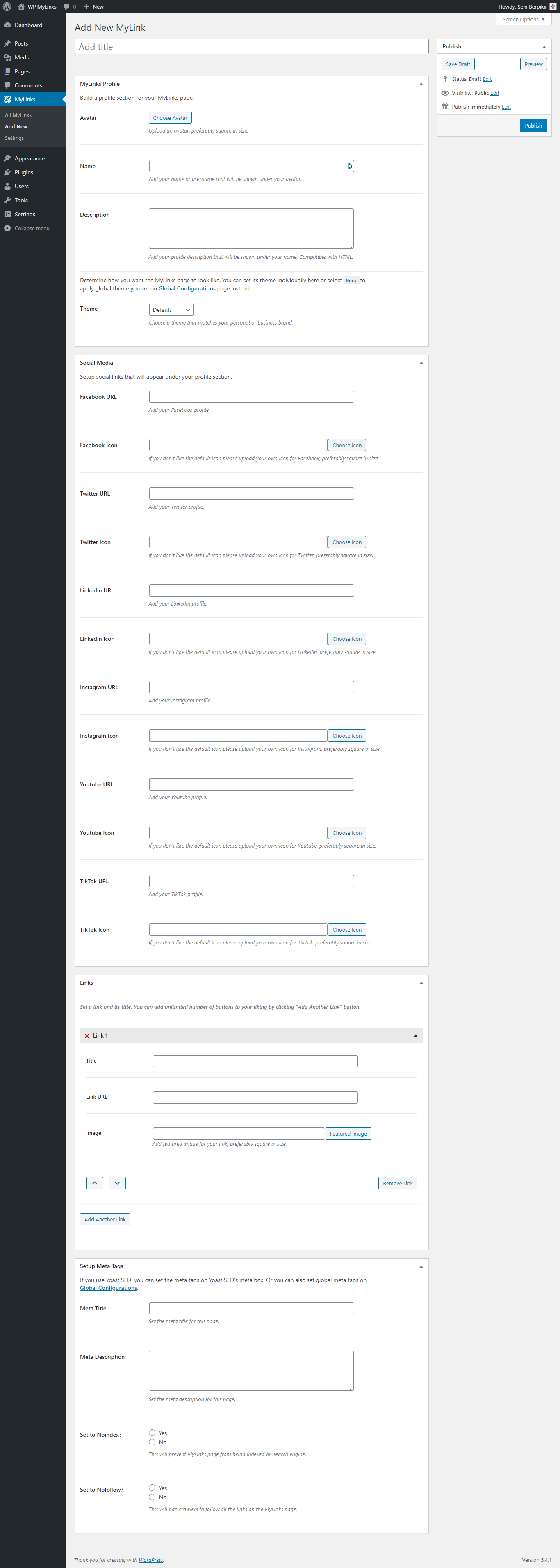
Add New MyLink post editor to start creating MyLink landing page 
Global Configurations setting panel 
Custom Scripts and Styles setting panel 
WP MyLinks on mobile
安装
4 simple steps to get started:
- Install and activate this plugin via dashboard or upload
wp-mylinksfolder into the/wp-content/plugins/directory. - Begin configurating this plugin through
MyLinksadmin menu. - Add links using
Add Newsub-menu. - Complete the configuration and you’re all set!
常见问题
-
Is it free to use?
-
Definitely free to use for unlimited sites! 🙂
-
How to install and use WP MyLinks?
-
4 simple steps to start:
- Install and activate this plugin via dashboard or upload
wp-mylinksfolder into the/wp-content/plugins/directory. - Begin configurating this plugin through
MyLinksadmin menu. - Add links using
Add Newsub-menu. - Complete the configuration and you’re all set!
- Install and activate this plugin via dashboard or upload
-
How many micro landing pages can I create?
-
Unlimited 🙂
-
How many links can I put in the page?
-
Unlimited 🙂
-
What if I get 404 not found?
-
As of version 1.0.8, the plugin automatically flushes rewrite rules on activation and after every update, so 404 errors after upgrading should be a thing of the past. If you do still see a 404:
1. Go to Settings => Permalinks page.
2. Click the Save Changes button without having to change anything.
3. Recheck your MyLink page. The issue will most likely disappear.
If the problem persists, please make sure you are using pretty permalinks (Post name) under Settings => Permalinks. Be careful when changing your permalink structure: it affects every URL on your site and can hurt SEO. -
I have a Page or Post with the same slug as a MyLink. Which one wins?
-
The Page or Post wins. Starting in 1.0.8, the plugin only routes a slug-only URL (e.g. /my-page/) to a MyLink when no published page or post already owns that slug. This prevents the plugin from accidentally taking over URLs that belong to the rest of your site. Rename the MyLink slug to resolve the conflict.
-
Can I change the /mylink/ slug used internally?
-
Yes. Use the
wp_mylinks_cpt_rewrite_slugfilter to override the slug. Public URLs are still served at // regardless. Example:
add_filter( ‘wp_mylinks_cpt_rewrite_slug’, function() { return ‘bio’; } ); -
Does WP MyLinks work with Yoast SEO?
-
Yes. Yoast remains the source of truth on any page where it has set its own meta title, description, Open Graph image, or schema. WP MyLinks detects Yoast at runtime and steps aside automatically — no double tags. If Yoast is installed but you’ve disabled its Open Graph or schema features, WP MyLinks will fill the gap.
-
Will the new Schema.org and Open Graph features change anything if I don’t enable them?
-
No. Both features are off by default. Existing 1.0.7 installs upgrade silently and continue rendering exactly as before. Enable them on Settings MyLinks Global only when you’re ready.
-
The new “Additional Social Platforms” metabox on the MyLink editor (right under the existing Social Media metabox) lets you add any platform with a name, URL, and optional icon. Each row appears in the same icon row as the hardcoded 8 platforms (Facebook, Twitter, LinkedIn, Instagram, YouTube, Pinterest, TikTok, Discord). The hardcoded platforms are preserved exactly — no migration risk.
-
Where can I ask another question or feature request?
-
Please do not hesitate to send your inquiry through my contact form. Just ask!
评价


贡献者及开发者

更新日志
1.0.8 – May 23, 2026
Headline features
- [New] Schema.org JSON-LD output for every MyLinks page. Choose
Person(default) orOrganizationeither globally on Settings MyLinks Global, or per-page on the MyLink editor. Output includes name, image, description, page URL, and asameAsarray populated from all configured social profiles — perfect for Google’s Knowledge Graph. Defers automatically to Yoast SEO when Yoast is handling schema. - [New] ProfilePage schema wrapper (optional toggle on Settings MyLinks Global). When enabled, the JSON-LD output becomes a
@grapharray containing the Person/Organization entity, a ProfilePage that references it via@id, and a BreadcrumbList. This is the pattern used by X (Twitter), GitHub, and LinkedIn profiles. Helps search engines and AI tools recognize the URL as a canonical profile page. - [New] BreadcrumbList schema automatically emitted alongside the Person/Organization schema whenever JSON-LD is enabled. Two-step path (Home page name). Google uses this in SERPs in place of the raw URL line.
- [New] Open Graph & Twitter Card meta tags. Share previews on Facebook, X (Twitter), LinkedIn, and Discord now display your MyLink page properly. Configure globally or per-page; the share image falls back gracefully through per-page global Yoast avatar so something always renders. Defers to Yoast when Yoast is handling Open Graph.
- [New] Default share-image option (recommended size 1200×630) on Settings MyLinks Global, with per-page overrides on the MyLink editor.
- [New] Twitter / X handle field on Settings MyLinks Global. Used for
twitter:siteandtwitter:creator. The@is added automatically if missing. - [New] Additional Social Platforms metabox on the MyLink editor (placed right under the existing Social Media metabox so it’s impossible to miss). Add Threads, Bluesky, GitHub, Mastodon, WhatsApp, Telegram, Signal, or any other platform via a CMB2 repeater with sortable rows. Each row accepts a name, profile URL, and optional icon. Existing hardcoded 8 platforms (Facebook, Twitter, LinkedIn, Instagram, YouTube, Pinterest, TikTok, Discord) are preserved exactly — no migration risk.
- [New] Accessibility improvements: skip-to-content link, ARIA labels on every social icon and link button, “opens in new tab” hints for screen readers, graceful avatar
altfallback when the name is empty, decorative images correctly marked with emptyalt. WCAG 2.2 compliant.
Permalink fixes (the long-standing 404 bug)
- [Fixed] Permalink conflicts that caused 404s when MyLink slugs collided with pages, posts, or pagination. The post type now registers with a real
mylinkrewrite slug and resolves slug-only URLs through the WordPressrequestfilter with proper collision detection — no more fragilepre_get_postshacks. - [Fixed] Activation hook was registered against the wrong file path, so rewrite rules were never flushed on activation. Activation now flushes rules correctly, and a one-time auto-flush runs on the first admin page load after every update so existing installs heal themselves transparently.
- [Fixed] Slug-stripping no longer corrupts post permalinks whose slug happens to contain the word “mylink”. The replacement is now anchored to the home URL via regex.
- [Fixed]
pre_get_postscallback was registered twice and contained a logic bug ('' == isset(...)) that made the post-type override fire on every front-page query. - [Fixed]
wp_mylinks_requestfilter no longer breaks when other plugins add query vars (the brittle2 != count($query->query)check has been removed). - [Added] Canonical 301 redirect from
/mylink/<slug>/to/<slug>/for SEO consistency. - [Added]
wp_mylinks_cpt_rewrite_slugfilter so developers can change the internal CPT slug without breaking public URLs.
Data preservation & uninstall
- [Fixed] Deactivation no longer deletes user options. The previous code wiped every plugin setting on deactivation, which destroyed configuration for anyone who toggled the plugin off temporarily. A separate
uninstall.phpnow handles true uninstallation. - [New] “Delete Plugin Data on Uninstall?” option on Settings MyLinks Global. Off by default — preserve your settings across uninstall/reinstall cycles. Enable it for a clean removal of all plugin options and oEmbed caches.
- [Added]
WP_MYLINKS_PURGE_POSTS_ON_UNINSTALLconstant for users who want a complete data purge (including posts) on plugin deletion. - [Added] Proper
uninstall.phpthat cleans up options and oEmbed transients (when opted in), but preserves MyLink posts by default.
Security & code quality
- [Security] Hardened admin settings page: every option output is now properly escaped, every
register_setting()has an explicitsanitize_callback, and tab parameters use a strict allowlist. - [Security] Admin column rendering now escapes URLs with
esc_url()andesc_attr(). - [Security] All user-supplied script/style content output through tightly-scoped
wp_kses()allowlists. Admin-only withmanage_optionscapability gating remains. Custom-script settings now use a dedicatedwp_mylinks_sanitize_raw_script()callback that strips control characters and normalizes line endings while preserving raw HTML/JS/CSS content. - [Changed] Front-end template refactored to produce clean, predictable HTML output with consistent two-space indentation. PHP control structures now sit at column 0 so their whitespace doesn’t leak into the rendered markup.
- [Changed] Empty
<div class="user-profile">and<div class="description">wrappers are no longer emitted when those sections have no content (eliminates ~60px of phantom vertical space). - [Changed] Inline
<style>blocks consolidated from three separate tags into one<style id="wp-mylinks-inline-css">block per page. - [Changed] Asset enqueueing moved to
<head>for stylesheets and just-before-</body>for scripts (proper WordPress convention). - [Changed] Renamed the global
Pluginclass toWp_Mylinks_Front_Page_Pluginto avoid namespace collisions with other plugins. - [Changed] Renamed misspelled function
wp_mylinks_custom_sidebar_suppporttowp_mylinks_custom_sidebar_support(with backward-compat alias). - [Misc] Frontend template upgraded
<div class="mylinks">to<main class="mylinks">for better semantic markup. - [Misc] Invalid duplicate
id="link_count"on multiple anchors replaced with alink_countclass. Obsoletealign="middle"attribute removed. Image alt text reflects link title. - [Misc]
<meta name="generator">added to identify plugin output for support.
Internationalization
- [New] Eleven new translatable strings on the MyLink CMB2 metaboxes (
Choose Avatar,Choose Icon× 8,Choose Favicon,Select a link…) that were previously hard-coded English. - [New] Submenu titles for the Collection sidebar (
UTM Campaign Builder,Support) and admin sidebar quick links (Rate This Plugin,Buy Me a Coffee, etc.) are now translatable. - [Misc] Added
/* translators: */comments to everysprintf()call in admin output for translator clarity. - [Misc] All
add_submenu_page(),add_meta_box(), and CMB2 field labels now flow through__()/_x()with thewp-mylinkstext domain.
Hooks & filters for extension
- [Added] New action hooks for plugin extension:
wp_mylinks_head,wp_mylinks_body_open,wp_mylinks_before_links,wp_mylinks_after_links,wp_mylinks_footer. - [Added] New filter hooks:
wp_mylinks_schema_data(mutate JSON-LD before encoding),wp_mylinks_og_meta(mutate Open Graph meta lines before output). - [Added]
wp_mylinks_extract_youtube_id()helper recognizes regular, short (youtu.be), embed, mobile, and shorts YouTube URLs. Previously, only the standard?v=URL format worked.
Frontend assets
- [Misc] Frontend JavaScript modernized: added
'use strict', switched to an IIFE, validates YouTube IDs before injecting them, lazy-loads thumbnails, supports keyboard activation (Enter/Space), forces HTTPS for thumbnail URLs. - [Misc] Frontend CSS rewritten to WordPress CSS Coding Standards: tab indentation, alphabetized selectors per section, the
@keyframes slidebgblock consolidated from three duplicates to one, removed long-obsolete-webkit-/-moz-border-radius and gradient prefixes, and the minified file regenerated to match the source. - [Added]
.screen-reader-texthelper class with WCAG-compliant focus styling for the new skip-to-content link. - [Added] Bundled
globe.svgfallback icon for Additional Social Platforms with no custom icon configured.
Admin assets
- [Misc] Admin assets (CSS and JS) now only enqueue on plugin-relevant screens (the settings page and the mylink/mylinks-collection edit screens) instead of every wp-admin page, eliminating the prior risk of leaking styles into other admin areas.
- [Misc] Admin JavaScript modernized: wrapped in IIFE with
'use strict', switched to event delegation, no more globalmediaUploaderleak. Reusable media-frame helper now drives both the favicon and the new Open Graph share-image pickers without conflict. - [New] Friendly admin footer text on plugin screens with a 5-star review prompt linking to the WordPress.org reviews page. Footer text on every other admin page is left untouched.
WordPress 7.0 compatibility
- [Misc] Bumped minimum WordPress version to 6.0 and tested up to WordPress 7.0.
- [Misc] Audited the codebase for PHP 8.x compatibility.
- [Misc] View counter switched to atomic
update_post_meta()and skips admin/cron requests for cleaner counts.
1.0.7 – September 26, 2024
- [Security] Fixed Cross Site Scripting (XSS) vulnerability as discovered and reported by SOPROBRO to Patchstack, reported by Darius Sveikauskas (Kudos to SOPROBRO, Darius Sveikauskas and Patchstack)
- [Fixed] Fixed JavaScript issues preventing users to add new links
- [Fixed] Fixed several unsanitized fields on the MyLinks page output
- [Fixed] CSS issues making several templates not responsive on smaller screens
- [New] Added extra options for Transparent avatar style and adding scripts to after the open tag
- [Misc] Changed and optimized several fields on the MyLinks editor screen
- [Misc] Updated CMB2 to the latest version 2.11.0
- [Misc] Updated select2.min.js to the latest version 4.1.0-rc.0
- [Misc] Optimized a large part of the MyLinks page template
- [Misc] Compatibility with latest version of WordPress v6.6.2
1.0.6 – April 28, 2023
- [New] Enhanced Media Embedding: In addition to embedding YouTube videos, you can now seamlessly embed media from any site supported by WordPress.
- [New] Organized Link Collections: Easily save and access important links in a dedicated collections page, eliminating the need to repeatedly enter the same links manually.
- [New] Searchable Link Lists: The Link input field now includes a search function, allowing you to find previously defined links from your Links Collection, existing posts, or pages by default.
- [New] Added Discord social media support
- [Fixed] Flush permalink issue
- [Misc] Compatibility with latest version of WordPress
1.0.5 – February 25, 2022
- [New] Youtube Video embed
- [New] Card-style Link
- [New] Avatar Styles
- [New] Social Buttons position
- [Fixed] Flush permalink issue
- [Misc] CSS issues
- [Misc] Compatibility with latest version of WordPress
1.0.4 – August 15, 2020
- [Fixed] CSS issues
- [Misc] Compatibility with latest version of WordPress
1.0.3 – July 26, 2020
- [New] Klepon Viral theme
- [Fixed] CSS issues
- [Fixed] Bug on MyLink as front page not redirect to home page
- [Fixed] 404 permalink issue
1.0.2 – July 18, 2020
- [New] Social icon for Pinterest
- [New] Individual custom favicon input on every MyLinks Page
- [New] Individual custom header script input on every MyLinks Page
- [New] Individual custom footer script input on every MyLinks Page
- [New] Individual custom style input on every MyLinks Page
- [Fixed] Several icons not showing correctly
1.0.1 – June 16, 2020
- [New] Set MyLinks page as front page
- [Fixed] Permalink rewrite issue
- Compatibility with latest version of WordPress
1.0.0
- Initial release: Hello World!