
描述
PukiWiki is a PHP-based Wiki. PukiWiki features headings, quotations, lists of various types, preformatted texts, images, footnotes, hyperlinks, smileys, and many others.
WP PukiWiki allow the WordPress author to use PukiWiki-style Wiki syntax in writing posts and pages. The screenshots give you some idea. Visit the main site for more information.
Requirements
- Working PukiWiki system accessible from the Internet.
- WP PukiWiki: WP PukiWiki uses PHP’s Curl API. Turn it on if this feature is missing on your site.
屏幕截图
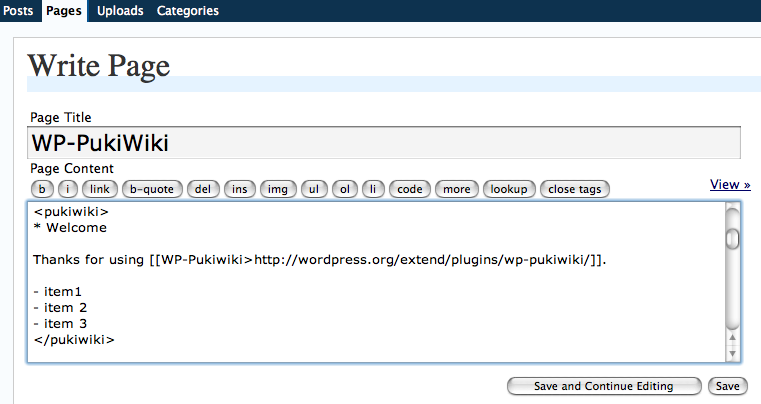
Make a region of your writing enclosed by pseudo pukiwiki tags (<pukiwiki> and </pukiwiki>) and you can use PukiWiki syntax in writing your documents. 
Given the above example filled in the WordPress textfield, produced is this page view. Simple, isn’t it?
安装
- Setup
PukiWikiand make it accessible via http from your WordPress hosting server.PukiWikican be obtained from PukiWiki official site. If you already have a runningPukiWikiyou can use that site. WP PukiWiki uses a PukiWiki system to translate Wiki syntax to HTML but WP PukiWiki does not modify PukiWiki at all. Therefore, it is safe to use your existing PukiWiki system. - Obtain and unzip wp-pukiwiki.zip.
- Open
wp-pukiwiki.phpwith a text editor and modify the definition forWPPW_URLso that it points to the URL of yourPukiWikisite. - Upload the
wp-pukiwikifolder/directory to the/wp-content/plugins/directory of your WordPress hosting server. - Activate the plugin.
常见问题
You can find more information from the WP PukiWiki main site. It offers more detailed installation instructions, examples, manual, and more.
评价
此插件暂无评价。
